

Photoleap: AI Photo Generator
Lightricks Ltd.
Installs
10M+
Developer
Lightricks Ltd.
-
Category
Generative AI
-
Content Rating
Everyone
Developer Email
Privacy Policy
https://static.lightricks.com/legal/privacy-policy.html
Screenshots


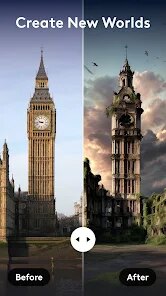

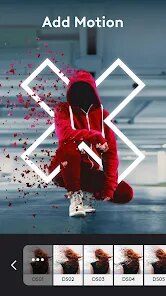
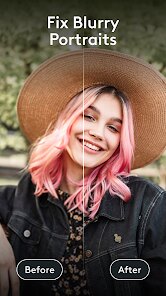
Expert Review
Photoleap is a powerful AI photo editing and generation app from Lightricks. It's not just a simple filter tool; it uses artificial intelligence to let you transform your photos in creative ways or even generate completely new images from text descriptions. I use it mostly for making cool social media posts and experimenting with digital art ideas. The app first launched a while back, and you can easily find it and download it from the Google Play Store or the Apple App Store. It's been installed millions of times, which shows how popular it is. You can get the basic version of the app for free, which lets you try out a lot of the core features. To start using it, you just need to install the app and create an account. The free version does have some limitations and shows ads, but there are optional in-app purchases if you want to unlock everything without interruptions.
Using Photoleap is pretty intuitive once you get the hang of it. I usually start by either picking a photo from my gallery or typing a prompt into the AI generator. For editing, the AI tools can remove backgrounds with one tap or change the style of a picture completely. A good tip is to be specific with your text prompts for the best image generation results. Instead of just 'a cat,' try something like 'a fluffy orange cat wearing a tiny crown, digital art style.' The app also has layers and blending modes, which are great for more advanced compositions. I spend a lot of time just playing with the different AI filters and effects to see what I can create.
When I was looking for a photo app, I also tried others like PicsArt and Adobe Express. They're all good, but I kept coming back to Photoleap. For me, the main reason is how powerful and yet accessible the AI features are. In PicsArt, the AI tools feel a bit more scattered or locked behind a paywall. Adobe Express is fantastic for quick designs, but its AI image generation isn't as integrated or fun to use as Photoleap's. Photoleap puts those creative, 'wow' factor AI tools right at the center of the experience. It feels more like a creative playground specifically built around AI, which is exactly what I wanted. So, while other apps can do similar things, Photoleap's focus on AI-powered artistry made me choose it as my go-to app.
Key Functional Highlights
- 🎨 AI Image Generation from Text: This is the standout feature for me. You just type a description, and the app creates unique images. Compared to a similar popular app like Dream by WOMBO, I find Photoleap's results to be more detailed and offer more control over the style right from the prompt.
- ✂️ One-Tap AI Background Remover: It works incredibly fast and accurately. In many other editing apps, background removal can be a manual chore. Here, it's almost magic and saves so much time when I'm making composite images.
- 🔄 AI Style Transfer & Filters: You can apply the artistic style of one image to another. It goes beyond basic filters, truly transforming the texture and feel of your photo. It's more advanced than the style filters in apps like Prisma.
- 🧩 Layered Editing with AI Tools: Unlike simpler editors, Photoleap lets you work with layers. The cool part is that AI tools (like the background remover or object generator) work on individual layers, giving you professional-level control for complex edits.
Advantages & Benefits
- ✅ Deep AI Integration: The AI isn't just a gimmick; it's woven into almost every tool, making complex edits simple. Apps like Canva have AI features too, but they feel more like add-ons.
- ✅ Creative Focus: It's designed for artistic exploration, not just quick fixes. This sets it apart from more utilitarian editors like Google Photos.
- ✅ Quality of Output: The resolution and detail in generated and edited images are generally high, which is crucial for printing or posting online.
Areas for Improvement
- ⚠️ Subscription Model for Full Power: To really unlock the app's potential, a subscription is needed. The free version has ads and limits on AI generations. A direct competitor, PicsArt, also uses a subscription, but its free tier sometimes feels more generous.
- ⚠️ Can Be Overwhelming: The sheer number of tools and options might intimidate beginners looking for a simple edit. An app like Snapseed is much more straightforward for basic adjustments.
- ⚠️ Performance on Older Devices: Some of the heavier AI processing can slow down on phones that aren't the latest models. Lighter apps, such as Adobe Lightroom Mobile, tend to run more smoothly across devices.
Recommended Apps
![]()
ZEPETO: Avatar, Connect & Play
Naver Z Corporation4.3
![]()
Reverse Voice: Flip Singing
NindaFuit0![]()
AI Chat Ask Assistant - NowAI
Now Tech4.3![]()
Lie Detector Test: Prank App
DkTech inc.4.3![]()
Peachy - AI Face & Body Editor
InShot Video Editor4.8
![]()
AI Video Art Creator - Livensa
FERASET4.5![]()
Google Voice
Google LLC4.3![]()
Horoscopes & Tarot
Astrolis Horoscopes4.7![]()
eBay online shopping & selling
eBay Mobile4.6![]()
JPay
Jpay Mobile4.1![]()
Stranger Things 5 Challenges
MVH Entertainment Team5![]()
Chat Master: Prank Story
ABI Game Studio4.8![]()
Google Maps
Google LLC4.2![]()
AI Chat・Ask Chatbot Assistant
AI Chat Studio4.5![]()
Name Meanings with Impact
Alif Innovative Solution3.7















You May Like
-
![]()
True Tarot Card Reading
KaApps4.2 -
![]()
LinkedIn: Jobs & Business News
LinkedIn4.2 -
![]()
iControl: Easy Widgets Themes
Fancy keyboard for theme apps4.6 -
![]()
Duolingo: Language & Chess
Duolingo4.7 -
![]()
Flipped:Chat with AI Character
First Group pte ltd4.1 -
![]()
Hearing Age
Mobile Solutions Tech0 -
![]()
TikTok
TikTok Pte. Ltd.4.4 -
![]()
Pretty Makeup - Beauty Camera
Photo Editor Perfect Corp.4.4 -
![]()
PhotoRoom AI Photo Editor
PhotoRoom Background Editor App4.7 -
![]()
Lightleap by Lightricks
Lightricks Ltd.4.3 -
![]()
Name Meaning
Dexati4.1 -
![]()
Truth Social
T Media Tech LLC3.3 -
![]()
Ace Hardware
Ace Hardware Corporation4.7 -
![]()
Kpop Fans Demon Hunter Wallpap
JHNStudio4.3 -
![]()
Artplay - AI Photo & Video
Hideaway Technology Limited4.5












































