

Peachy - AI Face & Body Editor
InShot Video Editor
Installs
5M+
Developer
InShot Video Editor
-
Category
Generative AI
-
Content Rating
Everyone 10+
Developer Email
Privacy Policy
https://inshot.cc/peachy/android/terms/privacy_policy.html
Screenshots

Expert Review
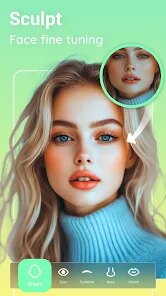
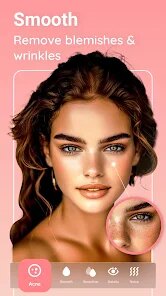
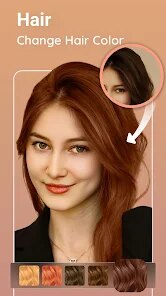
Peachy - AI Face & Body Editor is a photo editing app that uses artificial intelligence to help you enhance your selfies and portraits. It's basically a smart tool for smoothing skin, reshaping facial features, slimming the body, and applying various beauty filters. The app was first launched a few years back and is developed by the same team behind the popular InShot Video Editor. You can easily find and download it for free from the Google Play Store or the Apple App Store. It has racked up millions of installs, which shows how many people are using it. There's no need to register an account to start editing, which is super convenient. You just install the app, open it, and pick a photo from your gallery. While the core download is free, the app does include in-app purchases to unlock premium features and filters. You'll also encounter some ads while using the free version, but they're usually not too intrusive.
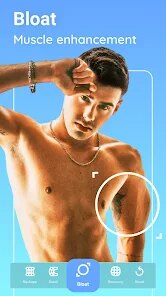
Using Peachy is pretty straightforward. After you choose a photo, the AI often automatically detects your face and suggests enhancements. I usually start with the 'Beautify' section to even out my skin tone and remove any blemishes. The 'Reshape' tools are powerful but require a light touch; it's easy to go overboard and make edits look unnatural. My tip is to use the sliders subtly, moving them just 10-20% for a more realistic result. The body editing features, like slimming or leg lengthening, work best on full-body shots with a clear background. Remember to save a copy of your original photo before you start editing, just in case.
Compared to other similar apps like FaceTune or AirBrush, I find myself choosing Peachy more often. Why? For casual, everyday editing, Peachy feels less complicated and faster to use. FaceTune is incredibly powerful and precise, almost like a professional tool, but it can be overwhelming and is quite expensive. AirBrush is also great, but I feel its filters can sometimes look too uniform. Peachy strikes a good balance for me. It offers enough control to make noticeable improvements without requiring a tutorial to understand. The fact that it's from the InShot team also gives me some confidence in its reliability. For quick touch-ups before posting on social media, this app gets the job done efficiently.
Key Functional Highlights
- 🤖 AI-Powered 'One-Tap Beauty': Unlike manual editors, Peachy's core feature is its AI that analyzes your photo and applies a balanced set of enhancements with one tap. It adjusts skin, eyes, and facial structure together, which is faster than tweaking each setting individually in apps like AirBrush.
- 🎭 Realistic Reshape Tools: The body and face reshaping tools use advanced algorithms to warp pixels naturally. Compared to some other free editors where edits look obviously 'Photoshopped', Peachy's sliders, when used moderately, can produce surprisingly believable results.
- 📁 Non-Destructive Editing within the App: A standout feature is the edit history panel. You can go back and adjust any previous edit (like face slimming) without starting over, which is a level of flexibility you don't always get in similar mobile photo apps.
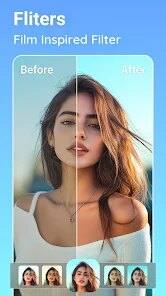
- ✨ Diverse & Trendy Filters: Beyond basic edits, the app packs a library of filters and effects specifically tuned for portraits. These include everything from natural light adjustments to more artistic, trendy styles, giving it an edge over apps with more generic filter packs.
Advantages & Benefits
- 👍 Great Value in Free Tier: Compared to FaceTune (which is largely subscription-based), Peachy offers a very capable set of tools for free. You can achieve a lot before feeling pressured to purchase.
- 👍 User-Friendly Interface: The layout is cleaner and less cluttered than many competitors. Tools are well-labeled, making it easier for beginners to navigate compared to something like Perfect365.
- 👍 Fast Processing: The AI processing and rendering of edits is generally quicker than on some other AI editor apps I've tried, which makes the editing workflow smoother.
Areas for Improvement
- 👎 Ads Can Interrupt Flow: The free version shows ads, sometimes between applying different effects. This breaks the editing rhythm more noticeably than in apps like Adobe Lightroom Mobile, which is cleaner in its free form.
- 👎 Premium Features Are Locked Tight: Key features like high-resolution export and certain premium filters are behind a paywall. In contrast, an app like Snapseed is completely free with no ads and offers professional-grade tools.
- 👎 Occasional AI Glitches: On complex photos or group shots, the AI face detection can sometimes miss or misapply edits, requiring manual correction. More established apps like FaceApp tend to be slightly more consistent in detection.
Recommended Apps
![]()
ZEPETO: Avatar, Connect & Play
Naver Z Corporation4.3
![]()
Reverse Voice: Flip Singing
NindaFuit0![]()
AI Chat Ask Assistant - NowAI
Now Tech4.3![]()
Lie Detector Test: Prank App
DkTech inc.4.3![]()
Peachy - AI Face & Body Editor
InShot Video Editor4.8
![]()
AI Video Art Creator - Livensa
FERASET4.5![]()
Google Voice
Google LLC4.3![]()
Horoscopes & Tarot
Astrolis Horoscopes4.7![]()
eBay online shopping & selling
eBay Mobile4.6![]()
JPay
Jpay Mobile4.1![]()
Stranger Things 5 Challenges
MVH Entertainment Team5![]()
Chat Master: Prank Story
ABI Game Studio4.8![]()
Google Maps
Google LLC4.2![]()
AI Chat・Ask Chatbot Assistant
AI Chat Studio4.5![]()
Name Meanings with Impact
Alif Innovative Solution3.7














You May Like
-
![]()
True Tarot Card Reading
KaApps4.2 -
![]()
LinkedIn: Jobs & Business News
LinkedIn4.2 -
![]()
iControl: Easy Widgets Themes
Fancy keyboard for theme apps4.6 -
![]()
Duolingo: Language & Chess
Duolingo4.7 -
![]()
Flipped:Chat with AI Character
First Group pte ltd4.1 -
![]()
Hearing Age
Mobile Solutions Tech0 -
![]()
TikTok
TikTok Pte. Ltd.4.4 -
![]()
Pretty Makeup - Beauty Camera
Photo Editor Perfect Corp.4.4 -
![]()
PhotoRoom AI Photo Editor
PhotoRoom Background Editor App4.7 -
![]()
Lightleap by Lightricks
Lightricks Ltd.4.3 -
![]()
Name Meaning
Dexati4.1 -
![]()
Truth Social
T Media Tech LLC3.3 -
![]()
Ace Hardware
Ace Hardware Corporation4.7 -
![]()
Kpop Fans Demon Hunter Wallpap
JHNStudio4.3 -
![]()
Artplay - AI Photo & Video
Hideaway Technology Limited4.5










































