

AI Chat・Ask Chatbot Assistant
AI Chat Studio
Installs
10M+
Developer
AI Chat Studio
-
Category
Productivity
-
Content Rating
Everyone
Developer Email
Privacy Policy
https://aichat.emoji-keyboard.com/privacy.html
Screenshots



Expert Review
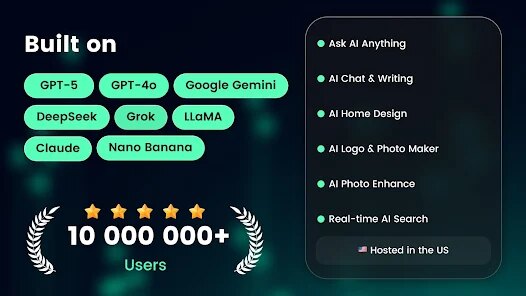
For anyone searching for an intelligent conversation partner on Google Play, AI Chat・Ask Chatbot Assistant from AI Chat Studio is worth a look. This app functions as a versatile conversational agent, capable of answering questions, offering suggestions, and assisting with a wide range of tasks. Available for free download, the app includes optional in-app purchases and displays advertisements, which is a common model for such tools. Its installation base suggests a steady user interest in mobile AI assistants.
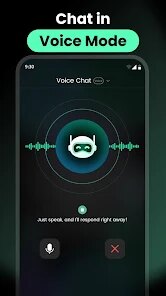
Using AI Chat・Ask Chatbot Assistant is largely straightforward. Once you install and open the app, you're presented with a clean chat interface where you can type or speak your queries. The assistant responds with text-based answers, drawing from its trained knowledge base. In practice, I found the responses to be reasonably relevant and articulate, though the depth of answers can vary depending on the question's complexity. The voice input feature works smoothly, adding a layer of convenience for quick questions.
Compared to other chatbot apps I've tried, this one strikes a decent balance between simplicity and capability. Some competitors focus heavily on niche tasks or have overly complex menus. AI Chat・Ask Chatbot Assistant keeps things minimal, which I appreciate. However, it doesn't offer the same level of customization or integration with other services that you might find in more established assistants. It feels more like a general-purpose tool than a specialized one, which is fine for casual use but might leave power users wanting more.
Key Functional Highlights
- The app's interface is clean and doesn't overwhelm you with options. It's easy to navigate, though the design feels somewhat generic compared to a few visually polished alternatives I've seen. The lack of customization in chat bubbles or themes is a minor miss, but it doesn't hinder functionality.
- Response speed is generally fast, with most answers appearing within a couple of seconds. This makes the conversation feel fluid. On occasion, complex queries take longer, but that's expected. It performs better than a similar app I tried that often lagged during peak usage.
- The app handles multiple languages decently, which is a plus for non-English users. I tested a few basic questions in Spanish, and the responses were coherent. This is an area where it outshines some single-language competitors.
- There is a built-in conversation history, allowing you to revisit past chats. However, there's no search function within that history, which could be improved. Compared to another chatbot I use that logs everything with timestamps and tags, this feels a bit basic.
Advantages & Benefits
- It's handy for quick fact-checking while cooking or working, without needing to open a web browser.
- The voice input is reliable in quiet environments, making it useful when typing isn't convenient.
- I use it to draft short messages or emails, and it usually provides a solid starting point.
- It's a good option for casual entertainment, like asking for jokes or simple games, during short breaks.
Areas for Improvement
- Ads appear between conversations, which can disrupt a flow if you're asking a series of questions quickly.
- The free version has moderate response limits per session, requiring a brief wait before continuing.
- Occasionally, the assistant provides generic or circular answers to complex questions, which isn't very helpful.
- It doesn't remember context across different sessions, so you have to reintroduce topics each time you open the app.
Recommended Apps
![]()
ZEPETO: Avatar, Connect & Play
Naver Z Corporation4.3
![]()
Reverse Voice: Flip Singing
NindaFuit0![]()
AI Chat Ask Assistant - NowAI
Now Tech4.3![]()
Lie Detector Test: Prank App
DkTech inc.4.3![]()
Peachy - AI Face & Body Editor
InShot Video Editor4.8
![]()
AI Video Art Creator - Livensa
FERASET4.5![]()
Google Voice
Google LLC4.3![]()
Horoscopes & Tarot
Astrolis Horoscopes4.7![]()
eBay online shopping & selling
eBay Mobile4.6![]()
JPay
Jpay Mobile4.1![]()
Stranger Things 5 Challenges
MVH Entertainment Team5![]()
Chat Master: Prank Story
ABI Game Studio4.8![]()
Google Maps
Google LLC4.2![]()
AI Chat・Ask Chatbot Assistant
AI Chat Studio4.5![]()
Name Meanings with Impact
Alif Innovative Solution3.7














You May Like
-
![]()
True Tarot Card Reading
KaApps4.2 -
![]()
LinkedIn: Jobs & Business News
LinkedIn4.2 -
![]()
iControl: Easy Widgets Themes
Fancy keyboard for theme apps4.6 -
![]()
Duolingo: Language & Chess
Duolingo4.7 -
![]()
Flipped:Chat with AI Character
First Group pte ltd4.1 -
![]()
Hearing Age
Mobile Solutions Tech0 -
![]()
TikTok
TikTok Pte. Ltd.4.4 -
![]()
Pretty Makeup - Beauty Camera
Photo Editor Perfect Corp.4.4 -
![]()
PhotoRoom AI Photo Editor
PhotoRoom Background Editor App4.7 -
![]()
Lightleap by Lightricks
Lightricks Ltd.4.3 -
![]()
Name Meaning
Dexati4.1 -
![]()
Truth Social
T Media Tech LLC3.3 -
![]()
Ace Hardware
Ace Hardware Corporation4.7 -
![]()
Kpop Fans Demon Hunter Wallpap
JHNStudio4.3 -
![]()
Artplay - AI Photo & Video
Hideaway Technology Limited4.5










































