

MyFitnessPal: Calorie Counter
MyFitnessPal, Inc.
Installs
100,000,000+
Developer
MyFitnessPal, Inc.
-
Category
Health & Fitness
-
Content Rating
Rated for 3+
Developer Email
Privacy Policy
https://www.myfitnesspal.com/privacy-policy
Screenshots

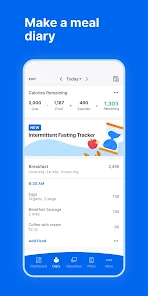
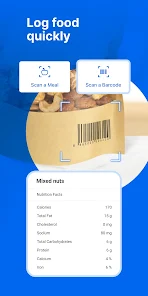
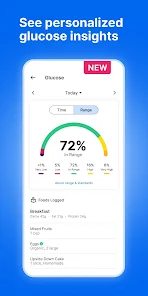
Expert Review
MyFitnessPal is a calorie counter and nutrition tracking app that helps you log your food, exercise, and weight. It's basically a digital food diary that makes it super easy to see what you're eating and how active you are. The app first launched way back in 2005, which is ancient in app years, and it's been a go-to for people trying to lose weight, gain muscle, or just understand their habits better. You can download it for free from the Google Play Store or the Apple App Store, and it has over 50 million installs on Google Play alone. You don't have to pay anything to install it and start using the core features. You do need to create an account to save your data, but that's pretty standard. The free version does show you ads, and there's a premium subscription you can buy to remove those ads and unlock extra tools like detailed nutrient breakdowns and custom macro goals.
Using the app is straightforward. You just search for foods in their massive database and tap to add them to your daily log. I use it mostly to scan barcodes on packaged foods – that's the fastest way to log something. A tip I learned is to save your frequent meals, so you don't have to add each item individually every time you eat the same breakfast. Also, connecting it to other apps like your step counter or smartwatch helps get a more complete picture of your daily calorie burn without manual entry.
Compared to other apps in the calorie tracking genre, like Lose It! or Cronometer, I stick with MyFitnessPal mainly because of its huge food database. After so many years and users, almost everything I scan or search for is already in there, which saves me a ton of time. Lose It! has a nicer design, but I found its database wasn't as complete for my local grocery items. Cronometer is amazing for super detailed micronutrient tracking, but it feels more clinical and is slower to use for quick, everyday logging. For me, MyFitnessPal hits the sweet spot between being powerful enough and simple enough to use every single day without it feeling like a chore.
Key Functional Highlights
- 📱 Massive Food Database: The biggest reason I use this app over others is its library. With millions of user-submitted entries, I almost never have to manually create a food item. Scanning a barcode or typing a name usually pulls up the exact product, making logging incredibly fast.
- ⚙️ Seamless App Integration: It connects with a ton of other fitness apps and devices. My steps from Google Fit automatically sync to adjust my daily calorie budget, and my workouts from Strava import without me lifting a finger. This creates a unified health dashboard without the manual hassle.
- 📊 Simple, Clear Dashboard: The main screen gives you a quick snapshot of your day – calories remaining, macros (carbs, protein, fat), and a pie chart. It's not overloaded with info, so you can check your progress in seconds, which is perfect for staying on track during a busy day.
- 🍽️ Meal and Recipe Saving: This feature is a lifesaver for meal prep. I can save my standard lunches as a "meal" and log it with one tap. For homemade recipes, I can input the ingredients once, specify the number of servings, and the app calculates the nutrition per portion automatically.
Advantages & Benefits
- ✅ Unbeatable Database Size: Compared to Lose It! or FatSecret, MyFitnessPal's food database is simply larger and more likely to have obscure or regional items, which is the most important feature for a tracker.
- ✅ Established Ecosystem: Its long history means it integrates with virtually every major fitness platform (Fitbit, Garmin, Apple Health, etc.), offering more connectivity than newer apps.
- ✅ Community and Familiarity: The app's design and workflow are almost industry-standard now. Its widespread use makes it easy to find friends for support or share tips with others who use the same system.
Areas for Improvement
- ❌ Ads in Free Version: The free version has persistent banner and video ads, which can be intrusive. Apps like Cronometer offer a cleaner, ad-free experience in their free tier, making them less distracting.
- ❌ Database Inaccuracy: Because users can submit entries, the database has many duplicate and incorrect entries. You have to double-check values, whereas an app like Cronometer uses verified, professional databases for more reliable data.
- ❌ Clunky Recipe Import: The feature to import recipes from websites often fails or miscalculates ingredients. For serious recipe tracking, a dedicated app like Paprika performs this task much more reliably.
Recommended Apps
![]()
ZEPETO: Avatar, Connect & Play
Naver Z Corporation4.3
![]()
Reverse Voice: Flip Singing
NindaFuit0![]()
AI Chat Ask Assistant - NowAI
Now Tech4.3![]()
Lie Detector Test: Prank App
DkTech inc.4.3![]()
Peachy - AI Face & Body Editor
InShot Video Editor4.8
![]()
AI Video Art Creator - Livensa
FERASET4.5![]()
Google Voice
Google LLC4.3![]()
Horoscopes & Tarot
Astrolis Horoscopes4.7![]()
eBay online shopping & selling
eBay Mobile4.6![]()
JPay
Jpay Mobile4.1![]()
Stranger Things 5 Challenges
MVH Entertainment Team5![]()
Chat Master: Prank Story
ABI Game Studio4.8![]()
Google Maps
Google LLC4.2![]()
AI Chat・Ask Chatbot Assistant
AI Chat Studio4.5![]()
Name Meanings with Impact
Alif Innovative Solution3.7















You May Like
-
![]()
True Tarot Card Reading
KaApps4.2 -
![]()
LinkedIn: Jobs & Business News
LinkedIn4.2 -
![]()
iControl: Easy Widgets Themes
Fancy keyboard for theme apps4.6 -
![]()
Duolingo: Language & Chess
Duolingo4.7 -
![]()
Flipped:Chat with AI Character
First Group pte ltd4.1 -
![]()
Hearing Age
Mobile Solutions Tech0 -
![]()
TikTok
TikTok Pte. Ltd.4.4 -
![]()
Pretty Makeup - Beauty Camera
Photo Editor Perfect Corp.4.4 -
![]()
PhotoRoom AI Photo Editor
PhotoRoom Background Editor App4.7 -
![]()
Lightleap by Lightricks
Lightricks Ltd.4.3 -
![]()
Name Meaning
Dexati4.1 -
![]()
Truth Social
T Media Tech LLC3.3 -
![]()
Ace Hardware
Ace Hardware Corporation4.7 -
![]()
Kpop Fans Demon Hunter Wallpap
JHNStudio4.3 -
![]()
Artplay - AI Photo & Video
Hideaway Technology Limited4.5










































