

Revive: Animation & AI Photos
REFACEAI LIMITED
Installs
1,000,000+
Developer
REFACEAI LIMITED
-
Category
Entertainment
-
Content Rating
Rated for 3+
Developer Email
Privacy Policy
https://reviveapp.net/privacy
Screenshots
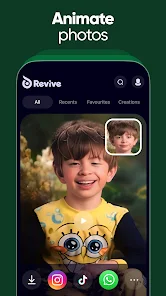
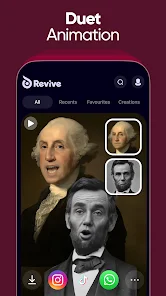
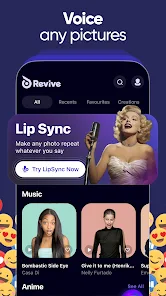

Expert Review
I've been using Revive: Animation & AI Photos for a few months now, and it's become one of my favorite creative apps. This app, available on both the Google Play Store and Apple's App Store, lets you bring old photos to life by animating faces or create entirely new AI-generated portraits. It launched a couple of years back and has already racked up millions of downloads. You can download and install it for free, and you don't even need to register to start playing with the basic features, which is great for quick testing. Of course, to unlock the full potential and save your creations without a watermark, you'll need a subscription. The free version does show ads, but they're not too intrusive.
Using the app is super straightforward. You just pick a photo from your gallery, and the AI detects the face. Then, you choose from a huge library of animation templates – everything from subtle smiles to full-on dance moves. My tip is to use clear, front-facing photos for the best results. The 'AI Photos' section is wild; you can generate portraits in different artistic styles or even blend features. I spend hours just experimenting there. It's perfect for making fun content for social media or giving a nostalgic touch to family pictures.
There are other face-swap and animation apps out there, like Reface or MyHeritage's Deep Nostalgia. I tried a few, but I keep coming back to Revive. For me, the quality of the animation feels smoother and more natural here. While MyHeritage is amazing for animating historical photos, Revive offers way more variety and creative control for everyday fun. The user interface is also less cluttered than some competitors, making the whole process from download to final share much faster. It just feels like a more polished and versatile app in this genre.
Key Functional Highlights
- 🎭 Vast Template Library: Unlike some apps with limited options, Revive boasts a massive and constantly updated collection of animation templates. From celebrity impersonations to original character motions, there's always something new to try, which keeps the app feeling fresh long after you install it.
- 🤖 Powerful AI Photo Generator: This is where the app truly shines. The AI photo tools go beyond simple filters. You can create hyper-realistic portraits in different eras, art styles, or even fantasy settings. It's like having a professional digital artist in your pocket, a feature that sets it apart from many similar apps on Google Play.
- 📁 Intuitive Project Management: The app neatly organizes all your creations into a personal gallery. You can easily revisit old projects, re-edit them, or share them again. This simple but effective system makes managing your digital creations hassle-free.
Advantages & Benefits
- ✨ Superior Animation Quality: The output from Revive often looks more seamless and less "glitchy" compared to outputs from apps like Reface. The facial movements integrate better with the original photo.
- 🚀 Faster Processing Speed: On my device, it generates AI photos and animations noticeably quicker than some competing apps, making the creative workflow much smoother.
- 🎨 Greater Creative Freedom: The blend of animation and generative AI in one app provides more tools for originality than apps that focus solely on one genre.
Areas for Improvement
- 💸 Subscription Cost: To access the best features ad-free, the subscription is required and can feel pricey compared to some one-time purchase options in other apps.
- 📶 Internet Dependent: Nearly all core features require a strong internet connection. You can't do much offline, unlike some apps that allow basic edits without data.
- 🖼️ Source Photo Sensitivity: The quality of the final animation is heavily dependent on the input photo. Low-light or blurry pictures don't work well, a limitation it shares with others in this genre.
Recommended Apps
![]()
ZEPETO: Avatar, Connect & Play
Naver Z Corporation4.3
![]()
Reverse Voice: Flip Singing
NindaFuit0![]()
AI Chat Ask Assistant - NowAI
Now Tech4.3![]()
Lie Detector Test: Prank App
DkTech inc.4.3![]()
Peachy - AI Face & Body Editor
InShot Video Editor4.8
![]()
AI Video Art Creator - Livensa
FERASET4.5![]()
Google Voice
Google LLC4.3![]()
Horoscopes & Tarot
Astrolis Horoscopes4.7![]()
eBay online shopping & selling
eBay Mobile4.6![]()
JPay
Jpay Mobile4.1![]()
Stranger Things 5 Challenges
MVH Entertainment Team5![]()
Chat Master: Prank Story
ABI Game Studio4.8![]()
Google Maps
Google LLC4.2![]()
AI Chat・Ask Chatbot Assistant
AI Chat Studio4.5![]()
Name Meanings with Impact
Alif Innovative Solution3.7















You May Like
-
![]()
True Tarot Card Reading
KaApps4.2 -
![]()
LinkedIn: Jobs & Business News
LinkedIn4.2 -
![]()
iControl: Easy Widgets Themes
Fancy keyboard for theme apps4.6 -
![]()
Duolingo: Language & Chess
Duolingo4.7 -
![]()
Flipped:Chat with AI Character
First Group pte ltd4.1 -
![]()
Hearing Age
Mobile Solutions Tech0 -
![]()
TikTok
TikTok Pte. Ltd.4.4 -
![]()
Pretty Makeup - Beauty Camera
Photo Editor Perfect Corp.4.4 -
![]()
PhotoRoom AI Photo Editor
PhotoRoom Background Editor App4.7 -
![]()
Lightleap by Lightricks
Lightricks Ltd.4.3 -
![]()
Name Meaning
Dexati4.1 -
![]()
Truth Social
T Media Tech LLC3.3 -
![]()
Ace Hardware
Ace Hardware Corporation4.7 -
![]()
Kpop Fans Demon Hunter Wallpap
JHNStudio4.3 -
![]()
Artplay - AI Photo & Video
Hideaway Technology Limited4.5











































