

Ace Hardware
Ace Hardware Corporation
Installs
1M+
Developer
Ace Hardware Corporation
-
Category
Shopping
-
Content Rating
Everyone
Developer Email
Privacy Policy
http://www.acehardware.com/helpdesk/index.jsp?display=safety&subdisplay=privacy
Screenshots
Expert Review
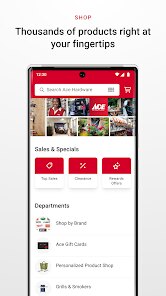
For anyone who enjoys tackling home improvement projects, the official Ace Hardware app from Ace Hardware Corporation serves as a practical digital companion. Available as a free download on Google Play, the app combines a comprehensive product catalog with store management tools, though it does feature targeted advertisements and optional in-app purchases for certain services. The install base is tied to the company's substantial retail presence, making it a logical extension for existing Ace customers looking to bring the shopping experience to their phones.
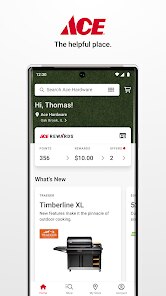
Navigating through the app feels like having a simplified version of the brick-and-mortar experience. The main dashboard presents categories like paint, tools, and hardware, where you can browse specific items and check local store availability. I found the search function reasonably accurate for common items, though more specialized product names sometimes required a bit of trial and error. Each product page includes typical pricing details, and the ability to add items to a list is implemented cleanly, without unnecessary friction. The checkout process, when purchasing for delivery, works about as smoothly as you would expect from a major retailer application.
Side-by-side with other hardware apps like The Home Depot or Lowe's, the Ace app feels distinctly more streamlined but also more limited in scope. While it offers a cleaner interface with fewer competing visual elements, it lacks the advanced project planning tools or augmented reality features found in some competitors. My impression is that the design prioritizes quick in-and-out shopping trips over deep product discovery, which suits the typical Ace Hardware customer base that often knows exactly what they need before opening the app.
Key Functional Highlights
- Store inventory visibility is one of the app's strongest features, allowing you to check whether an item is in stock at your preferred location before making the trip. The tool displays aisle and bay numbers in many cases, which I found more helpful than the general "in stock" indicators used by some competing apps.
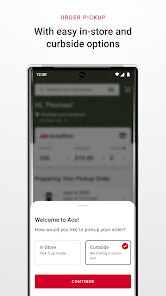
- Ordering for in-store pickup is a straightforward process that completes in just a few taps, though not all items qualify for this option. The system notifies you when the order is ready via push notification, and pickups at my local store were handled efficiently without requiring additional steps.
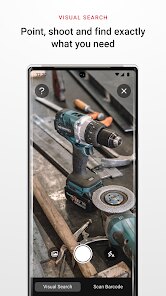
- The paint color matching feature works consistently when you have a physical sample, though the digital color visualizer tool feels less refined than similar options I have seen elsewhere. Photographing a wall and seeing virtual colors applied produces acceptable results but lacks the precision of more specialized decorating apps.
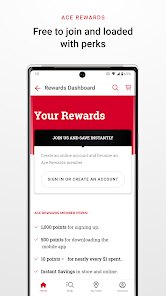
- While the app includes a loyalty program integration, its visibility within the interface could be better. Accessing rewards information sometimes feels buried behind a few extra taps compared to how prominently other retailers display such benefits.
Advantages & Benefits
- Quickly checking if an item is in stock before driving to the store has saved me from wasted trips, especially during busy weekends when stock changes rapidly.
- Building shopping lists for specific projects is simple and keeps everything organized in one place without needing a separate notes application.
- Finding the exact aisle location for products reduces time wandering around the store, which is particularly helpful in larger locations.
- Receiving notifications about weekly deals or seasonal sales helps me plan purchases around better pricing without actively monitoring advertisements.
Areas for Improvement
- The ad placement within search results occasionally pushes sponsored items above the most relevant matches, adding a small extra step to find what I originally searched for.
- Setting up a new account during the initial launch felt slightly cumbersome due to multiple verification steps, though this process only happens once.
- Some product descriptions lack detailed specifications or customer reviews, making quick comparisons harder than on competing apps that aggregate more data per item.
Recommended Apps
![]()
ZEPETO: Avatar, Connect & Play
Naver Z Corporation4.3
![]()
Reverse Voice: Flip Singing
NindaFuit0![]()
AI Chat Ask Assistant - NowAI
Now Tech4.3![]()
Lie Detector Test: Prank App
DkTech inc.4.3![]()
Peachy - AI Face & Body Editor
InShot Video Editor4.8
![]()
AI Video Art Creator - Livensa
FERASET4.5![]()
Google Voice
Google LLC4.3![]()
Horoscopes & Tarot
Astrolis Horoscopes4.7![]()
eBay online shopping & selling
eBay Mobile4.6![]()
JPay
Jpay Mobile4.1![]()
Stranger Things 5 Challenges
MVH Entertainment Team5![]()
Chat Master: Prank Story
ABI Game Studio4.8![]()
Google Maps
Google LLC4.2![]()
AI Chat・Ask Chatbot Assistant
AI Chat Studio4.5![]()
Name Meanings with Impact
Alif Innovative Solution3.7















You May Like
-
![]()
True Tarot Card Reading
KaApps4.2 -
![]()
LinkedIn: Jobs & Business News
LinkedIn4.2 -
![]()
iControl: Easy Widgets Themes
Fancy keyboard for theme apps4.6 -
![]()
Duolingo: Language & Chess
Duolingo4.7 -
![]()
Flipped:Chat with AI Character
First Group pte ltd4.1 -
![]()
Hearing Age
Mobile Solutions Tech0 -
![]()
TikTok
TikTok Pte. Ltd.4.4 -
![]()
Pretty Makeup - Beauty Camera
Photo Editor Perfect Corp.4.4 -
![]()
PhotoRoom AI Photo Editor
PhotoRoom Background Editor App4.7 -
![]()
Lightleap by Lightricks
Lightricks Ltd.4.3 -
![]()
Name Meaning
Dexati4.1 -
![]()
Truth Social
T Media Tech LLC3.3 -
![]()
Ace Hardware
Ace Hardware Corporation4.7 -
![]()
Kpop Fans Demon Hunter Wallpap
JHNStudio4.3 -
![]()
Artplay - AI Photo & Video
Hideaway Technology Limited4.5










































