

Google Pay
Google LLC
Installs
1,000,000,000+
Developer
Google LLC
-
Category
Finance
-
Content Rating
Rated for 3+
Developer Email
Privacy Policy
http://www.google.com/policies/privacy
Screenshots
Expert Review
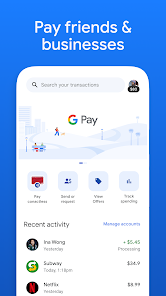
Google Pay is a digital wallet and online payment app that lets you pay for things in stores, online, and send money to friends. It's basically your phone's version of your physical wallet. The app first launched back in 2018, combining Google's previous payment services. You can download it for free from the Google Play Store or the Apple App Store, and it's got over a billion installs on Google Play alone. You don't need to pay anything to get the app, but you do need to register with your Google account and link a payment method like a debit or credit card to use it. While the core service is free, you might see ads or offers from partner banks and stores within the app, and there are no mandatory in-app purchases.
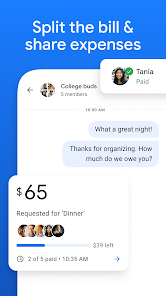
Using Google Pay is pretty straightforward. For in-store purchases, you just unlock your phone and hold it near the payment terminal. I use it almost every day for coffee or groceries. A good tip is to make sure your default card is the one you use most often. You can also use it to buy stuff in other apps or on websites without having to type your card details every time, which is a huge time-saver. I've found it super handy for splitting dinner bills with friends; you can send money directly to their phone number or email, and it usually arrives instantly.
Compared to other payment apps like Samsung Pay or Apple Pay, I stick with Google Pay because it works on both Android and iOS, so I can send money to almost anyone. Samsung Pay is great for Samsung phones with its magnetic stripe trick, but it's not as universal. Apple Pay is seamless on iPhones but doesn't play as nicely with the Android world. For me, Google Pay hits the sweet spot with its wide compatibility. It feels like the most neutral ground, especially since my friend group uses a mix of phones. It just works without needing everyone to be on the same brand of device.
Key Functional Highlights
- 🛒 Seamless In-Store & Online Checkout: The core feature is its tap-to-pay simplicity. Once you set it up, paying at any NFC terminal is just a phone unlock away. It also auto-fills your saved cards on thousands of websites and within other apps, making online shopping a one-tap affair.
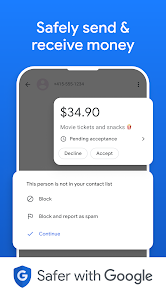
- 🤝 Peer-to-Peer Payments: Sending or requesting money is integrated right into the app. You can use a contact's phone number or email, and the transfer is often immediate. It's much faster than using a traditional banking app for the same thing.
- 📊 Transaction History & Insights: Unlike just using your bank card, Google Pay organizes all your transactions in one place, regardless of which card you used. It can show you spending patterns and help you track where your money goes each month.
- 🎫 Passes & Tickets Storage: Beyond payments, you can store things like boarding passes, event tickets, gift cards, and even loyalty cards. It keeps everything digital and accessible, so you don't have to dig through your email at the gate or counter.
Advantages & Benefits
- ✅ Cross-Platform Universality: Unlike Apple Pay (iOS only) or Samsung Pay (best on Samsung), Google Pay is available and fully functional on both major mobile OSes. This makes it the best choice for mixed friend groups.
- ✅ Deep Google Ecosystem Integration: If you use Gmail, Google Chrome, or the Play Store, the app works beautifully with them. Card autofill in Chrome and paying for Play Store purchases is effortless.
- ✅ Widespread Merchant Acceptance: Because it uses standard NFC technology, it works at virtually any contactless payment terminal, giving it broader immediate utility than some regional or bank-specific apps.
Areas for Improvement
- ⚠️ Privacy Concerns: As a Google product, it involves sharing your financial transaction data with Google. Some users prefer the perceived privacy of bank-specific apps or Apple's stance on data.
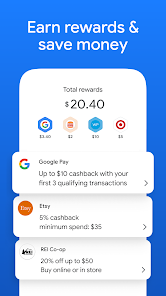
- ⚠️ Feature Variability by Region: Not all cool features, like comprehensive cashback offers or full banking integration, are available everywhere. Your experience can differ greatly depending on your country.
- ⚠️ Less Rewards-Centric: Compared to some dedicated cashback or rewards apps (like Rakuten), the offers and rewards within Google Pay can be less generous or less consistent.
Recommended Apps
![]()
ZEPETO: Avatar, Connect & Play
Naver Z Corporation4.3
![]()
Reverse Voice: Flip Singing
NindaFuit0![]()
AI Chat Ask Assistant - NowAI
Now Tech4.3![]()
Lie Detector Test: Prank App
DkTech inc.4.3![]()
Peachy - AI Face & Body Editor
InShot Video Editor4.8
![]()
AI Video Art Creator - Livensa
FERASET4.5![]()
Google Voice
Google LLC4.3![]()
Horoscopes & Tarot
Astrolis Horoscopes4.7![]()
eBay online shopping & selling
eBay Mobile4.6![]()
JPay
Jpay Mobile4.1![]()
Stranger Things 5 Challenges
MVH Entertainment Team5![]()
Chat Master: Prank Story
ABI Game Studio4.8![]()
Google Maps
Google LLC4.2![]()
AI Chat・Ask Chatbot Assistant
AI Chat Studio4.5![]()
Name Meanings with Impact
Alif Innovative Solution3.7















You May Like
-
![]()
True Tarot Card Reading
KaApps4.2 -
![]()
LinkedIn: Jobs & Business News
LinkedIn4.2 -
![]()
iControl: Easy Widgets Themes
Fancy keyboard for theme apps4.6 -
![]()
Duolingo: Language & Chess
Duolingo4.7 -
![]()
Flipped:Chat with AI Character
First Group pte ltd4.1 -
![]()
Hearing Age
Mobile Solutions Tech0 -
![]()
TikTok
TikTok Pte. Ltd.4.4 -
![]()
Pretty Makeup - Beauty Camera
Photo Editor Perfect Corp.4.4 -
![]()
PhotoRoom AI Photo Editor
PhotoRoom Background Editor App4.7 -
![]()
Lightleap by Lightricks
Lightricks Ltd.4.3 -
![]()
Name Meaning
Dexati4.1 -
![]()
Truth Social
T Media Tech LLC3.3 -
![]()
Ace Hardware
Ace Hardware Corporation4.7 -
![]()
Kpop Fans Demon Hunter Wallpap
JHNStudio4.3 -
![]()
Artplay - AI Photo & Video
Hideaway Technology Limited4.5











































