

Remini - AI Photo Enhancer
Bending Spoons
Installs
100M+
Developer
Bending Spoons
-
Category
Video Players & Editors
-
Content Rating
Rated for 3+
Developer Email
Privacy Policy
https://bendingspoons.com/privacy.html?app=1470373330
Screenshots



Expert Review
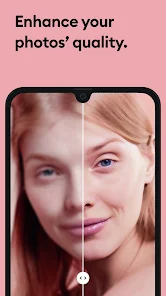
Remini - AI Photo Enhancer is a mobile app that uses artificial intelligence to improve the quality of your photos. It's designed to sharpen blurry images, restore old or damaged pictures, and generally make photos look clearer and more detailed. The app was first launched a few years ago and has become incredibly popular. You can find it on both the Google Play Store and the App Store. It has racked up tens of millions of downloads, which shows how many people are using it. The app itself is free to download and install. You don't need to create an account or register to start using its basic features, which is really convenient for a quick fix. However, like many free apps, it includes in-app purchases for premium features and also shows ads.
Using Remini is pretty straightforward. You just open the app, pick a photo from your gallery, and let the AI work its magic. It processes the image and gives you a before-and-after slider so you can see the difference. A good tip is to use it on photos that are slightly out of focus rather than completely ruined; the results are often more impressive that way. I also found it works best on portraits and old family photos. You can process a few images for free each day, but if you want to do more, you'll need to watch an ad or consider a subscription.
There are other photo enhancer apps out there, like Adobe Lightroom or Snapseed, which are great for general editing. But I keep coming back to Remini for one specific thing: fixing blurry faces. While Lightroom gives you more control over colors and lighting, Remini's AI is uniquely focused on reconstructing details, especially in people's faces. It feels less like manual editing and more like having a smart assistant that just knows how to make a face look clearer. That's the main reason I chose it over others for this particular job. It doesn't replace my main photo editor, but it's the go-to app I install when I need to rescue an important but poorly taken picture.
Key Functional Highlights
- 🔍 AI-Powered Detail Enhancement: The core feature of this app is its deep-learning engine that analyzes and reconstructs image details. It doesn't just apply a sharpening filter; it intelligently guesses and adds missing pixels, which is fantastic for bringing old, low-resolution photos back to life.
- 🎭 Specialized Face Enhancement: Unlike general editors like VSCO, Remini has algorithms specifically tuned for facial features. It can sharpen eyes, smooth skin realistically, and enhance details in portraits without making people look unnatural or plastic, which is a common pitfall with other enhancers.
- ⚡ One-Tap Simplicity: The process is incredibly simple. You select a photo and tap 'Enhance'. There's no confusing slider or complex settings to adjust, making it accessible for anyone to download and use immediately, regardless of their photo editing skills.
- 📁 Batch Processing & History: For users who get the premium version, the app allows you to process multiple photos at once. It also keeps a history of all your enhanced images, so you can easily go back and download them again or compare different versions.
Advantages & Benefits
- 👍 Superior for Old Photos: Compared to apps like PhotoDirector, Remini's AI is simply better at handling grainy, scratched, or faded historical photographs. The restoration feels more authentic.
- 👍 No Learning Curve: Apps like Adobe Photoshop Express are powerful but can be overwhelming. Remini's strength is its instant, one-button result, which is perfect for quick fixes.
- 👍 Free Tier is Useful: You can actually get decent use out of the app without paying, unlike some competitors that lock basic features behind a paywall immediately after you install them.
Areas for Improvement
- 👎 Heavy on Ads and Upsells: The free version is interrupted by frequent video ads, and the push for in-app purchases is very aggressive compared to a simpler app like Afterlight.
- 👎 Can Over-process Images: Sometimes, the AI goes too far, making textures look overly smooth or artificial, especially on non-portrait images. You have less control to dial it back than you would in Snapseed.
- 👎 Subscription Model: To unlock unlimited use and the best features, you need a recurring subscription. Some similar apps offer a one-time purchase option, which can be more appealing for casual users.
Recommended Apps
![]()
ZEPETO: Avatar, Connect & Play
Naver Z Corporation4.3
![]()
Reverse Voice: Flip Singing
NindaFuit0![]()
AI Chat Ask Assistant - NowAI
Now Tech4.3![]()
Lie Detector Test: Prank App
DkTech inc.4.3![]()
Peachy - AI Face & Body Editor
InShot Video Editor4.8
![]()
AI Video Art Creator - Livensa
FERASET4.5![]()
Google Voice
Google LLC4.3![]()
Horoscopes & Tarot
Astrolis Horoscopes4.7![]()
eBay online shopping & selling
eBay Mobile4.6![]()
JPay
Jpay Mobile4.1![]()
Stranger Things 5 Challenges
MVH Entertainment Team5![]()
Chat Master: Prank Story
ABI Game Studio4.8![]()
Google Maps
Google LLC4.2![]()
AI Chat・Ask Chatbot Assistant
AI Chat Studio4.5![]()
Name Meanings with Impact
Alif Innovative Solution3.7















You May Like
-
![]()
True Tarot Card Reading
KaApps4.2 -
![]()
LinkedIn: Jobs & Business News
LinkedIn4.2 -
![]()
iControl: Easy Widgets Themes
Fancy keyboard for theme apps4.6 -
![]()
Duolingo: Language & Chess
Duolingo4.7 -
![]()
Flipped:Chat with AI Character
First Group pte ltd4.1 -
![]()
Hearing Age
Mobile Solutions Tech0 -
![]()
TikTok
TikTok Pte. Ltd.4.4 -
![]()
Pretty Makeup - Beauty Camera
Photo Editor Perfect Corp.4.4 -
![]()
PhotoRoom AI Photo Editor
PhotoRoom Background Editor App4.7 -
![]()
Lightleap by Lightricks
Lightricks Ltd.4.3 -
![]()
Name Meaning
Dexati4.1 -
![]()
Truth Social
T Media Tech LLC3.3 -
![]()
Ace Hardware
Ace Hardware Corporation4.7 -
![]()
Kpop Fans Demon Hunter Wallpap
JHNStudio4.3 -
![]()
Artplay - AI Photo & Video
Hideaway Technology Limited4.5










































