

Google Chat
Google LLC
Installs
10,000,000+
Developer
Google LLC
-
Category
Business
-
Content Rating
Rated for 3+
Developer Email
Privacy Policy
http://www.google.com/policies/privacy
Screenshots
Expert Review
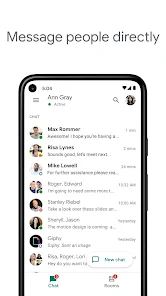
Google Chat is Google's official messaging and collaboration app, designed for both personal chats and team-based work. It's essentially the modern evolution of Hangouts, fully integrated into the Google Workspace ecosystem. The app first launched in its current form back in 2020 and is widely available for download on the Google Play Store and Apple's App Store. With over a billion installs on Google Play alone, it's a massively popular choice. The core app is free to download and install, and you can start using it with just your Google account—no separate registration is needed. While the basic version is free, it does offer advanced features as part of paid Google Workspace plans. You might encounter some promotional elements for other Google services, but intrusive in-app ads aren't really a thing here.
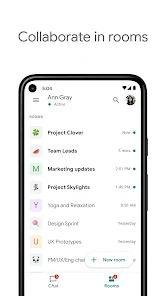
Using the app is pretty straightforward. After you install it and sign in, you're greeted with a clean interface split into 'Chats' for direct messages and 'Spaces' for team projects. A handy tip is to use the '@' mention feature to get someone's attention in a busy space, and pinning important messages or files in a space keeps key info easy to find. For quick collaboration, you can start a Google Meet call or work on a Doc, Sheet, or Slide right within the chat window without ever leaving the app.
Compared to similar apps like Slack or Microsoft Teams, I keep coming back to Google Chat. The main reason is the seamless integration. If your life already runs on Gmail, Google Drive, and Calendar, this app feels like a natural extension. Everything is just there. While Slack has more third-party bots and Teams is a powerhouse for Microsoft 365 users, Google Chat's simplicity and deep ties to the tools I use daily make it the easier, more convenient choice for me. It doesn't try to do everything, but what it does, it does well within the Google universe.
Key Functional Highlights
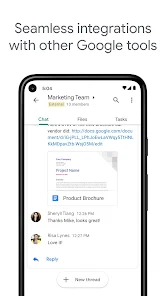
- 🔗 Deep Google Workspace Integration: This is the app's killer feature. You can preview and collaborate on Drive files, see Calendar invites, and even join a Google Meet call with a single click, all without switching apps. It turns the chat window into a central hub for work.
- 📁 Spaces for Organized Teamwork: Unlike basic group chats, Spaces are designed for ongoing projects. You can assign tasks, pin important announcements, and organize conversations by topics, which keeps team discussions much more structured than in a typical messaging app.
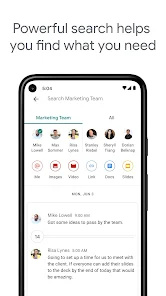
- 🔍 Powerful Search with Google's Muscle: Finding an old message, file, or link is incredibly fast because it leverages Google's powerful search technology. It can search across all your chats and spaces, making it far superior to the search functions in many other chat apps.
- 🤖 Useful Built-in Bots: The app comes with handy bots like the Google Drive bot that notifies you about file activity or the Meet bot that helps schedule calls. While the ecosystem isn't as vast as Slack's, these native bots are genuinely useful and work flawlessly.
Advantages & Benefits
- ✅ Zero-Friction Onboarding: If you have a Google account, you're already in. There's no new sign-up, which beats apps like Slack or Discord that require a separate registration process.
- ✅ Clean, Uncluttered Interface: Compared to the sometimes-busy interfaces of Slack or Microsoft Teams, Google Chat's design is minimalist and focuses on conversation, reducing visual noise.
- ✅ Fantastic Free Tier: The free version is very capable for most personal and small team uses, offering robust features without the immediate paywall you hit with some advanced features in competitors.
Areas for Improvement
- ❌ Limited Third-Party App Directory: Compared to Slack's enormous library of integrations, Google Chat's selection of connected apps feels limited, which can be a drawback for teams using many non-Google tools.
- ❌ Can Feel Too "Google-Centric": If your workflow doesn't heavily involve Google products, the app's standout integrations become less valuable, making a more platform-agnostic app like Slack a better fit.
- ❌ Less Customization and Fun: Apps like Discord or Slack offer more ways to customize notifications, add fun emojis, or use bots for games. Google Chat feels more utilitarian and business-focused.
Recommended Apps
![]()
ZEPETO: Avatar, Connect & Play
Naver Z Corporation4.3
![]()
Reverse Voice: Flip Singing
NindaFuit0![]()
AI Chat Ask Assistant - NowAI
Now Tech4.3![]()
Lie Detector Test: Prank App
DkTech inc.4.3![]()
Peachy - AI Face & Body Editor
InShot Video Editor4.8
![]()
AI Video Art Creator - Livensa
FERASET4.5![]()
Google Voice
Google LLC4.3![]()
Horoscopes & Tarot
Astrolis Horoscopes4.7![]()
eBay online shopping & selling
eBay Mobile4.6![]()
JPay
Jpay Mobile4.1![]()
Stranger Things 5 Challenges
MVH Entertainment Team5![]()
Chat Master: Prank Story
ABI Game Studio4.8![]()
Google Maps
Google LLC4.2![]()
AI Chat・Ask Chatbot Assistant
AI Chat Studio4.5![]()
Name Meanings with Impact
Alif Innovative Solution3.7















You May Like
-
![]()
True Tarot Card Reading
KaApps4.2 -
![]()
LinkedIn: Jobs & Business News
LinkedIn4.2 -
![]()
iControl: Easy Widgets Themes
Fancy keyboard for theme apps4.6 -
![]()
Duolingo: Language & Chess
Duolingo4.7 -
![]()
Flipped:Chat with AI Character
First Group pte ltd4.1 -
![]()
Hearing Age
Mobile Solutions Tech0 -
![]()
TikTok
TikTok Pte. Ltd.4.4 -
![]()
Pretty Makeup - Beauty Camera
Photo Editor Perfect Corp.4.4 -
![]()
PhotoRoom AI Photo Editor
PhotoRoom Background Editor App4.7 -
![]()
Lightleap by Lightricks
Lightricks Ltd.4.3 -
![]()
Name Meaning
Dexati4.1 -
![]()
Truth Social
T Media Tech LLC3.3 -
![]()
Ace Hardware
Ace Hardware Corporation4.7 -
![]()
Kpop Fans Demon Hunter Wallpap
JHNStudio4.3 -
![]()
Artplay - AI Photo & Video
Hideaway Technology Limited4.5










































