

PolyBuzz: Chat with AI Friends
CLOUD WHALE INTERACTIVE TECHNOLOGY LLC.
Installs
10M+
Developer
CLOUD WHALE INTERACTIVE TECHNOLOGY LLC.
-
Category
Generative AI
-
Content Rating
Mature 17+
Developer Email
Privacy Policy
https://app.polybuzz.ai/static/hy/speakmaster/privacyPolicy/index.html?darkmode=1&darkStyle=1
Screenshots




Expert Review
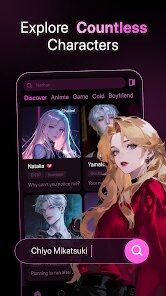
Poly.AI is a mobile application available on Google Play that allows users to create and interact with custom AI chatbots. The app is free to download and install, with its core functionality accessible without immediate payment, though it operates on a freemium model that includes in-app purchases for extended features. It falls into the productivity and entertainment genre, offering a hands-on way to explore conversational AI. The download numbers suggest it has found a steady user base interested in personalized AI interactions.
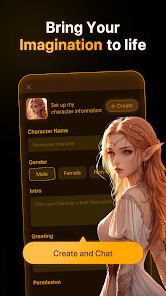
Getting started with the app involves a straightforward setup where you can either choose from pre-built chatbot personalities or define your own from scratch. The interaction is primarily text-based; you type a message, and the AI generates a response. The interface is clean, focusing the screen on the conversation thread, with settings and creation tools tucked into a side menu. During use, the bot's responses are generally coherent and can be surprisingly engaging for a mobile tool, though the depth varies depending on the complexity you program into its initial parameters.
In the landscape of AI companion apps, Poly.AI distinguishes itself by emphasizing user-led creation rather than offering a single, fixed AI personality. Unlike some competitors that focus on emotional support or task-oriented assistants, this app feels more like a sandbox. You have more direct control over the bot's knowledge base and conversational goals, which makes it less of a ready-made companion and more of a customizable project. This design choice shifts the focus from passive consumption to active tinkering, which will appeal more to users curious about how AI conversations are structured.
Key Functional Highlights
- The core creation suite is quite flexible. You can feed the bot specific information, set its tone, and even outline key topics it should master. This isn't just selecting a preset; it involves writing a brief and examples, which gives the resulting chatbot a unique, tailored feel compared to more generic AI chat apps.
- Interaction speed is a strong point. Responses from the AI are generated quickly, maintaining the flow of a natural conversation without frustrating lag. This technical performance is crucial for an app where the primary activity is back-and-forth dialogue.
- The app includes a community aspect where you can explore and try chatbots created by other users. This library provides immediate value and inspiration, showing what's possible within the platform and saving you from starting every project with a blank slate.
- While the free version is functional, the transition to premium features is noticeable. Advanced customization options and longer conversation memory are gated, which creates a tangible difference between basic and advanced usage. This model is common, but the line here feels particularly defined.
Advantages & Benefits
- It serves as a practical, low-stakes introduction to training conversational AI models without needing any coding knowledge.
- The ability to craft a bot for a specific purpose, like practicing a language or simulating an interview, adds genuine utility beyond casual chatting.
- Having a personalized AI that can reference the information you provided creates a more relevant and useful interaction than talking to a general-knowledge assistant.
Areas for Improvement
- The AI can sometimes produce generic or slightly off-topic replies, especially if the initial instructions aren't meticulously detailed, requiring occasional manual correction.
- Navigation between creating a bot, managing multiple bots, and the chat interface itself can feel a bit fragmented, making the workflow less seamless than it could be.
- For a free app, the presence of banner ads is expected, but they can be visually distracting during a text-focused conversation, briefly pulling you out of the immersive experience.
Recommended Apps
![]()
ZEPETO: Avatar, Connect & Play
Naver Z Corporation4.3
![]()
Reverse Voice: Flip Singing
NindaFuit0![]()
AI Chat Ask Assistant - NowAI
Now Tech4.3![]()
Lie Detector Test: Prank App
DkTech inc.4.3![]()
Peachy - AI Face & Body Editor
InShot Video Editor4.8
![]()
AI Video Art Creator - Livensa
FERASET4.5![]()
Google Voice
Google LLC4.3![]()
Horoscopes & Tarot
Astrolis Horoscopes4.7![]()
eBay online shopping & selling
eBay Mobile4.6![]()
JPay
Jpay Mobile4.1![]()
Stranger Things 5 Challenges
MVH Entertainment Team5![]()
Chat Master: Prank Story
ABI Game Studio4.8![]()
Google Maps
Google LLC4.2![]()
AI Chat・Ask Chatbot Assistant
AI Chat Studio4.5![]()
Name Meanings with Impact
Alif Innovative Solution3.7















You May Like
-
![]()
True Tarot Card Reading
KaApps4.2 -
![]()
LinkedIn: Jobs & Business News
LinkedIn4.2 -
![]()
iControl: Easy Widgets Themes
Fancy keyboard for theme apps4.6 -
![]()
Duolingo: Language & Chess
Duolingo4.7 -
![]()
Flipped:Chat with AI Character
First Group pte ltd4.1 -
![]()
Hearing Age
Mobile Solutions Tech0 -
![]()
TikTok
TikTok Pte. Ltd.4.4 -
![]()
Pretty Makeup - Beauty Camera
Photo Editor Perfect Corp.4.4 -
![]()
PhotoRoom AI Photo Editor
PhotoRoom Background Editor App4.7 -
![]()
Lightleap by Lightricks
Lightricks Ltd.4.3 -
![]()
Name Meaning
Dexati4.1 -
![]()
Truth Social
T Media Tech LLC3.3 -
![]()
Ace Hardware
Ace Hardware Corporation4.7 -
![]()
Kpop Fans Demon Hunter Wallpap
JHNStudio4.3 -
![]()
Artplay - AI Photo & Video
Hideaway Technology Limited4.5












































