

PhotoRoom AI Photo Editor
PhotoRoom Background Editor App
Installs
50M+
Developer
PhotoRoom Background Editor App
-
Category
Video Players & Editors
-
Content Rating
Rated for 3+
Developer Email
Privacy Policy
https://photoroom.com/legal/privacy
Screenshots
Expert Review
PhotoRoom is an AI photo editor app that's become my go-to for cleaning up product shots and creating professional-looking graphics. It launched back in 2019 and you can easily download it from the Google Play Store or the App Store. The app has racked up millions of installs, which tells you how popular it is. It's free to download and install, and you can start using it right away without needing to register an account, which I really appreciate for quick edits. Of course, there are in-app purchases if you want to unlock all the pro features, and you'll see some ads in the free version, but they're not too intrusive.
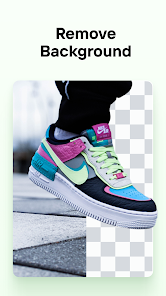
Using the app is pretty straightforward. You just pick a photo from your gallery, and the AI instantly removes the background. That's the magic part. My main tip is to use photos with good contrast between your subject and the background for the cleanest cutouts. After that, you can play around with adding new backgrounds, adjusting shadows, or dropping in text. It's perfect for making social media posts or listing items for sale online. I use it all the time for my small online shop.
I've tried a few other background removal apps, but I keep coming back to PhotoRoom. Apps like Background Eraser or Remove BG are okay, but PhotoRoom's AI just seems smarter and faster. The edges it creates are cleaner, especially on tricky stuff like hair or fabric. For me, the choice is easy because this app delivers more consistent, high-quality results without a lot of fuss. It feels more polished than other options in the same genre.
Key Functional Highlights
- 🤖 Instant AI Background Removal: The core feature is its lightning-fast AI cutout. You tap your photo, and the background is gone in a second. It's way more accurate than manual tools in other apps, saving me tons of time.
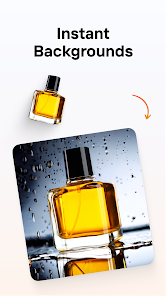
- 🎨 Huge Library of Templates & Backgrounds: Unlike basic editors, PhotoRoom offers a massive collection of professional templates for Instagram, eBay, Etsy, etc. You can also choose from solid colors, gradients, or upload your own images, which is great for branding.
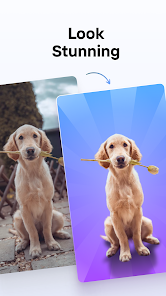
- ✨ Advanced Editing Tools (Shadows & Glows): After removing the background, you can add realistic drop shadows or glows to your subject. This tiny detail makes product photos look like they're professionally shot on a studio set, a feature many similar apps lack.
- 📱 One-Tap Export for Social Media: The app is built for creators. With one tap, you can resize your graphic for different platforms like Instagram Stories or Pinterest pins directly within the app, which is super convenient compared to using separate tools.
Advantages & Benefits
- ✅ Superior Cut-Out Quality: Compared to apps like 'Background Eraser', PhotoRoom's AI handles complex edges (like frizzy hair or fuzzy sweaters) much better, with fewer mistakes to clean up manually.
- ✅ All-in-One Workflow: While 'Remove.bg' is great for just background removal, PhotoRoom bundles editing, templates, and export into a single, smooth workflow. You don't need to jump between multiple apps.
- ✅ User-Friendly for Beginners: The interface is cleaner and less cluttered than something like 'Adobe Express' for this specific task. It gets you from photo to finished graphic in under a minute.
Areas for Improvement
- ⚠️ Watermarks on Free Exports: The free version places a small watermark on downloaded images. To remove it, you need a subscription, whereas some competitors offer a few watermark-free exports daily.
- ⚠️ Subscription Model: Full access requires a recurring subscription. Some users might prefer a one-time purchase model offered by other editing apps for certain advanced features.
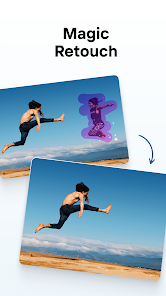
- ⚠️ Occasional AI Misses: On very busy or low-contrast backgrounds, the AI can sometimes make errors, requiring use of the manual brush tool, which isn't as refined as in dedicated desktop software like Photoshop.
Recommended Apps
![]()
ZEPETO: Avatar, Connect & Play
Naver Z Corporation4.3
![]()
Reverse Voice: Flip Singing
NindaFuit0![]()
AI Chat Ask Assistant - NowAI
Now Tech4.3![]()
Lie Detector Test: Prank App
DkTech inc.4.3![]()
Peachy - AI Face & Body Editor
InShot Video Editor4.8
![]()
AI Video Art Creator - Livensa
FERASET4.5![]()
Google Voice
Google LLC4.3![]()
Horoscopes & Tarot
Astrolis Horoscopes4.7![]()
eBay online shopping & selling
eBay Mobile4.6![]()
JPay
Jpay Mobile4.1![]()
Stranger Things 5 Challenges
MVH Entertainment Team5![]()
Chat Master: Prank Story
ABI Game Studio4.8![]()
Google Maps
Google LLC4.2![]()
AI Chat・Ask Chatbot Assistant
AI Chat Studio4.5![]()
Name Meanings with Impact
Alif Innovative Solution3.7















You May Like
-
![]()
True Tarot Card Reading
KaApps4.2 -
![]()
LinkedIn: Jobs & Business News
LinkedIn4.2 -
![]()
iControl: Easy Widgets Themes
Fancy keyboard for theme apps4.6 -
![]()
Duolingo: Language & Chess
Duolingo4.7 -
![]()
Flipped:Chat with AI Character
First Group pte ltd4.1 -
![]()
Hearing Age
Mobile Solutions Tech0 -
![]()
TikTok
TikTok Pte. Ltd.4.4 -
![]()
Pretty Makeup - Beauty Camera
Photo Editor Perfect Corp.4.4 -
![]()
PhotoRoom AI Photo Editor
PhotoRoom Background Editor App4.7 -
![]()
Lightleap by Lightricks
Lightricks Ltd.4.3 -
![]()
Name Meaning
Dexati4.1 -
![]()
Truth Social
T Media Tech LLC3.3 -
![]()
Ace Hardware
Ace Hardware Corporation4.7 -
![]()
Kpop Fans Demon Hunter Wallpap
JHNStudio4.3 -
![]()
Artplay - AI Photo & Video
Hideaway Technology Limited4.5









































