

PayByPhone
PayByPhone Technologies Inc .
Installs
10M+
Developer
PayByPhone Technologies Inc .
-
Category
Productivity
-
Content Rating
Everyone
Developer Email
Privacy Policy
https://www.paybyphone.com/about/terms-privacy
Screenshots


Expert Review
PayByPhone, developed by PayByPhone Technologies Inc., is a mobile payment application designed specifically for parking fee transactions. This free-to-download app is available on Google Play for Android users, with the option to install it directly on smartphones. The app operates on a straightforward model where users pay for their parking sessions through their mobile devices instead of using traditional payment methods like coins, credit cards, or parking kiosks. While the app itself costs nothing to download and install, it includes in-app purchases for parking fees, and users should be aware that standard data charges from their mobile carrier may apply during use. The service aims to streamline the often frustrating experience of finding correct change or queuing at payment machines.
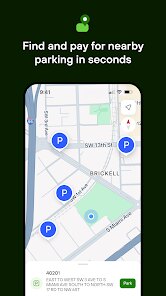
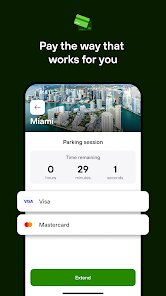
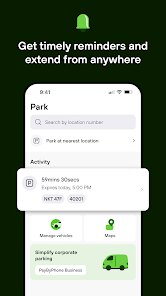
In practice, the app asks you to create an account and register your vehicle information and payment details. Once set up, you can locate parking zones by entering a zone number displayed on nearby signs or using the map feature. The payment process itself feels fairly straightforward: you select the duration you want to park, confirm the session, and the app handles the transaction. A countdown timer shows how much time remains, and the app sends a notification before the session expires, allowing you to extend the time remotely. This is particularly useful if you are running late or decide to stay longer at your location. Many parking spaces in participating cities now display the PayByPhone logo, so finding compatible spots usually isn't difficult.
Compared to other parking payment apps like ParkMobile or Passport Parking, PayByPhone feels somewhat more utilitarian in its interface. While ParkMobile has a more modern and visually polished design, PayByPhone focuses more on reliability and straightforward functionality. The app does lack certain features found in competitors, such as more advanced receipt management or integration with multiple parking operators in a single account view. Personally, I have found that the app performs consistently well in terms of transaction speed, but the design could benefit from a refresh to match current standards. The overall experience leans more toward practicality than aesthetics, which may suit users who prioritize function over form.
Key Functional Highlights
- Remote session extension works well in practice. You can add time from anywhere without returning to the parking spot, which feels genuinely convenient compared to traditional meters that require physical presence.
- Payment history is stored within the account, making expense tracking easier than with cash payments. Each transaction lists date, location, amount, and vehicle, which helps with reimbursements or personal budgeting.
- Zone-based entry is simple once you get used to it, though the map interface could be more accurate. Other apps like ParkMobile offer better visual parking area boundaries, but PayByPhone's numeric zone input is faster once you know the number.
- Multiple vehicle support is included, which is handy for households with more than one car. Switching between vehicles in the account is quick and does not require re-entering details each time.
Advantages & Benefits
- Saves time by eliminating the need to carry coins or find a working payment machine, especially in unfamiliar areas where parking rules vary.
- Notifications before expiry help avoid fines, which is a practical benefit that regular users will appreciate over time.
- Extending parking remotely is useful when meetings run long or plans change unexpectedly, giving more flexibility than traditional methods.
Areas for Improvement
- The user interface feels dated and could be more intuitive, with menus that sometimes require several taps to reach common functions.
- Adding funds to the account balance is less straightforward than paying per session, and the minimum top-up amount can be higher than you might want.
- Occasional connectivity issues cause delays in starting a session, which can be frustrating when you are in a hurry or at a location with weak signal.
- Customer support response times are sometimes slow for billing issues, especially through the in-app contact options.
Recommended Apps
![]()
ZEPETO: Avatar, Connect & Play
Naver Z Corporation4.3
![]()
Reverse Voice: Flip Singing
NindaFuit0![]()
AI Chat Ask Assistant - NowAI
Now Tech4.3![]()
Lie Detector Test: Prank App
DkTech inc.4.3![]()
Peachy - AI Face & Body Editor
InShot Video Editor4.8
![]()
AI Video Art Creator - Livensa
FERASET4.5![]()
Google Voice
Google LLC4.3![]()
Horoscopes & Tarot
Astrolis Horoscopes4.7![]()
eBay online shopping & selling
eBay Mobile4.6![]()
JPay
Jpay Mobile4.1![]()
Stranger Things 5 Challenges
MVH Entertainment Team5![]()
Chat Master: Prank Story
ABI Game Studio4.8![]()
Google Maps
Google LLC4.2![]()
AI Chat・Ask Chatbot Assistant
AI Chat Studio4.5![]()
Name Meanings with Impact
Alif Innovative Solution3.7















You May Like
-
![]()
True Tarot Card Reading
KaApps4.2 -
![]()
LinkedIn: Jobs & Business News
LinkedIn4.2 -
![]()
iControl: Easy Widgets Themes
Fancy keyboard for theme apps4.6 -
![]()
Duolingo: Language & Chess
Duolingo4.7 -
![]()
Flipped:Chat with AI Character
First Group pte ltd4.1 -
![]()
Hearing Age
Mobile Solutions Tech0 -
![]()
TikTok
TikTok Pte. Ltd.4.4 -
![]()
Pretty Makeup - Beauty Camera
Photo Editor Perfect Corp.4.4 -
![]()
PhotoRoom AI Photo Editor
PhotoRoom Background Editor App4.7 -
![]()
Lightleap by Lightricks
Lightricks Ltd.4.3 -
![]()
Name Meaning
Dexati4.1 -
![]()
Truth Social
T Media Tech LLC3.3 -
![]()
Ace Hardware
Ace Hardware Corporation4.7 -
![]()
Kpop Fans Demon Hunter Wallpap
JHNStudio4.3 -
![]()
Artplay - AI Photo & Video
Hideaway Technology Limited4.5










































