

WhatsApp Messenger
WhatsApp LLC
Installs
10B+
Developer
WhatsApp LLC
-
Category
Social
-
Content Rating
Everyone
Developer Email
Privacy Policy
https://www.whatsapp.com/legal/privacy-policy
Screenshots


Expert Review
WhatsApp Messenger, developed by WhatsApp LLC, is a free messaging app that has become a global standard for staying in touch. You can download it from the Google Play Store or the Apple App Store, and it's used by billions of people worldwide. It's completely free to download and use for messaging, and it doesn't show any ads. The app makes money through optional in-app purchases for businesses and, in some regions, a small annual subscription fee for WhatsApp Business, but for regular personal use, it remains ad-free.
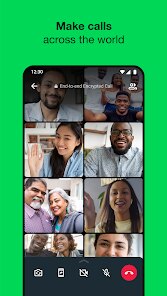
In practice, using WhatsApp is straightforward. You open the app, verify your phone number, and it automatically syncs with your phone's contacts who also use the service. The main screen is your chat list. Tapping on a contact opens a chat window where you can send text messages, photos, voice notes, documents, and even make voice or video calls. From my experience, the interface is clean and focuses on the conversation, without too many distracting elements. One thing I noticed is that group chats are easy to set up and manage, which is great for coordinating with family or project teams.
Compared to other popular messaging apps like Telegram or Signal, WhatsApp feels more universal and integrated. While Telegram offers larger groups and more cloud-based features, and Signal is praised for its privacy model, WhatsApp's strength is its sheer network effect. Almost everyone you know likely already has it installed. The experience is more consistent and less fragmented than using Apple's iMessage, which is limited to Apple devices. Overall, WhatsApp's simplicity and widespread adoption make it the default choice for many, even if other apps offer specific, more advanced features.
Key Functional Highlights
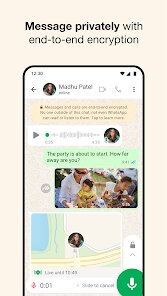
- The end-to-end encryption for all chats and calls is a fundamental feature. It means your conversations are secured so that only you and the person you're communicating with can read or listen to them. In daily use, this operates completely in the background, giving a sense of privacy without any extra steps from the user.
- Voice messaging is incredibly convenient. Instead of typing out a long message, you can just hold the microphone button and speak. The messages play instantly when received, and you can listen to them hands-free. It feels much more personal and efficient than texting, especially for quick updates or when you're on the go.
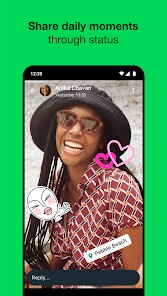
- The Status feature, which lets you share photos, videos, and text updates that disappear after 24 hours, is like a more private version of Instagram Stories or Snapchat. It's integrated directly within your messaging app, so you don't have to switch to another social platform to see what your close contacts are up to.
- WhatsApp Web and Desktop apps allow you to continue your conversations on your computer. This is a huge convenience for anyone who works at a desk. The sync is seamless; you just scan a QR code with your phone, and all your chats appear. It's more straightforward for basic messaging compared to something like Slack's multi-workspace setup, which can feel overwhelming for personal use.
Advantages & Benefits
- It's incredibly reliable for sending media. Photos and videos usually send quickly and maintain good quality, which isn't always the case with some other messaging services that heavily compress files.
- The search function within chats is powerful. You can find specific messages, links, or photos from months ago without having to scroll endlessly, which saves a lot of time.
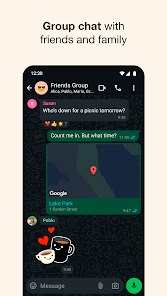
- Creating groups for different circles—like family, close friends, or a sports team—keeps conversations organized and relevant. The admin controls are simple but effective for managing the group.
- The app is lightweight and doesn't seem to drain your phone's battery excessively, even with frequent use throughout the day.
Areas for Improvement
- The backup system can be confusing. While it backs up to Google Drive or iCloud, restoring a backup to a new phone sometimes doesn't transfer your entire chat history seamlessly, which can be frustrating.
- There's no native option to use the same WhatsApp account on multiple phones simultaneously. You can use it on a computer and a phone, but not on two phones, which can be limiting for people who carry a work and personal device.
- The lack of true message scheduling is a minor inconvenience. For sending reminders or birthday wishes at a specific time, you have to remember to do it manually or use a separate app.
- While the interface is simple, it offers less customization than some competitors. You can't change themes or organize chats into folders, which some users might miss for personalizing their experience.
Recommended Apps
![]()
ZEPETO: Avatar, Connect & Play
Naver Z Corporation4.3
![]()
Reverse Voice: Flip Singing
NindaFuit0![]()
AI Chat Ask Assistant - NowAI
Now Tech4.3![]()
Lie Detector Test: Prank App
DkTech inc.4.3![]()
Peachy - AI Face & Body Editor
InShot Video Editor4.8
![]()
AI Video Art Creator - Livensa
FERASET4.5![]()
Google Voice
Google LLC4.3![]()
Horoscopes & Tarot
Astrolis Horoscopes4.7![]()
eBay online shopping & selling
eBay Mobile4.6![]()
JPay
Jpay Mobile4.1![]()
Stranger Things 5 Challenges
MVH Entertainment Team5![]()
Chat Master: Prank Story
ABI Game Studio4.8![]()
Google Maps
Google LLC4.2![]()
AI Chat・Ask Chatbot Assistant
AI Chat Studio4.5![]()
Name Meanings with Impact
Alif Innovative Solution3.7















You May Like
-
![]()
True Tarot Card Reading
KaApps4.2 -
![]()
LinkedIn: Jobs & Business News
LinkedIn4.2 -
![]()
iControl: Easy Widgets Themes
Fancy keyboard for theme apps4.6 -
![]()
Duolingo: Language & Chess
Duolingo4.7 -
![]()
Flipped:Chat with AI Character
First Group pte ltd4.1 -
![]()
Hearing Age
Mobile Solutions Tech0 -
![]()
TikTok
TikTok Pte. Ltd.4.4 -
![]()
Pretty Makeup - Beauty Camera
Photo Editor Perfect Corp.4.4 -
![]()
PhotoRoom AI Photo Editor
PhotoRoom Background Editor App4.7 -
![]()
Lightleap by Lightricks
Lightricks Ltd.4.3 -
![]()
Name Meaning
Dexati4.1 -
![]()
Truth Social
T Media Tech LLC3.3 -
![]()
Ace Hardware
Ace Hardware Corporation4.7 -
![]()
Kpop Fans Demon Hunter Wallpap
JHNStudio4.3 -
![]()
Artplay - AI Photo & Video
Hideaway Technology Limited4.5











































