

Amazon Fire TV
Amazon Mobile LLC
Installs
10,000,000+
Developer
Amazon Mobile LLC
-
Category
Productivity
-
Content Rating
Rated for 3+
Developer Email
Privacy Policy
http://www.amazon.com/gp/help/customer/display.html/?nodeId=468496
Screenshots
Expert Review
Amazon Fire TV is a streaming media player app that turns your compatible TV into a smart entertainment hub. It's the companion app for the Fire TV hardware, letting you browse, search, and control your Fire TV Stick, Cube, or smart TV from your phone. The app itself is free to download and install from the Google Play Store and Apple's App Store. It first launched alongside the early Fire TV devices, and it's seen millions of installs. You don't need to register for a separate account to use the app, as it connects to your existing Amazon account. While the app is free, accessing most content requires subscriptions to services like Prime Video, Netflix, or Hulu, and you can manage those subscriptions and make purchases directly through the linked Fire TV device.
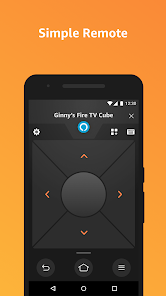
I use the app mainly as a super-powered remote. Typing passwords or search terms with the physical remote is a pain, so using the keyboard on my phone is a game-changer. A good tip is to enable the 'Use Mobile Device' notification feature; this lets the app pop up on your phone as soon as the Fire TV turns on, so you can jump right into controlling it. I also use the voice search through the app's microphone button a lot—it's often faster than typing.
Compared to other remote apps like the one for Roku or the generic Android TV remote, I stick with the official Amazon Fire TV app because it's just more integrated. The Roku app is good, but the Fire TV app feels like a direct extension of the device's interface. It shows your recent apps and channels right on your phone's screen, which the generic alternatives don't. For someone deep in the Amazon ecosystem, this app is the obvious choice for managing the viewing experience.
Key Functional Highlights
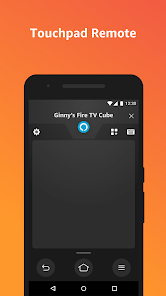
- 📱 Full-Featured Remote: It replicates all the buttons of the physical remote—directional pad, playback controls, home, back, menu—and adds a keyboard and microphone for voice search, making navigation and input far easier than with the clicker.
- 🎮 App & Game Launchpad: You can browse and directly install new apps and games from the Google Play-based Amazon Appstore right from your phone. Seeing all your installed apps on the mobile screen makes launching them on the big TV a one-tap affair.
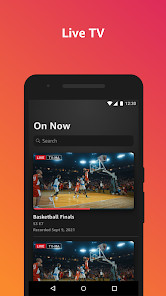
- 🎯 Content Discovery: The app aggregates content from all your installed streaming services. You can search for a movie or show once, and it will tell you which app it's available on, saving you from opening each app individually to check.
- 🔊 Audio Control: A standout feature is the dedicated volume and power control for your TV or sound system. Once set up, you can ditch your TV remote completely, as the app handles power, input switching, and volume.
Advantages & Benefits
- ✅ Seamless Ecosystem Integration: If you use Prime Video, Amazon Music, or have an Echo, this app ties everything together much tighter than a generic remote app could. Content recommendations and voice control via Alexa feel native.
- ✅ Superior Input Method: The typing and voice search capabilities are a massive strength over the basic Roku remote app, which can feel slower for text entry.
- ✅ Direct App Management: The ability to install and organize apps from your phone is more intuitive than doing it on the TV screen, a feature often missing from competitors like the Chromecast remote.
Areas for Improvement
- ❌ Occasional Connection Drops: Sometimes the app loses connection to the Fire TV device and needs a refresh, which can be frustrating mid-stream. The Roku app generally feels more stable in maintaining its connection.
- ❌ Ad-Supported Interface: The home screen of the app, like the Fire TV interface itself, promotes Amazon content and ads heavily. Other platforms, like Apple TV, have a cleaner, less ad-centric presentation.
- ❌ Limited Without Hardware: This is an obvious one, but the app is useless without a Fire TV device. It's not a standalone streaming app like Netflix, which limits its utility compared to universal media players like Plex.
Recommended Apps
![]()
ZEPETO: Avatar, Connect & Play
Naver Z Corporation4.3
![]()
Reverse Voice: Flip Singing
NindaFuit0![]()
AI Chat Ask Assistant - NowAI
Now Tech4.3![]()
Lie Detector Test: Prank App
DkTech inc.4.3![]()
Peachy - AI Face & Body Editor
InShot Video Editor4.8
![]()
AI Video Art Creator - Livensa
FERASET4.5![]()
Google Voice
Google LLC4.3![]()
Horoscopes & Tarot
Astrolis Horoscopes4.7![]()
eBay online shopping & selling
eBay Mobile4.6![]()
JPay
Jpay Mobile4.1![]()
Stranger Things 5 Challenges
MVH Entertainment Team5![]()
Chat Master: Prank Story
ABI Game Studio4.8![]()
Google Maps
Google LLC4.2![]()
AI Chat・Ask Chatbot Assistant
AI Chat Studio4.5![]()
Name Meanings with Impact
Alif Innovative Solution3.7















You May Like
-
![]()
True Tarot Card Reading
KaApps4.2 -
![]()
LinkedIn: Jobs & Business News
LinkedIn4.2 -
![]()
iControl: Easy Widgets Themes
Fancy keyboard for theme apps4.6 -
![]()
Duolingo: Language & Chess
Duolingo4.7 -
![]()
Flipped:Chat with AI Character
First Group pte ltd4.1 -
![]()
Hearing Age
Mobile Solutions Tech0 -
![]()
TikTok
TikTok Pte. Ltd.4.4 -
![]()
Pretty Makeup - Beauty Camera
Photo Editor Perfect Corp.4.4 -
![]()
PhotoRoom AI Photo Editor
PhotoRoom Background Editor App4.7 -
![]()
Lightleap by Lightricks
Lightricks Ltd.4.3 -
![]()
Name Meaning
Dexati4.1 -
![]()
Truth Social
T Media Tech LLC3.3 -
![]()
Ace Hardware
Ace Hardware Corporation4.7 -
![]()
Kpop Fans Demon Hunter Wallpap
JHNStudio4.3 -
![]()
Artplay - AI Photo & Video
Hideaway Technology Limited4.5











































