

Photo Blender: Picture Mixer
VysionApps
Installs
10M+
Developer
VysionApps
-
Category
Video Players & Editors
-
Content Rating
Rated for 3+
Developer Email
Privacy Policy
https://www.iubenda.com/privacy-policy/7995834
Screenshots
Expert Review
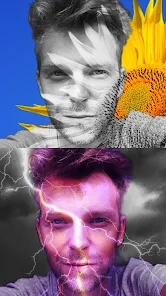
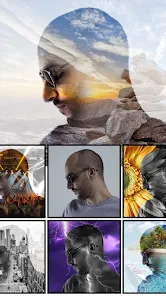
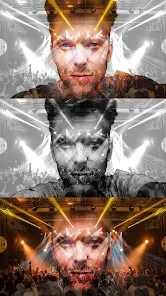
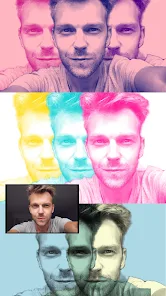
Photo Blender: Picture Mixer is a creative photo editing app that lets you blend two images together to make unique double exposure effects and collages. It's a fun tool for anyone who wants to experiment with their photos without needing professional skills. The app first launched a few years back and is available for download on the Google Play Store. It's racked up millions of installs, which shows how popular it is. You can get the app for free, and you don't even need to register an account to start using it right away. That's super convenient. Inside the app, you might see some ads, and there are optional in-app purchases if you want to unlock extra features or remove the ads.
Using the app is pretty straightforward. You just pick your two photos, and the app does a lot of the blending work for you. A good tip is to start with photos that have clear subjects and contrasting backgrounds; it makes the blending effect look much cooler. You can adjust the transparency, change the blend mode, and add filters to get the exact look you want. I like to play around with the different settings until the picture looks just right. It's more about experimenting than following strict rules.
I've tried a few other photo blending apps from the Google Play Store, like Photo Blender & Mix Editor or Double Exposure. While they do similar things, I keep coming back to Photo Blender: Picture Mixer. The main reason is its simplicity. Some other apps feel cluttered with too many buttons, but this one has a cleaner layout that's easier to navigate. The blending results often look more natural here, too. For quick, creative edits on my phone, this app just gets the job done without any fuss.
Key Functional Highlights
- 🎨 Intuitive Blending Controls: The core feature is its simple slider and mode selector for blending two pictures. It's much more direct than similar apps where you have to dig through menus to find basic tools.
- 📱 Lightweight and Fast: The app installs quickly and doesn't take up much space. Compared to a heavier app like PicsArt, which has blending as just one feature among many, this app launches and processes blends faster for this specific task.
- ✨ One-Tap Styles and Filters: It offers a collection of pre-set blend styles and filters. This is a standout feature because you can achieve complex double exposure looks instantly, whereas in other apps, you might have to manually layer several effects.
- 🔗 Easy Social Sharing: Once your blend is done, sharing it to Instagram or other platforms is integrated seamlessly within the app, which is smoother than the export process in some competing editors.
Advantages & Benefits
- 👍 User-Friendly Interface: The layout is cleaner and less intimidating than apps like 'Photo Blender - Mix Pic Editor'. New users can figure it out immediately.
- 👍 Quality of Blends: The blending algorithms often produce more artistic and less 'choppy' results compared to some other free blend apps on Google Play.
- 👍 Truly Free to Start: You can download, install, and create several blends without paying, unlike some apps that lock basic features behind a paywall immediately.
Areas for Improvement
- 👎 Ad Interruptions: The free version has frequent video ads, which can be more intrusive than the banner ads found in apps like 'Double Exposure Photo Editor'.
- 👎 Limited Advanced Tools: If you want fine-tuned control over masks or layers, this app lacks those pro features that something like 'Superimpose' offers.
- 👎 Occasional Crashes: With very high-resolution photos, the app can sometimes freeze or close, which is a stability issue I haven't faced as often with other established editing apps.
Recommended Apps
![]()
ZEPETO: Avatar, Connect & Play
Naver Z Corporation4.3
![]()
Reverse Voice: Flip Singing
NindaFuit0![]()
AI Chat Ask Assistant - NowAI
Now Tech4.3![]()
Lie Detector Test: Prank App
DkTech inc.4.3![]()
Peachy - AI Face & Body Editor
InShot Video Editor4.8
![]()
AI Video Art Creator - Livensa
FERASET4.5![]()
Google Voice
Google LLC4.3![]()
Horoscopes & Tarot
Astrolis Horoscopes4.7![]()
eBay online shopping & selling
eBay Mobile4.6![]()
JPay
Jpay Mobile4.1![]()
Stranger Things 5 Challenges
MVH Entertainment Team5![]()
Chat Master: Prank Story
ABI Game Studio4.8![]()
Google Maps
Google LLC4.2![]()
AI Chat・Ask Chatbot Assistant
AI Chat Studio4.5![]()
Name Meanings with Impact
Alif Innovative Solution3.7















You May Like
-
![]()
True Tarot Card Reading
KaApps4.2 -
![]()
LinkedIn: Jobs & Business News
LinkedIn4.2 -
![]()
iControl: Easy Widgets Themes
Fancy keyboard for theme apps4.6 -
![]()
Duolingo: Language & Chess
Duolingo4.7 -
![]()
Flipped:Chat with AI Character
First Group pte ltd4.1 -
![]()
Hearing Age
Mobile Solutions Tech0 -
![]()
TikTok
TikTok Pte. Ltd.4.4 -
![]()
Pretty Makeup - Beauty Camera
Photo Editor Perfect Corp.4.4 -
![]()
PhotoRoom AI Photo Editor
PhotoRoom Background Editor App4.7 -
![]()
Lightleap by Lightricks
Lightricks Ltd.4.3 -
![]()
Name Meaning
Dexati4.1 -
![]()
Truth Social
T Media Tech LLC3.3 -
![]()
Ace Hardware
Ace Hardware Corporation4.7 -
![]()
Kpop Fans Demon Hunter Wallpap
JHNStudio4.3 -
![]()
Artplay - AI Photo & Video
Hideaway Technology Limited4.5











































