

Google Gemini
Google LLC
Installs
100M+
Developer
Google LLC
-
Category
Generative AI
-
Content Rating
Teen
Developer Email
Privacy Policy
https://support.google.com/bard/answer/13594961
Screenshots

Expert Review
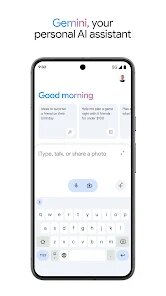
Google Gemini is Google's official AI assistant app, available for free download on the Google Play Store. It's designed to be a central hub for interacting with Google's latest AI models, helping you with everything from drafting emails and brainstorming ideas to analyzing images and having natural conversations. The app is free to use and doesn't contain traditional ads, though it's part of Google's ecosystem and integrates with their other services. It's a direct evolution of the older Google Assistant, aiming for a more capable and conversational experience powered by advanced language models.
In practice, you interact with Gemini primarily through text or voice, much like chatting with a very knowledgeable friend. You can ask it to summarize a long article you're reading, generate a packing list for a trip, or even help you write a social media post in a specific tone. One of its most practical uses for me has been getting quick explanations on complex topics or asking for step-by-step instructions for tasks like troubleshooting a gadget. It feels less like a simple search tool and more like a collaborative partner for thinking and planning.
Compared to other AI assistants, Gemini's biggest difference is its deep integration with Google's own products, like Gmail, Docs, and Maps. For instance, you can ask it to find details from your upcoming flights in Gmail or get directions without switching apps. Other standalone chatbots might be more creative in some areas, but Gemini shines when you're already embedded in Google's world. From my experience, it feels more utilitarian and focused on productivity within that ecosystem, whereas some competitors might prioritize more open-ended, creative exploration.
Key Functional Highlights
- The integration with Google services is its standout feature. You can say, "Find my reservation for next Thursday's dinner" and it will scan your Gmail to pull up the confirmation. This makes it feel less like a separate app and more like a smart layer over your existing digital life, which is incredibly convenient for managing daily tasks.
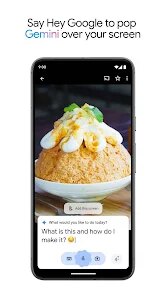
- Its ability to understand and work with images is notably strong. You can take a picture of a plant and ask what it is, or upload a screenshot of a complex graph and ask for a plain-English summary. In my use, the accuracy here feels more reliable than some other free AI tools that offer similar visual analysis features.
- The conversational memory is good within a single chat session. It can remember the context of what you were discussing a few messages back, which makes refining ideas or asking follow-up questions much smoother compared to older, more stateless assistants that treated each query as brand new.
- One thing I noticed is that its tone is generally helpful and informative, but can sometimes default to a slightly cautious or corporate phrasing, especially on open-ended creative tasks. In comparison, some other AI models might offer responses that feel a bit more varied or playful in their language.
Advantages & Benefits
- Having a capable AI assistant that works seamlessly with my Gmail and Calendar is a major time-saver for planning.
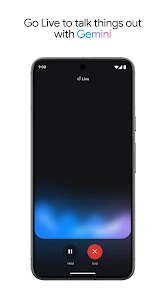
- The voice interaction is fast and the speech recognition is very accurate, making it easy to use hands-free.
- Getting instant summaries of web pages or documents directly within a chat feels efficient and cuts down on reading time.
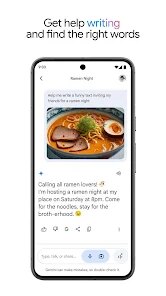
- It's genuinely useful for overcoming writer's block or quickly structuring ideas for emails and simple documents.
Areas for Improvement
- It still occasionally provides outdated or incorrect information with high confidence, requiring you to double-check important facts.
- The free version has usage limits during peak times, which can interrupt longer work sessions.
- Some advanced features, like more extended conversations or deeper analysis, are reserved for the paid Gemini Advanced tier.
- From my experience, it can be less adept at highly creative or stylistic writing tasks compared to some specialized tools.
Recommended Apps
![]()
ZEPETO: Avatar, Connect & Play
Naver Z Corporation4.3
![]()
Reverse Voice: Flip Singing
NindaFuit0![]()
AI Chat Ask Assistant - NowAI
Now Tech4.3![]()
Lie Detector Test: Prank App
DkTech inc.4.3![]()
Peachy - AI Face & Body Editor
InShot Video Editor4.8
![]()
AI Video Art Creator - Livensa
FERASET4.5![]()
Google Voice
Google LLC4.3![]()
Horoscopes & Tarot
Astrolis Horoscopes4.7![]()
eBay online shopping & selling
eBay Mobile4.6![]()
JPay
Jpay Mobile4.1![]()
Stranger Things 5 Challenges
MVH Entertainment Team5![]()
Chat Master: Prank Story
ABI Game Studio4.8![]()
Google Maps
Google LLC4.2![]()
AI Chat・Ask Chatbot Assistant
AI Chat Studio4.5![]()
Name Meanings with Impact
Alif Innovative Solution3.7















You May Like
-
![]()
True Tarot Card Reading
KaApps4.2 -
![]()
LinkedIn: Jobs & Business News
LinkedIn4.2 -
![]()
iControl: Easy Widgets Themes
Fancy keyboard for theme apps4.6 -
![]()
Duolingo: Language & Chess
Duolingo4.7 -
![]()
Flipped:Chat with AI Character
First Group pte ltd4.1 -
![]()
Hearing Age
Mobile Solutions Tech0 -
![]()
TikTok
TikTok Pte. Ltd.4.4 -
![]()
Pretty Makeup - Beauty Camera
Photo Editor Perfect Corp.4.4 -
![]()
PhotoRoom AI Photo Editor
PhotoRoom Background Editor App4.7 -
![]()
Lightleap by Lightricks
Lightricks Ltd.4.3 -
![]()
Name Meaning
Dexati4.1 -
![]()
Truth Social
T Media Tech LLC3.3 -
![]()
Ace Hardware
Ace Hardware Corporation4.7 -
![]()
Kpop Fans Demon Hunter Wallpap
JHNStudio4.3 -
![]()
Artplay - AI Photo & Video
Hideaway Technology Limited4.5











































