

Lightleap by Lightricks
Lightricks Ltd.
Installs
10M+
Developer
Lightricks Ltd.
-
Category
Video Players & Editors
-
Content Rating
Rated for 3+
Developer Email
Privacy Policy
https://static.lightricks.com/legal/privacy-policy.html
Screenshots
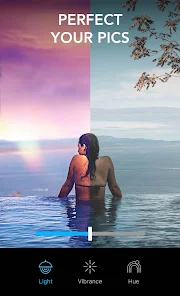

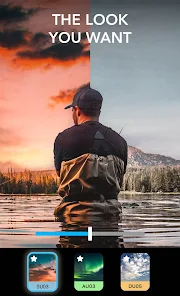
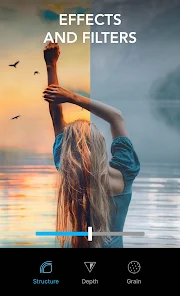
Expert Review
I've been using Lightleap by Lightricks for a while now, and it's become my go-to app for photo editing. Basically, it's a powerful photo editor that focuses on giving you amazing lighting effects and color adjustments with just a few taps. The app first launched a few years back, and you can easily download it from the Google Play Store or the App Store. It's got millions of installs, which tells you it's pretty popular. The best part? You can install the app for free and start using it right away without needing to register an account. Of course, there are in-app purchases to unlock more advanced features, and you might see some ads in the free version, but the core tools are solid.
Using Lightleap is super intuitive. I usually just open a photo from my gallery, and the app suggests different lighting filters instantly. My tip is to play with the 'Sky' replacement tool first—it can completely transform a dull outdoor shot. You can also fine-tune colors and shadows manually if you want more control. I find that stacking a couple of subtle effects often gives a more natural, professional look than going all-in on one dramatic filter.
When I was looking for a good photo editor, I tried a few others like Snapseed and VSCO. They're great, but I kept coming back to Lightleap. For me, the main reason is how specialized it is. While other apps try to do everything, Lightleap really masters the art of manipulating light and atmosphere. It feels less like a generic editor and more like a creative tool specifically for making your photos glow. The results just look more polished and unique compared to what I could achieve with the more general editing apps.
Key Functional Highlights
- ✨ AI Sky Replacement: This is the app's standout feature. With one tap, you can replace a bland or overcast sky in your photo with a stunning sunset, dramatic storm clouds, or a starry night. The AI blends it so well it often looks completely natural.
- ✨ Advanced Lighting Controls: Unlike many apps that just offer filters, Lightleap gives you precise sliders for things like 'Golden Hour' glow, 'Sunshine' intensity, and 'Haze' effects. You can place and adjust virtual light sources, which is something you rarely see outside of desktop software.
- ✨ Portrait-Specific Tools: It has smart features for portraits, like automatically detecting faces and allowing you to add studio-quality catchlights to the eyes or apply a soft, diffused glow to the skin. This makes it much more powerful for people photos compared to a basic editor.
Advantages & Benefits
- 👍 Specialization Over Generalization: Compared to Adobe Lightroom (which is fantastic for raw editing), Lightleap wins for pure creative lighting effects. It's faster for achieving a specific, beautiful mood.
- 👍 Ease of 'Wow' Factor: Against an app like PicsArt, Lightleap's effects are more sophisticated and less 'over-filtered'. It's easier to get a professionally stunning result without looking tacky.
- 👍 Innovative Tools: Features like the relighting AI are genuinely unique. You won't find the same level of intelligent sky and light manipulation in standard free editors like Google Photos.
Areas for Improvement
- 👎 Subscription Model: To access the best features, you need a subscription. An app like Snapseed is completely free with no strings attached, which makes Lightleap feel more restrictive for casual users.
- 👎 Can Be Overpowering: The effects are so strong that it's easy to overdo it. An app like VSCO encourages more subtle, film-like edits, whereas Lightleap's style can lead to unrealistic photos if you're not careful.
- 👎 Limited 'Non-Glam' Editing: If you just want to straighten, crop, and adjust basics, it's slower than a simpler app. It's not the best choice for quick, utilitarian photo fixes.
Recommended Apps
![]()
ZEPETO: Avatar, Connect & Play
Naver Z Corporation4.3
![]()
Reverse Voice: Flip Singing
NindaFuit0![]()
AI Chat Ask Assistant - NowAI
Now Tech4.3![]()
Lie Detector Test: Prank App
DkTech inc.4.3![]()
Peachy - AI Face & Body Editor
InShot Video Editor4.8
![]()
AI Video Art Creator - Livensa
FERASET4.5![]()
Google Voice
Google LLC4.3![]()
Horoscopes & Tarot
Astrolis Horoscopes4.7![]()
eBay online shopping & selling
eBay Mobile4.6![]()
JPay
Jpay Mobile4.1![]()
Stranger Things 5 Challenges
MVH Entertainment Team5![]()
Chat Master: Prank Story
ABI Game Studio4.8![]()
Google Maps
Google LLC4.2![]()
AI Chat・Ask Chatbot Assistant
AI Chat Studio4.5![]()
Name Meanings with Impact
Alif Innovative Solution3.7















You May Like
-
![]()
True Tarot Card Reading
KaApps4.2 -
![]()
LinkedIn: Jobs & Business News
LinkedIn4.2 -
![]()
iControl: Easy Widgets Themes
Fancy keyboard for theme apps4.6 -
![]()
Duolingo: Language & Chess
Duolingo4.7 -
![]()
Flipped:Chat with AI Character
First Group pte ltd4.1 -
![]()
Hearing Age
Mobile Solutions Tech0 -
![]()
TikTok
TikTok Pte. Ltd.4.4 -
![]()
Pretty Makeup - Beauty Camera
Photo Editor Perfect Corp.4.4 -
![]()
PhotoRoom AI Photo Editor
PhotoRoom Background Editor App4.7 -
![]()
Lightleap by Lightricks
Lightricks Ltd.4.3 -
![]()
Name Meaning
Dexati4.1 -
![]()
Truth Social
T Media Tech LLC3.3 -
![]()
Ace Hardware
Ace Hardware Corporation4.7 -
![]()
Kpop Fans Demon Hunter Wallpap
JHNStudio4.3 -
![]()
Artplay - AI Photo & Video
Hideaway Technology Limited4.5










































