

CapCut - Video Editor
Bytedance Pte. Ltd.
Installs
1B+
Developer
Bytedance Pte. Ltd.
-
Category
Video Players & Editors
-
Content Rating
Teen
Developer Email
Privacy Policy
https://sf16-draftcdn-sg.ibytedtos.com/obj/ies-hotsoon-draft-sg/capcut/via_clause_privacy_policy_en.html
Screenshots
Expert Review
CapCut is a free video editing app developed by Bytedance, the company behind TikTok. You can find and download it from the Google Play Store or the Apple App Store. It's designed to be a straightforward tool for creating and editing videos, from simple clips for social media to more polished projects. The app is completely free to download and use, with no watermarks on your exports. While the core features are free, there is a "Pro" section that offers premium effects, filters, and music for a subscription, and the app does show ads for these upgrades within the interface.
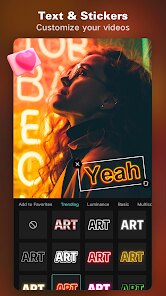
In practice, using CapCut feels intuitive. You start a new project, import your clips and photos, and then work on a timeline where you can trim, split, and rearrange footage. The interface is clean, with editing tools like speed adjustment, reverse playback, and keyframe animation easily accessible. From my experience, adding text, stickers, and transitions is a smooth process, often just a couple of taps away. The app also includes a robust library of trending music and sound effects, which it syncs well with for automatic beat-matching, making it easy to create videos that feel current.
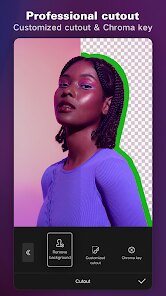
Compared to other popular mobile editors like InShot or Adobe Premiere Rush, CapCut stands out for its deep integration of trendy, social-media-ready features. While InShot is also very user-friendly, CapCut often has more advanced tools, like the curve speed adjustment and chroma key (green screen), readily available for free. Adobe Rush offers superior color grading and cloud syncing for professional workflows, but feels more complex. Overall, CapCut strikes a balance, offering powerful features in a package that remains accessible for quick, everyday editing, which is why I tend to reach for it first for most social media clips.
Key Functional Highlights
- The editing timeline is powerful yet manageable. It allows for precise cutting and layering of video, audio, and text tracks. One thing I noticed is how smoothly you can pinch to zoom on the timeline for finer control, which makes detailed edits less frustrating than in some simpler apps.
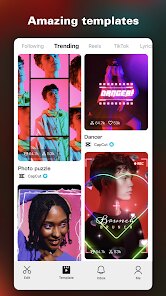
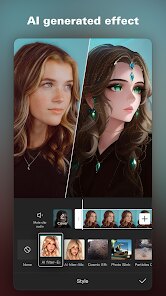
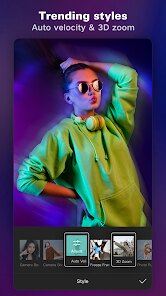
- Its library of effects is massive and constantly updated. Beyond basic filters, it offers trendy visual effects like glitches, transitions, and overlays that are popular on platforms like TikTok and Instagram Reels. This saves a lot of time searching for assets elsewhere.
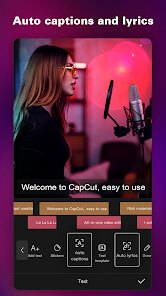
- The auto-captions feature is a major time-saver. It can generate subtitles from speech in the video surprisingly accurately and allows for easy styling and timing adjustments. Compared to doing this manually in another app, it's a huge convenience.
- Performance is generally reliable. Rendering and exporting videos is fast, even for longer projects. While very complex projects with many layers can sometimes cause a slight lag, for most edits, the app runs smoothly without crashing.
Advantages & Benefits
- Exporting videos without any watermark or branding is a significant advantage for a free app.
- The sheer volume of free music, sound effects, and templates means you rarely have to look outside the app for assets.
- Features like beat sync and auto-captions automate tedious tasks, making the editing process much quicker.
- The interface is logically organized, so even new features are usually easy to find without a tutorial.
Areas for Improvement
- The in-app ads promoting the "Pro" features can be intrusive, sometimes popping up when you're selecting a filter or template.
- Some of the most appealing visual effects and fonts are locked behind the Pro subscription, which can feel limiting.
- While auto-captions are great, the accuracy can vary with background noise or strong accents, requiring manual corrections.
- Projects are saved locally by default; without a clear cloud backup option, there's a risk of losing work if you change devices or uninstall the app.
Recommended Apps
![]()
ZEPETO: Avatar, Connect & Play
Naver Z Corporation4.3
![]()
Reverse Voice: Flip Singing
NindaFuit0![]()
AI Chat Ask Assistant - NowAI
Now Tech4.3![]()
Lie Detector Test: Prank App
DkTech inc.4.3![]()
Peachy - AI Face & Body Editor
InShot Video Editor4.8
![]()
AI Video Art Creator - Livensa
FERASET4.5![]()
Google Voice
Google LLC4.3![]()
Horoscopes & Tarot
Astrolis Horoscopes4.7![]()
eBay online shopping & selling
eBay Mobile4.6![]()
JPay
Jpay Mobile4.1![]()
Stranger Things 5 Challenges
MVH Entertainment Team5![]()
Chat Master: Prank Story
ABI Game Studio4.8![]()
Google Maps
Google LLC4.2![]()
AI Chat・Ask Chatbot Assistant
AI Chat Studio4.5![]()
Name Meanings with Impact
Alif Innovative Solution3.7















You May Like
-
![]()
True Tarot Card Reading
KaApps4.2 -
![]()
LinkedIn: Jobs & Business News
LinkedIn4.2 -
![]()
iControl: Easy Widgets Themes
Fancy keyboard for theme apps4.6 -
![]()
Duolingo: Language & Chess
Duolingo4.7 -
![]()
Flipped:Chat with AI Character
First Group pte ltd4.1 -
![]()
Hearing Age
Mobile Solutions Tech0 -
![]()
TikTok
TikTok Pte. Ltd.4.4 -
![]()
Pretty Makeup - Beauty Camera
Photo Editor Perfect Corp.4.4 -
![]()
PhotoRoom AI Photo Editor
PhotoRoom Background Editor App4.7 -
![]()
Lightleap by Lightricks
Lightricks Ltd.4.3 -
![]()
Name Meaning
Dexati4.1 -
![]()
Truth Social
T Media Tech LLC3.3 -
![]()
Ace Hardware
Ace Hardware Corporation4.7 -
![]()
Kpop Fans Demon Hunter Wallpap
JHNStudio4.3 -
![]()
Artplay - AI Photo & Video
Hideaway Technology Limited4.5












































