

Microsoft Teams
Microsoft Corporation
Installs
100,000,000+
Developer
Microsoft Corporation
-
Category
Business
-
Content Rating
Rated for 3+
Developer Email
Privacy Policy
https://aka.ms/privacy
Screenshots

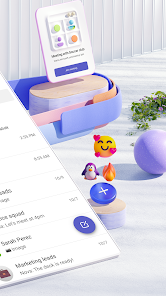

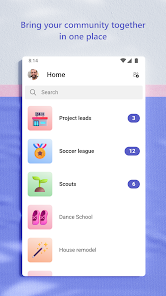
Expert Review
Microsoft Teams is a collaboration app that helps people work together, whether they're in the same office or spread across the globe. It's designed for chatting, video meetings, file sharing, and managing projects all in one place. The app first launched back in 2017 and has become a central hub for many workplaces and schools. You can download it for free from the Google Play Store or the App Store, and it has been installed by hundreds of millions of users. While the core app is free to download and use, you typically need an account from your work or school to sign in. There are also paid plans for businesses that unlock more features, like longer meeting times and more storage. You might see some promotional messages for Microsoft's other services, but generally, the app itself isn't cluttered with disruptive ads.
Using the app is pretty straightforward. Once you're signed in with your organization's account, you'll see your teams and channels. I use it daily for quick chats with colleagues instead of long email chains, and for jumping into video calls with a single click. A handy tip is to use the '@' mention feature to get someone's attention in a busy channel. You can also pin important files or conversations to the top of a channel so they're easy to find later. For larger meetings, it's good to know how to mute your microphone and turn off your video to reduce background noise.
Compared to other apps in the collaboration genre, like Slack or Google Chat, I find myself using Microsoft Teams more because it's already integrated with the rest of the Microsoft 365 tools my company uses, like Word and Outlook. The transition between writing an email and starting a Teams chat feels seamless. While Slack might have a slight edge with its vast number of third-party app integrations, Teams feels more like a complete, unified workspace right out of the box, especially for organizations deeply invested in the Microsoft ecosystem. The decision to install this particular app often comes down to what your workplace or school has standardized on.
Key Functional Highlights
- 🔗 Deep Office 365 Integration: The app isn't just a standalone tool; it's woven directly into the Microsoft 365 suite. You can co-edit Word, Excel, or PowerPoint files in real-time during a meeting without ever leaving the Teams window, which is a huge productivity boost compared to switching between apps.
- 📞 All-in-One Meeting Hub: Beyond basic video calls, this app bundles meeting features like together mode (which places everyone in a shared digital background), live captions, background blur, and direct recording to OneDrive or Stream. It consolidates what you might need separate apps for elsewhere.
- 🗂️ Structured Collaboration with Channels: The organization into Teams and Channels provides clear structure for projects. Unlike a single chaotic group chat, you can have dedicated channels for specific topics, with their own files, tabs, and connectors, keeping discussions focused and files easy to locate.
- 🤖 Built-in Workflow Bots & Apps: The app includes useful bots like the Who bot to find people and their skills, and a Praise bot for recognizing colleagues. You can also add Planner for task management or a SharePoint site as a tab, turning a chat channel into a mini-project dashboard.
Advantages & Benefits
- ✅ Unified Communication Platform: It effectively replaces the need for a separate instant messenger, video conferencing app, and file-sharing service. Compared to using Zoom for meetings and Slack for chat, having everything in one app like Teams simplifies the workflow.
- ✅ Enterprise-Grade Security & Compliance: Being a Microsoft product, it meets rigorous security standards that many businesses require. This level of built-in data governance and compliance is often more robust out-of-the-box than what's found in apps like Discord or even some configurations of Slack.
- ✅ Seamless Calendar & Email Sync: The integration with Outlook is exceptional. Meetings scheduled in Outlook automatically appear in Teams, and you can join them with one click. This tight coupling is a significant advantage over other collaboration apps that require extra plugins or manual updates.
Areas for Improvement
- ⚠️ Can Be Resource-Intensive: The app is known to consume a significant amount of memory and CPU, especially during video calls, which can slow down older computers. Lighter apps like Google Meet or even the web version of Teams sometimes perform better on less powerful hardware.
- ⚠️ Steeper Learning Curve for New Users: With so many features and tabs, the interface can feel overwhelming initially. New users might find simpler apps like Slack or WhatsApp for Business easier to navigate when they just need basic chat and call functions.
- ⚠️ Notification Management Can Be Tricky: With multiple active teams and channels, notifications can quickly become noisy. Fine-tuning them for each channel is necessary but can be a bit cumbersome compared to the more straightforward notification settings in some competing apps.
Recommended Apps
![]()
ZEPETO: Avatar, Connect & Play
Naver Z Corporation4.3
![]()
Reverse Voice: Flip Singing
NindaFuit0![]()
AI Chat Ask Assistant - NowAI
Now Tech4.3![]()
Lie Detector Test: Prank App
DkTech inc.4.3![]()
Peachy - AI Face & Body Editor
InShot Video Editor4.8
![]()
AI Video Art Creator - Livensa
FERASET4.5![]()
Google Voice
Google LLC4.3![]()
Horoscopes & Tarot
Astrolis Horoscopes4.7![]()
eBay online shopping & selling
eBay Mobile4.6![]()
JPay
Jpay Mobile4.1![]()
Stranger Things 5 Challenges
MVH Entertainment Team5![]()
Chat Master: Prank Story
ABI Game Studio4.8![]()
Google Maps
Google LLC4.2![]()
AI Chat・Ask Chatbot Assistant
AI Chat Studio4.5![]()
Name Meanings with Impact
Alif Innovative Solution3.7















You May Like
-
![]()
True Tarot Card Reading
KaApps4.2 -
![]()
LinkedIn: Jobs & Business News
LinkedIn4.2 -
![]()
iControl: Easy Widgets Themes
Fancy keyboard for theme apps4.6 -
![]()
Duolingo: Language & Chess
Duolingo4.7 -
![]()
Flipped:Chat with AI Character
First Group pte ltd4.1 -
![]()
Hearing Age
Mobile Solutions Tech0 -
![]()
TikTok
TikTok Pte. Ltd.4.4 -
![]()
Pretty Makeup - Beauty Camera
Photo Editor Perfect Corp.4.4 -
![]()
PhotoRoom AI Photo Editor
PhotoRoom Background Editor App4.7 -
![]()
Lightleap by Lightricks
Lightricks Ltd.4.3 -
![]()
Name Meaning
Dexati4.1 -
![]()
Truth Social
T Media Tech LLC3.3 -
![]()
Ace Hardware
Ace Hardware Corporation4.7 -
![]()
Kpop Fans Demon Hunter Wallpap
JHNStudio4.3 -
![]()
Artplay - AI Photo & Video
Hideaway Technology Limited4.5










































