

Google Chrome: Fast & Secure
Google LLC
Installs
10,000,000,000+
Developer
Google LLC
-
Category
Social
-
Content Rating
Rated for 3+
Developer Email
Privacy Policy
http://www.google.com/chrome/intl/en/privacy.html
Screenshots
Expert Review
Google Chrome is my go-to web browser on both my phone and computer. It's basically the app I use to access the internet for everything – searching, reading news, watching videos, or checking social media. Google first launched the Chrome browser for computers way back in 2008, and the mobile app followed later. You can easily download it for free from the Google Play Store for Android devices or the App Store for iPhones. It has billions of installs, which shows how popular it is. You don't need to register an account just to install and start using the app, but signing in with your Google account lets you sync your bookmarks and history across all your devices. The app itself is free, and while it doesn't have traditional in-app purchases, it does show ads on the websites you visit, not within the browser interface itself.
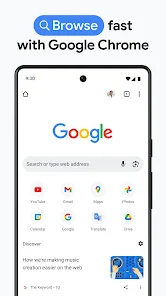
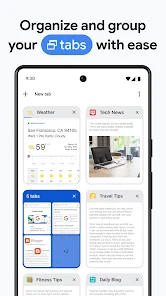
Using Chrome is pretty straightforward. I just tap the icon, type what I'm looking for in the address bar, and I'm off. A handy tip I use all the time is opening new tabs for different tasks – I might have one for work research and another for shopping. You can also group tabs together to stay organized. Another great feature is Incognito Mode, which I use when I don't want my browsing history saved, like when looking for a gift surprise. Remembering to update the app regularly from the store is a good habit, as it often brings speed improvements and important security fixes.
I've tried other browsers like Firefox and Samsung Internet, but I always come back to Chrome. The main reason is how seamlessly it works with my other Google stuff, like Gmail and Drive. If I find an article on my phone, I can send it to my laptop with one click and pick up reading right where I left off. Some other apps might claim to be more private or have unique features, but for me, Chrome's simplicity, speed, and deep integration with the services I already use daily make it the easiest choice. It just works without me having to think about it too much.
Key Functional Highlights
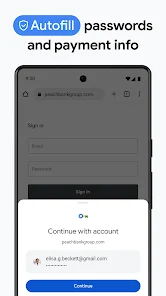
- 🔗 Seamless Sync Across Devices: This is Chrome's killer feature for me. Once I sign in, all my bookmarks, open tabs, passwords, and even my browsing history are available on my phone, tablet, and laptop. I can start researching something on my computer during the day and continue reading the same articles on my phone later that evening without any hassle.
- 🔍 The Omnibox is a Powerhouse: The address bar (they call it the Omnibox) does so much more than just take web addresses. I can type a math problem, a unit conversion, or a quick fact, and it often gives me the answer right there without loading a full search results page. It's like having a super-fast assistant built into the app.
- 📚 Vast Library of Extensions: Compared to many mobile browsers, Chrome's access to extensions through the Chrome Web Store on desktop is a huge advantage. While the mobile app itself is streamlined, the ability to customize the desktop version with ad-blockers, password managers, and productivity tools that sync back to my account enhances the whole ecosystem.
- 🚀 Reliable Speed and Rendering: Pages just load fast and look right. I rarely run into websites that don't display properly in Chrome. Compared to some other browsers I've tested, it consistently feels snappier when opening new tabs and scrolling through content-heavy sites.
Advantages & Benefits
- ✅ Unbeaten Ecosystem Integration: If you live in the Google world (Gmail, Docs, YouTube), Chrome feels like a native part of it. The handoff between services is smoother than with browsers like Firefox or Microsoft Edge.
- ✅ Sheer Ubiquity and Compatibility: Because it's the most used browser, developers often test their websites on Chrome first. This means I almost never encounter "best viewed in Chrome" issues that can pop up with less common browsers.
- ✅ Minimalist and Intuitive Design: The interface is clean and gets out of the way. It's easier for me to navigate than something like Opera, which can feel a bit cluttered with its built-in sidebar features.
Areas for Improvement
- ⚠️ Known Memory Hog on Desktop: While the mobile app is generally efficient, the desktop version of Chrome is famous for using a lot of RAM, especially with many tabs open. Apps like Firefox have made strides in being more memory-friendly.
- ⚠️ Privacy Concerns for Some Users: As a Google product, Chrome is tied to Google's data collection practices. For users extremely focused on privacy, browsers like Brave or Firefox Focus are built from the ground up with a stronger privacy-first stance.
- ⚠️ Limited Customization on Mobile: The mobile app is quite streamlined, which is good for simplicity but means you can't change as much about its look and behavior as you can with something like Kiwi Browser or Firefox for Android.
Recommended Apps
![]()
ZEPETO: Avatar, Connect & Play
Naver Z Corporation4.3
![]()
Reverse Voice: Flip Singing
NindaFuit0![]()
AI Chat Ask Assistant - NowAI
Now Tech4.3![]()
Lie Detector Test: Prank App
DkTech inc.4.3![]()
Peachy - AI Face & Body Editor
InShot Video Editor4.8
![]()
AI Video Art Creator - Livensa
FERASET4.5![]()
Google Voice
Google LLC4.3![]()
Horoscopes & Tarot
Astrolis Horoscopes4.7![]()
eBay online shopping & selling
eBay Mobile4.6![]()
JPay
Jpay Mobile4.1![]()
Stranger Things 5 Challenges
MVH Entertainment Team5![]()
Chat Master: Prank Story
ABI Game Studio4.8![]()
Google Maps
Google LLC4.2![]()
AI Chat・Ask Chatbot Assistant
AI Chat Studio4.5![]()
Name Meanings with Impact
Alif Innovative Solution3.7















You May Like
-
![]()
True Tarot Card Reading
KaApps4.2 -
![]()
LinkedIn: Jobs & Business News
LinkedIn4.2 -
![]()
iControl: Easy Widgets Themes
Fancy keyboard for theme apps4.6 -
![]()
Duolingo: Language & Chess
Duolingo4.7 -
![]()
Flipped:Chat with AI Character
First Group pte ltd4.1 -
![]()
Hearing Age
Mobile Solutions Tech0 -
![]()
TikTok
TikTok Pte. Ltd.4.4 -
![]()
Pretty Makeup - Beauty Camera
Photo Editor Perfect Corp.4.4 -
![]()
PhotoRoom AI Photo Editor
PhotoRoom Background Editor App4.7 -
![]()
Lightleap by Lightricks
Lightricks Ltd.4.3 -
![]()
Name Meaning
Dexati4.1 -
![]()
Truth Social
T Media Tech LLC3.3 -
![]()
Ace Hardware
Ace Hardware Corporation4.7 -
![]()
Kpop Fans Demon Hunter Wallpap
JHNStudio4.3 -
![]()
Artplay - AI Photo & Video
Hideaway Technology Limited4.5











































