

YouTube
Google LLC
Installs
10,000,000,000+
Developer
Google LLC
-
Category
Entertainment
-
Content Rating
Rated for 12+
Developer Email
Privacy Policy
http://www.google.com/policies/privacy
Screenshots
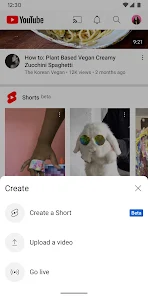


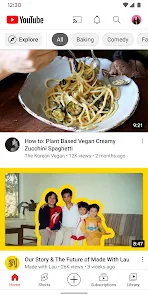
Expert Review
YouTube, developed by Google LLC, is the definitive video platform for watching, sharing, and discovering content. Available for free on both the Google Play Store and Apple's App Store, it's one of the most downloaded apps globally, with billions of installs. While the core app is free to use and supports itself with video ads, it also offers a premium subscription called YouTube Premium, which removes ads, enables background play, and provides access to YouTube Music.
In practice, using the YouTube app is straightforward. You open it to a personalized Home feed of recommended videos, which is a mix of channels you subscribe to and algorithmically suggested content. You can search for anything, from music videos and tutorials to live streams and documentaries. From my experience, the core actions—subscribing to channels, liking videos, and adding them to playlists—are intuitive. The app also handles video playback well, with standard controls for play, pause, and seeking, along with options for playback speed and quality settings.
Compared to other video services, YouTube's main difference is its sheer scale and the nature of its content. Platforms like Vimeo often focus on professional or artistic videos, while TikTok and Instagram Reels are built for short, vertical clips. YouTube sits in the middle, hosting everything from feature-length documentaries to quick, user-generated how-tos. One thing I've noticed is that YouTube's recommendation algorithm is particularly powerful for discovering niche interests, which can be both a strength and a way to lose track of time.
Key Functional Highlights
- The recommendation system on the Home and 'Up Next' sections is a central part of the experience. It learns from your watch history and tends to surface a diverse mix of content, from news to entertainment. While it generally works well for discovery, it can sometimes feel like it's stuck in a loop, suggesting very similar videos.
- Playback features are robust. You can adjust video quality to suit your connection, which is practical for mobile data. The ability to double-tap to skip forward or back 10 seconds is a small but frequently used convenience. Compared to some dedicated streaming apps, YouTube's player is reliable and rarely has issues with buffering on a stable connection.
- The subscription management system is simple. Your Subscriptions feed shows the latest uploads from channels you follow in chronological order, which is cleaner than the algorithm-driven Home page. However, it doesn't offer much in the way of organizing or categorizing your subscriptions, a feature some third-party apps have tried to address.
- Integration with the broader Google ecosystem is seamless. If you're signed into your Google account, your watch history, subscriptions, and playlists sync instantly across the mobile app, the website, and smart TV apps. This cross-device continuity is a significant advantage over more isolated platforms.
Advantages & Benefits
- Having access to an almost endless library of content for free is incredibly convenient for learning, entertainment, or just passing time.
- The search function is powerful and fast, making it easy to find very specific videos or tutorials.
- Background play with YouTube Premium (or by using the mobile website in desktop mode) is a game-changer for listening to podcasts, music, or long talks.
- The ability to create and share playlists for different moods or projects is simple and useful.
Areas for Improvement
- The ad experience in the free version can be disruptive, with unskippable ads sometimes appearing mid-video during key moments.
- While the recommendations are often good, they can occasionally feel repetitive or push content from a narrow set of popular creators.
- The mobile app interface can feel a bit cluttered at times, with multiple banners and prompts for trying Premium or other Google services.
- Video quality sometimes defaults to a lower resolution to save data, requiring manual adjustment each time if you want the best visual experience.
Recommended Apps
![]()
ZEPETO: Avatar, Connect & Play
Naver Z Corporation4.3
![]()
Reverse Voice: Flip Singing
NindaFuit0![]()
AI Chat Ask Assistant - NowAI
Now Tech4.3![]()
Lie Detector Test: Prank App
DkTech inc.4.3![]()
Peachy - AI Face & Body Editor
InShot Video Editor4.8
![]()
AI Video Art Creator - Livensa
FERASET4.5![]()
Google Voice
Google LLC4.3![]()
Horoscopes & Tarot
Astrolis Horoscopes4.7![]()
eBay online shopping & selling
eBay Mobile4.6![]()
JPay
Jpay Mobile4.1![]()
Stranger Things 5 Challenges
MVH Entertainment Team5![]()
Chat Master: Prank Story
ABI Game Studio4.8![]()
Google Maps
Google LLC4.2![]()
AI Chat・Ask Chatbot Assistant
AI Chat Studio4.5![]()
Name Meanings with Impact
Alif Innovative Solution3.7















You May Like
-
![]()
True Tarot Card Reading
KaApps4.2 -
![]()
LinkedIn: Jobs & Business News
LinkedIn4.2 -
![]()
iControl: Easy Widgets Themes
Fancy keyboard for theme apps4.6 -
![]()
Duolingo: Language & Chess
Duolingo4.7 -
![]()
Flipped:Chat with AI Character
First Group pte ltd4.1 -
![]()
Hearing Age
Mobile Solutions Tech0 -
![]()
TikTok
TikTok Pte. Ltd.4.4 -
![]()
Pretty Makeup - Beauty Camera
Photo Editor Perfect Corp.4.4 -
![]()
PhotoRoom AI Photo Editor
PhotoRoom Background Editor App4.7 -
![]()
Lightleap by Lightricks
Lightricks Ltd.4.3 -
![]()
Name Meaning
Dexati4.1 -
![]()
Truth Social
T Media Tech LLC3.3 -
![]()
Ace Hardware
Ace Hardware Corporation4.7 -
![]()
Kpop Fans Demon Hunter Wallpap
JHNStudio4.3 -
![]()
Artplay - AI Photo & Video
Hideaway Technology Limited4.5










































