

Geeni
Merkury Innovations
Installs
5,000,000+
Developer
Merkury Innovations
-
Category
Productivity
-
Content Rating
Rated for 3+
Developer Email
Privacy Policy
https://merkuryinnovations.com/privacy/
Screenshots
Expert Review
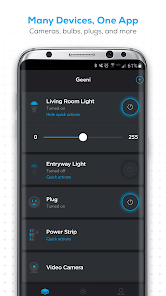
I've been using the Geeni app for my smart home gadgets for a while now. It's basically the control center for a bunch of different smart devices like plugs, bulbs, cameras, and strips from the Merkury Innovations brand. You download the app, set up your devices, and then you can turn things on or off, set schedules, or check your camera feeds all from your phone. I first got it a few years back when I picked up a smart plug on a whim. It's free to install from the Google Play Store or the App Store, and it has millions of downloads. You do need to create an account to use it, which is pretty standard. There are no annoying ads popping up while you're using it, which is a huge plus. I haven't needed to make any in-app purchases for extra features in my day-to-day use; everything core is included.
Using the Geeni app is pretty straightforward. After you install it and make an account, you add each device by following the steps—usually involving putting the device into pairing mode. My tip is to make sure your phone is connected to your 2.4GHz Wi-Fi network during setup, as most of these devices don't work with 5GHz. Once everything's connected, the main screen shows all your devices. I've found it super handy to group devices by room. For example, I have a 'Living Room' group with a smart bulb and a plug for the lamp. Then, with one tap, I can turn the whole room off when I'm heading to bed. Setting up schedules for lights to turn on at sunset or a plug to power a coffee maker in the morning is simple and works reliably.
When I was first looking into smart home apps, I also checked out options like the Kasa app from TP-Link and the Gosund app. A lot of them do similar things. I stuck with Geeni because the devices are often more affordable and easier to find in stores like Walmart, and the app just works without being overly complicated. For someone who isn't a tech expert and just wants basic, reliable control without a monthly fee, Geeni gets the job done. It might not have all the advanced automation features of something like SmartThings, but for controlling Merkury's own products, it's solid and user-friendly.
Key Functional Highlights
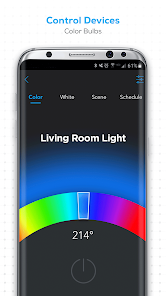
- 🔗 Wide Device Compatibility: The Geeni app works seamlessly with Merkury's entire ecosystem. Whether it's a simple smart plug, a color-changing light bulb, or an indoor security camera, you add and control them all from one place. This is cleaner than needing separate apps for different device types.
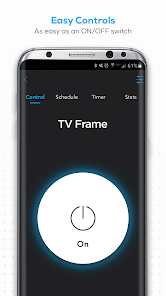
- ⏰ Simple Scheduling & Timers: Setting up routines is a breeze. You can easily create schedules to have lights turn on at dusk or a plug switch off after an hour. The interface for this is more intuitive than in some similar apps I've tried, like the Gosund app, where the timer settings felt a bit buried.
- 📹 Integrated Camera Viewing: If you have Geeni cameras, the live feed and recorded event clips appear right inside the main app. You don't need to jump to a separate camera application. This all-in-one approach is a standout feature compared to some ecosystems that split device controls.
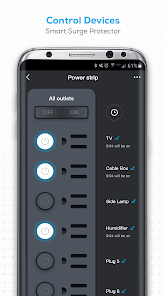
- 👥 Easy Sharing & Grouping: You can share device access with family members so everyone can control the lights. Grouping devices into rooms (like 'Bedroom' or 'Porch') is simple and lets you control multiple devices with a single command, which is perfect for setting scenes.
Advantages & Benefits
- ✅ Truly Free Core Features: Unlike some apps that gate basic functions behind a subscription, Geeni doesn't charge for remote access, scheduling, or live camera viewing. This beats apps like Wyze, which now require a subscription for certain video features.
- ✅ User-Friendly for Beginners: The setup process is very guided, with clear pictures and instructions. It's less daunting for first-time users compared to the more technical interface of something like the SmartLife app.
- ✅ Reliable Local Control: Once set up, basic commands like turning a plug on/off work quickly and reliably, as they don't always require an internet round-trip. This responsiveness is crucial for daily use.
Areas for Improvement
- ⚠️ Limited Third-Party Integration: The Geeni app primarily works with its own brand devices. It doesn't integrate with wider platforms like Google Home or Amazon Alexa natively within the app—you have to link it through those separate apps. This is more closed than an app like SmartThings.
- ⚠️ Basic Automation Options: While scheduling is great, the app lacks advanced 'if this, then that' automation rules found in platforms like IFTTT or the Tapo app. Your automation possibilities are somewhat limited.
- ⚠️ Device-Specific Quirks: Sometimes, a firmware update for a specific camera or bulb might temporarily cause issues in the app. Support and update notes aren't always as detailed as with bigger brands like Kasa.
Recommended Apps
![]()
ZEPETO: Avatar, Connect & Play
Naver Z Corporation4.3
![]()
Reverse Voice: Flip Singing
NindaFuit0![]()
AI Chat Ask Assistant - NowAI
Now Tech4.3![]()
Lie Detector Test: Prank App
DkTech inc.4.3![]()
Peachy - AI Face & Body Editor
InShot Video Editor4.8
![]()
AI Video Art Creator - Livensa
FERASET4.5![]()
Google Voice
Google LLC4.3![]()
Horoscopes & Tarot
Astrolis Horoscopes4.7![]()
eBay online shopping & selling
eBay Mobile4.6![]()
JPay
Jpay Mobile4.1![]()
Stranger Things 5 Challenges
MVH Entertainment Team5![]()
Chat Master: Prank Story
ABI Game Studio4.8![]()
Google Maps
Google LLC4.2![]()
AI Chat・Ask Chatbot Assistant
AI Chat Studio4.5![]()
Name Meanings with Impact
Alif Innovative Solution3.7















You May Like
-
![]()
True Tarot Card Reading
KaApps4.2 -
![]()
LinkedIn: Jobs & Business News
LinkedIn4.2 -
![]()
iControl: Easy Widgets Themes
Fancy keyboard for theme apps4.6 -
![]()
Duolingo: Language & Chess
Duolingo4.7 -
![]()
Flipped:Chat with AI Character
First Group pte ltd4.1 -
![]()
Hearing Age
Mobile Solutions Tech0 -
![]()
TikTok
TikTok Pte. Ltd.4.4 -
![]()
Pretty Makeup - Beauty Camera
Photo Editor Perfect Corp.4.4 -
![]()
PhotoRoom AI Photo Editor
PhotoRoom Background Editor App4.7 -
![]()
Lightleap by Lightricks
Lightricks Ltd.4.3 -
![]()
Name Meaning
Dexati4.1 -
![]()
Truth Social
T Media Tech LLC3.3 -
![]()
Ace Hardware
Ace Hardware Corporation4.7 -
![]()
Kpop Fans Demon Hunter Wallpap
JHNStudio4.3 -
![]()
Artplay - AI Photo & Video
Hideaway Technology Limited4.5










































