

Passport Parking
Passport Labs, Inc.
Installs
5M+
Developer
Passport Labs, Inc.
-
Category
Productivity
-
Content Rating
Everyone
Developer Email
Privacy Policy
https://passportinc.com/privacy-policy/
Screenshots
Expert Review
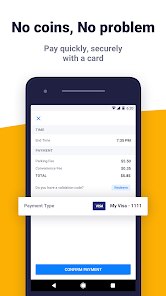
I've been using the Passport Parking app for a few years now, and it's become my go-to for paying for street and lot parking. It's a mobile payment app specifically for parking, and it's super handy. I first downloaded it from the Google Play Store back when my city started using it, and it's been available on both the App Store and Google Play for a while now. The app itself is free to download and install, and you don't need to register an account just to browse, but you do have to create one to actually pay for parking. There are no annoying in-app ads, which is a big plus, but you do pay a small convenience fee for each transaction, which is pretty standard for this genre of app.
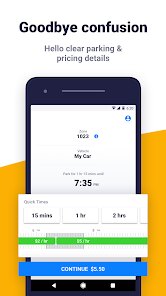
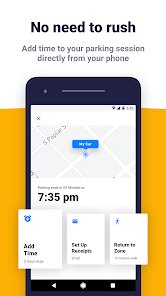
Using it is straightforward. You just open the app, enter the zone number posted on the meter or sign, select your vehicle and how long you want to park, and confirm the payment. My biggest tip is to make sure your location services are on when you first open it; sometimes it can automatically detect the zone you're in, which saves a step. Also, you can extend your parking session remotely before it expires, which has saved me from a ticket more than once when meetings ran long.
Compared to other parking apps like ParkMobile or PayByPhone, I stick with Passport Parking because it's the one my city and several others I frequently visit have officially partnered with. While other apps might have flashier interfaces, Passport Parking just works reliably. I don't have to wonder if it's accepted; if I see the Passport logo on the meter, I know the app will work. For me, that consistency and wide adoption in my area make it the better choice over other similar apps, even if some features are basic.
Key Functional Highlights
- 📍 Official City Integration: Many municipalities directly partner with Passport, making it the official payment method. This means guaranteed compatibility and often direct support from the city, which you don't always get with third-party apps.
- 🚗 Multi-City Use: Once you install the app and add your payment info, you can use it in any city that supports Passport Parking. It's incredibly convenient for travel without needing to download a new app for each location.
- ⏰ Remote Session Extension: A standout feature is the ability to add more time to your parking meter without having to go back to your car. This is a huge lifesaver and a feature not all competitors offer as seamlessly.
- 📱 Simple, No-Frills Interface: The app focuses on doing one job well: paying for parking. It's not cluttered with extras, making the process from download to payment very quick and intuitive.
Advantages & Benefits
- ✅ Reliability: It's consistently stable. I've rarely had a failed transaction, whereas with apps like ParkMobile, I've occasionally had hiccups.
- ✅ Wide Acceptance: It's supported in a ton of cities across the US, more than some other single apps cover on their own.
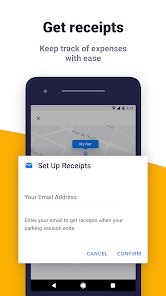
- ✅ Receipts & History: All transactions are logged in the app with digital receipts, making expense tracking for work or taxes much easier.
Areas for Improvement
- ⚠️ Convenience Fees: Each parking session includes a small fee (e.g., $0.35). Some competing apps have similar fees, but it's still an extra cost over using coins.
- ⚠️ Basic Features: It lacks some bells and whistles like advanced parking spot finders or reservations that apps like SpotHero offer, as it's focused purely on meter payment.
- ⚠️ City-Specific Rules: The app's functionality and fee structure can vary depending on the city's contract, which can be confusing if you use it in multiple places.
Recommended Apps
![]()
ZEPETO: Avatar, Connect & Play
Naver Z Corporation4.3
![]()
Reverse Voice: Flip Singing
NindaFuit0![]()
AI Chat Ask Assistant - NowAI
Now Tech4.3![]()
Lie Detector Test: Prank App
DkTech inc.4.3![]()
Peachy - AI Face & Body Editor
InShot Video Editor4.8
![]()
AI Video Art Creator - Livensa
FERASET4.5![]()
Google Voice
Google LLC4.3![]()
Horoscopes & Tarot
Astrolis Horoscopes4.7![]()
eBay online shopping & selling
eBay Mobile4.6![]()
JPay
Jpay Mobile4.1![]()
Stranger Things 5 Challenges
MVH Entertainment Team5![]()
Chat Master: Prank Story
ABI Game Studio4.8![]()
Google Maps
Google LLC4.2![]()
AI Chat・Ask Chatbot Assistant
AI Chat Studio4.5![]()
Name Meanings with Impact
Alif Innovative Solution3.7















You May Like
-
![]()
True Tarot Card Reading
KaApps4.2 -
![]()
LinkedIn: Jobs & Business News
LinkedIn4.2 -
![]()
iControl: Easy Widgets Themes
Fancy keyboard for theme apps4.6 -
![]()
Duolingo: Language & Chess
Duolingo4.7 -
![]()
Flipped:Chat with AI Character
First Group pte ltd4.1 -
![]()
Hearing Age
Mobile Solutions Tech0 -
![]()
TikTok
TikTok Pte. Ltd.4.4 -
![]()
Pretty Makeup - Beauty Camera
Photo Editor Perfect Corp.4.4 -
![]()
PhotoRoom AI Photo Editor
PhotoRoom Background Editor App4.7 -
![]()
Lightleap by Lightricks
Lightricks Ltd.4.3 -
![]()
Name Meaning
Dexati4.1 -
![]()
Truth Social
T Media Tech LLC3.3 -
![]()
Ace Hardware
Ace Hardware Corporation4.7 -
![]()
Kpop Fans Demon Hunter Wallpap
JHNStudio4.3 -
![]()
Artplay - AI Photo & Video
Hideaway Technology Limited4.5










































