

Amazon Alexa
Amazon Mobile LLC
Installs
100,000,000+
Developer
Amazon Mobile LLC
-
Category
Lifestyle
-
Content Rating
Rated for 3+
Developer Email
Privacy Policy
https://www.amazon.com/gp/help/customer/display.html?nodeId=201909010
Screenshots


Expert Review
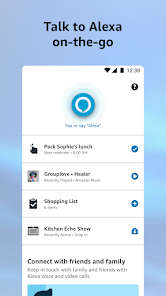
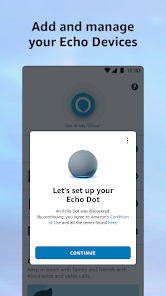
I've been using the Amazon Alexa app for a few years now, and it's become a central part of managing my smart home. In simple terms, it's the companion app for Amazon's Echo devices and other Alexa-enabled gadgets. You use it to set up your devices, discover new skills, and control everything from a single screen on your phone. The app itself has been around since the first Echo launched, and you can easily download it for free from the Google Play Store or the Apple App Store. It has a massive number of installs, which isn't surprising given how popular Echo devices are. You don't need to pay to download or install the app, but you will need an Amazon account to register and link your devices. While the core app is free, there are optional in-app purchases for things like premium music subscriptions or paid skills. You'll also encounter some ads within the app, usually promoting new Alexa features or Amazon services.
Using the app is pretty straightforward. After you install it and log in, it guides you through adding your Echo speakers, smart lights, or plugs. I found it most useful for creating routines—like having my lights turn on and the news play when I say "Alexa, good morning." A handy tip is to explore the 'Skills & Games' section regularly; it's where you add new capabilities to your Alexa, from trivia games to workout guides. You can also use the app to check what Alexa heard in its history, which is great for troubleshooting when it mishears a command.
Compared to other smart home apps like the one for Google Home, I keep coming back to Alexa's app. The main reason is the sheer breadth of compatible devices and skills. While Google's assistant might feel smarter for answering complex questions, the Alexa app feels more like a robust platform for building a connected home. Setting up routines and managing device groups feels more intuitive here. For someone already in the Amazon ecosystem, it's a no-brainer to install this app to get the most out of their Echo devices.
Key Functional Highlights
- 🔧 Centralized Smart Home Control: The core feature is managing all your compatible devices. From smart bulbs to thermostats, you can group them, create scenes, and control them all from one place, which is much more integrated than juggling multiple manufacturer apps.
- 🎵 Seamless Media Integration: The app deeply integrates with Amazon Music, Spotify, and others. You can set your default services, browse libraries, and send music directly to any Echo speaker in your house, creating a whole-home audio system with ease.
- 📅 Routine Builder: This is a standout feature. You can create complex multi-step routines triggered by voice, time, or device events (like a motion sensor). For example, a "Goodnight" routine can lock doors, turn off lights, and play white noise—all from one command.
- 🛒 Voice Shopping & Lists: Tied directly to your Amazon account, you can use the app to review your voice shopping history or manage shopping and to-do lists you create by voice, making it a true hub for Amazon ecosystem tasks.
Advantages & Benefits
- ✅ Massive Skill Library: Compared to Google Assistant or Siri, Alexa's library of third-party skills is enormous. The app makes discovering and enabling these "apps for Alexa" incredibly easy, constantly expanding what your devices can do.
- ✅ Device Compatibility: The app supports a wider range of smart home brands and products than any other platform. This universality is a huge strength over more closed systems like Apple HomeKit.
- ✅ Routine Flexibility: The depth of the routine creation tool is unmatched. Apps like SmartThings are powerful but complex, while Google Home's routines are simpler. Alexa strikes a great balance between power and user-friendliness.
Areas for Improvement
- ❌ App Can Feel Cluttered: The interface sometimes feels busy and ad-heavy compared to the cleaner, more minimalist design of the Google Home app. Navigating to specific settings isn't always intuitive.
- ❌ Performance Hiccups: The app can occasionally be slow to refresh device statuses or lag when sending commands, an issue I've encountered less frequently with Apple's Home app on iOS.
- ❌ Privacy Granularity: While you can review voice history, managing data and privacy settings feels scattered across the app and Amazon website. Other platforms present these controls more cohesively.
Recommended Apps
![]()
ZEPETO: Avatar, Connect & Play
Naver Z Corporation4.3
![]()
Reverse Voice: Flip Singing
NindaFuit0![]()
AI Chat Ask Assistant - NowAI
Now Tech4.3![]()
Lie Detector Test: Prank App
DkTech inc.4.3![]()
Peachy - AI Face & Body Editor
InShot Video Editor4.8
![]()
AI Video Art Creator - Livensa
FERASET4.5![]()
Google Voice
Google LLC4.3![]()
Horoscopes & Tarot
Astrolis Horoscopes4.7![]()
eBay online shopping & selling
eBay Mobile4.6![]()
JPay
Jpay Mobile4.1![]()
Stranger Things 5 Challenges
MVH Entertainment Team5![]()
Chat Master: Prank Story
ABI Game Studio4.8![]()
Google Maps
Google LLC4.2![]()
AI Chat・Ask Chatbot Assistant
AI Chat Studio4.5![]()
Name Meanings with Impact
Alif Innovative Solution3.7















You May Like
-
![]()
True Tarot Card Reading
KaApps4.2 -
![]()
LinkedIn: Jobs & Business News
LinkedIn4.2 -
![]()
iControl: Easy Widgets Themes
Fancy keyboard for theme apps4.6 -
![]()
Duolingo: Language & Chess
Duolingo4.7 -
![]()
Flipped:Chat with AI Character
First Group pte ltd4.1 -
![]()
Hearing Age
Mobile Solutions Tech0 -
![]()
TikTok
TikTok Pte. Ltd.4.4 -
![]()
Pretty Makeup - Beauty Camera
Photo Editor Perfect Corp.4.4 -
![]()
PhotoRoom AI Photo Editor
PhotoRoom Background Editor App4.7 -
![]()
Lightleap by Lightricks
Lightricks Ltd.4.3 -
![]()
Name Meaning
Dexati4.1 -
![]()
Truth Social
T Media Tech LLC3.3 -
![]()
Ace Hardware
Ace Hardware Corporation4.7 -
![]()
Kpop Fans Demon Hunter Wallpap
JHNStudio4.3 -
![]()
Artplay - AI Photo & Video
Hideaway Technology Limited4.5












































