
Magic Voice Changer
PerryLeeGame3
Installs
100K+
Developer
PerryLeeGame3
-
Category
Productivity
-
Content Rating
Rated for 12+
Developer Email
Privacy Policy
http://perrylegame.com/privacy.html
Screenshots
Expert Review
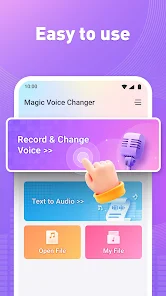
Magic Voice Changer is a fun audio manipulation app that lets you record your voice and transform it with a variety of effects. It's primarily used for creating silly videos, pranking friends, or just having a laugh. I first downloaded it from the Google Play Store a couple of years ago, and it's been a go-to app for quick entertainment ever since. The app is free to download and install, and it doesn't require any registration to start using it, which is super convenient. It has a huge number of installs, which shows how popular it is. While the app itself is free, there are some in-app ads, and you can make purchases to unlock additional premium voice effects or remove ads.
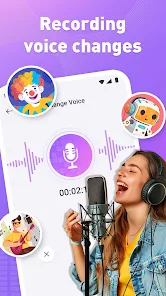
Using the app is straightforward. You just open it, hit record, and speak. After you stop recording, you can browse through a long list of effects—from helium-high pitches to deep demonic growls—and apply them instantly. A tip I've found useful is to record in a quiet room for the cleanest audio before applying the wild effects; it makes the final result much clearer. You can then save the clip to your phone or share it directly to social media or messaging apps.
Compared to other voice changer apps like 'Voice Changer with Effects' or 'MorphVOX', I keep coming back to Magic Voice Changer. The main reason is its simplicity and instant playback. Some other apps in this genre feel clunky or have delayed processing. With Magic Voice Changer, the effect applies the moment you select it, making the experimentation process really fast and fun. It might not have the super advanced soundboard features of some competitors, but for quick, hassle-free voice distortion, this app is my top choice.
Key Functional Highlights
- 🎤 Instant Effect Preview: Unlike some apps where you have to process the file, you hear the changed voice immediately after selecting an effect. This makes trying out different sounds, from robot to alien, incredibly fast and engaging.
- 📁 Easy Save & Share: Once you're happy with your creation, saving the audio file to your device or sharing it directly to platforms like WhatsApp or Instagram is just a tap away. The app integrates seamlessly with your phone's sharing menu.
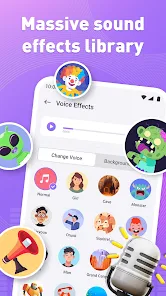
- 🎭 Huge Effect Library: The app boasts a massive collection of voice filters. Whether you want to sound like a chipmunk, a giant, or add a creepy echo, there's likely an effect for it. New effects are added periodically, keeping the app fresh.
- 🔊 Live Voice Change: A standout feature for pranks is the live mode. You can apply an effect and speak through your phone's microphone in real-time during a call (using speakerphone) or while recording a video, which is a feature many similar apps lack or implement poorly.
Advantages & Benefits
- ⚡ Speed and Ease: It's much faster and more intuitive to use than something like 'Voice Modulator'. You don't need to fiddle with complex sliders; just pick an effect and go.
- 😄 Pure Fun Focus: Apps like 'Voloco' are more for music and auto-tune. Magic Voice Changer is dedicated to comedy and novelty, offering a wider range of silly and dramatic effects perfect for entertainment.
- 🆓 Truly Free Core: You can download, install, and use a solid set of effects without paying, whereas some competitors lock most good features behind an immediate paywall.
Areas for Improvement
- 📢 Ad Interruptions: The free version has frequent video ads, which can break the flow when you're trying out multiple effects quickly. Apps like 'Voice Changer - Audio Effects' have a less intrusive ad model.
- 🎚️ Limited Customization: You can't fine-tune the effects. If you want to adjust the pitch or reverb level of a specific filter, you're out of luck. An app like 'MorphVOX' offers much deeper control.
- 🎵 Basic Audio Editing: It's purely for applying effects to recordings. You can't trim or combine clips within the app itself, a feature found in more advanced audio editors.
Recommended Apps
![]()
ZEPETO: Avatar, Connect & Play
Naver Z Corporation4.3
![]()
Reverse Voice: Flip Singing
NindaFuit0![]()
AI Chat Ask Assistant - NowAI
Now Tech4.3![]()
Lie Detector Test: Prank App
DkTech inc.4.3![]()
Peachy - AI Face & Body Editor
InShot Video Editor4.8
![]()
AI Video Art Creator - Livensa
FERASET4.5![]()
Google Voice
Google LLC4.3![]()
Horoscopes & Tarot
Astrolis Horoscopes4.7![]()
eBay online shopping & selling
eBay Mobile4.6![]()
JPay
Jpay Mobile4.1![]()
Stranger Things 5 Challenges
MVH Entertainment Team5![]()
Chat Master: Prank Story
ABI Game Studio4.8![]()
Google Maps
Google LLC4.2![]()
AI Chat・Ask Chatbot Assistant
AI Chat Studio4.5![]()
Name Meanings with Impact
Alif Innovative Solution3.7















You May Like
-
![]()
True Tarot Card Reading
KaApps4.2 -
![]()
LinkedIn: Jobs & Business News
LinkedIn4.2 -
![]()
iControl: Easy Widgets Themes
Fancy keyboard for theme apps4.6 -
![]()
Duolingo: Language & Chess
Duolingo4.7 -
![]()
Flipped:Chat with AI Character
First Group pte ltd4.1 -
![]()
Hearing Age
Mobile Solutions Tech0 -
![]()
TikTok
TikTok Pte. Ltd.4.4 -
![]()
Pretty Makeup - Beauty Camera
Photo Editor Perfect Corp.4.4 -
![]()
PhotoRoom AI Photo Editor
PhotoRoom Background Editor App4.7 -
![]()
Lightleap by Lightricks
Lightricks Ltd.4.3 -
![]()
Name Meaning
Dexati4.1 -
![]()
Truth Social
T Media Tech LLC3.3 -
![]()
Ace Hardware
Ace Hardware Corporation4.7 -
![]()
Kpop Fans Demon Hunter Wallpap
JHNStudio4.3 -
![]()
Artplay - AI Photo & Video
Hideaway Technology Limited4.5











































