

Artplay - AI Photo & Video
Hideaway Technology Limited
Installs
1M+
Developer
Hideaway Technology Limited
-
Category
Video Players & Editors
-
Content Rating
Everyone
Developer Email
Privacy Policy
https://sites.google.com/view/artplay-privacypolicy
Screenshots

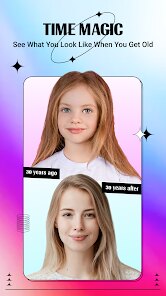


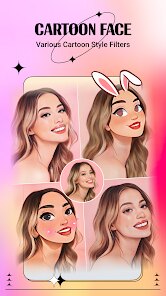

Expert Review
I've been using Artplay - AI Photo & Video for a few months now, and it's quickly become my go-to app for creative edits. In simple terms, it's a photo and video editing app that uses artificial intelligence to transform your media with artistic filters and effects. It launched a couple of years back and is available for free download on both the Google Play Store and the Apple App Store. I first found it on Google Play, and it has millions of installs, which shows how popular it is. You can install the app without paying anything, and you don't even need to register to start using most of the basic tools, which is super convenient. Of course, like many free apps, it does have some in-app purchases to unlock premium features and occasionally shows ads, but the free version is surprisingly powerful.
Using the app is pretty straightforward. You just open it, pick a photo or video from your gallery, and then browse through the huge library of AI-powered filters. My favorite trick is to use the 'Artistic' category to turn regular vacation photos into paintings or sketches. The AI processes the image in seconds, and you can adjust the intensity of the effect. For videos, it works the same way – you select a clip, apply a filter, and it renders a whole new look. I'd recommend trying the 'Trending' filters section to see what styles are popular. The app saves all your edits in a project history, so you can easily go back and tweak things.
I've tried other similar apps like PicsArt and Prisma, but I keep coming back to Artplay. While PicsArt is great for collages and Prisma is famous for its art filters, Artplay strikes a perfect balance for me. It feels more intuitive for quick, high-quality AI transformations. The effects often look more refined and less 'overcooked' compared to some others. For someone who wants to add a creative flair to their social media posts without spending hours learning complex software, this app is a fantastic choice. The sheer variety and the speed of the AI make it stand out in a crowded genre of photo editors.
Key Functional Highlights
- 🎨 Vast AI Filter Library: The app's core strength is its massive and constantly updated collection of AI filters. From turning photos into Van Gogh paintings to giving videos a cyberpunk vibe, the variety is incredible. Compared to a popular app like Prisma, which focuses heavily on artistic styles, Artplay offers a wider range, including modern, abstract, and even fun animated effects for videos.
- ⚡ One-Tap Processing Speed: The AI works incredibly fast. You tap a filter, and the transformation happens almost instantly for photos and within seconds for short videos. This speed is a game-changer compared to some other AI editing apps I've used, which can take much longer to render effects, making quick edits a breeze.
- ✂️ Simple, Non-Destructive Editing: After applying an AI filter, you can still adjust basics like brightness, contrast, and saturation without losing the AI effect. This layered editing approach is more user-friendly than apps that bake the effect in permanently after the first step, allowing for more creative control.
- 📹 Strong Video Support: Many photo-focused AI apps treat video as an afterthought. Artplay provides robust AI filters specifically designed for video clips, which is its outstanding feature for me. You can apply the same artistic styles to moving images, something that even powerful apps like PicsArt don't handle as seamlessly.
Advantages & Benefits
- 👍 Better Free Tier: Compared to similar apps like Prisma or PhotoLab, Artplay offers more usable filters and tools for free. You can achieve great results without immediately hitting a paywall.
- 👍 More Intuitive UI: The interface is cleaner and easier to navigate than something like PicsArt, which can feel cluttered with options. Finding and applying effects is quicker.
- 👍 Regular New Content: The developers add new filter packs and themes frequently, keeping the app fresh compared to some competitors that update less often.
Areas for Improvement
- 👎 Ads in Free Version: The ad interruptions can be annoying, especially during longer editing sessions. Some competing apps have a less intrusive ad model.
- 👎 Watermarks on Exports: The free version places a small watermark on exported media. To remove it, you need a subscription, whereas some other free apps don't watermark photos.
- 👎 Premium Can Be Pricey: While the free version is good, the jump to the full premium subscription feels steep compared to the one-time purchase options sometimes offered by similar apps.
Recommended Apps
![]()
ZEPETO: Avatar, Connect & Play
Naver Z Corporation4.3
![]()
Reverse Voice: Flip Singing
NindaFuit0![]()
AI Chat Ask Assistant - NowAI
Now Tech4.3![]()
Lie Detector Test: Prank App
DkTech inc.4.3![]()
Peachy - AI Face & Body Editor
InShot Video Editor4.8
![]()
AI Video Art Creator - Livensa
FERASET4.5![]()
Google Voice
Google LLC4.3![]()
Horoscopes & Tarot
Astrolis Horoscopes4.7![]()
eBay online shopping & selling
eBay Mobile4.6![]()
JPay
Jpay Mobile4.1![]()
Stranger Things 5 Challenges
MVH Entertainment Team5![]()
Chat Master: Prank Story
ABI Game Studio4.8![]()
Google Maps
Google LLC4.2![]()
AI Chat・Ask Chatbot Assistant
AI Chat Studio4.5![]()
Name Meanings with Impact
Alif Innovative Solution3.7















You May Like
-
![]()
True Tarot Card Reading
KaApps4.2 -
![]()
LinkedIn: Jobs & Business News
LinkedIn4.2 -
![]()
iControl: Easy Widgets Themes
Fancy keyboard for theme apps4.6 -
![]()
Duolingo: Language & Chess
Duolingo4.7 -
![]()
Flipped:Chat with AI Character
First Group pte ltd4.1 -
![]()
Hearing Age
Mobile Solutions Tech0 -
![]()
TikTok
TikTok Pte. Ltd.4.4 -
![]()
Pretty Makeup - Beauty Camera
Photo Editor Perfect Corp.4.4 -
![]()
PhotoRoom AI Photo Editor
PhotoRoom Background Editor App4.7 -
![]()
Lightleap by Lightricks
Lightricks Ltd.4.3 -
![]()
Name Meaning
Dexati4.1 -
![]()
Truth Social
T Media Tech LLC3.3 -
![]()
Ace Hardware
Ace Hardware Corporation4.7 -
![]()
Kpop Fans Demon Hunter Wallpap
JHNStudio4.3 -
![]()
Artplay - AI Photo & Video
Hideaway Technology Limited4.5










































