

iControl: Easy Widgets Themes
Fancy keyboard for theme apps
Installs
10M+
Developer
Fancy keyboard for theme apps
-
Category
Productivity
-
Content Rating
Teen
Developer Email
Privacy Policy
https://icontrol-themes.web.app/privacy-policy
Screenshots
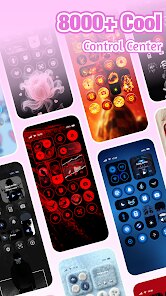
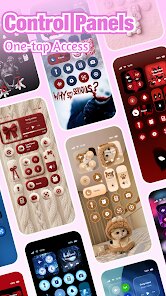
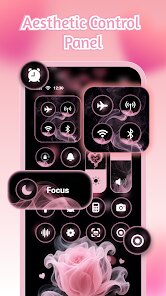
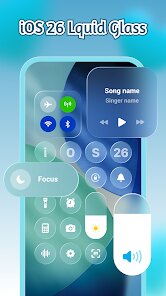
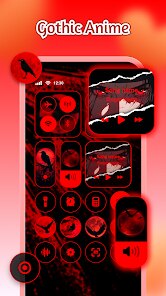
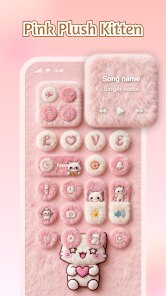
Expert Review
Widget customization apps are quite common on Google Play, but few manage to balance visual appeal with genuine usability. iControl: Easy Widgets Themes, developed by Fancy keyboard for theme apps, offers a free collection of home screen widgets with a focus on personalization. The app can be downloaded and installed without any upfront cost, though it does include advertisements and optional in-app purchases for unlocking premium designs. It is available for Android devices and has accumulated a moderate number of installations, suggesting a steady but not overwhelming user base.
The core functionality revolves around selecting and placing various widget styles onto the home screen. Users browse through categories like clocks, weather, battery status, and music controls, then apply them with a straightforward installation process. In practice, the setup feels reasonably smooth, though the app requires granting certain permissions to function correctly. The selection is decent for a free tool, with enough variety to match different aesthetic preferences. Some widgets are more detailed than others, and the response time after placement is generally quick, which keeps the experience frustration-free.
Compared to more established names like KWGT or UCCW, iControl is clearly aimed at users who prefer simplicity over deep customization. While those alternatives allow nearly unlimited tweaking, they also demand a steeper learning curve. iControl takes the opposite approach by offering pre-made designs that can be applied in a few taps. This makes it less flexible, but also more approachable for someone who just wants a cleaner or more colorful home screen without spending time configuring every detail. It is not a replacement for advanced tools, but it fills a practical gap for casual users.
Key Functional Highlights
- The widget selection covers common categories like analog clocks, digital time displays, and weather panels. Most designs are visually clean and fit well with modern Android themes. Using them feels straightforward, though the variety in each category is somewhat limited compared to premium apps.
- Applying a widget requires following a few steps through the app's interface, which is clear but not particularly fast. The app guides the user through the process, and after the first attempt, the workflow becomes familiar. It works reliably, though occasionally a widget may take a moment to refresh after placement.
- One notable feature is the inclusion of battery and memory status widgets, which are less common in free customization apps. These add a functional layer to the aesthetic changes. They work well enough for quick glances, though the information displayed is basic.
- Unlike apps such as HD Widgets, iControl keeps its design language consistent across its collection. There are no jarring style mismatches between different widget types. This coherence makes the home screen look more intentional, even when mixing multiple widgets.
Advantages & Benefits
- Setting up a personalized home screen takes only a few minutes, which is convenient for users who want quick results without complex configuration.
- The app does not drain battery noticeably during normal use, even when weather widgets are set to update regularly.
- Most widgets are free, so you can try several styles before deciding whether to purchase the premium collection.
Areas for Improvement
- The free version includes ads that appear when browsing the widget library, which can interrupt the selection process.
- Some widgets have limited customization options, like fixed colors or font sizes, which may not suit all tastes.
- Occasionally, a widget may not align perfectly with different launchers, resulting in slight scaling issues on certain devices.
Recommended Apps
![]()
ZEPETO: Avatar, Connect & Play
Naver Z Corporation4.3
![]()
Reverse Voice: Flip Singing
NindaFuit0![]()
AI Chat Ask Assistant - NowAI
Now Tech4.3![]()
Lie Detector Test: Prank App
DkTech inc.4.3![]()
Peachy - AI Face & Body Editor
InShot Video Editor4.8
![]()
AI Video Art Creator - Livensa
FERASET4.5![]()
Google Voice
Google LLC4.3![]()
Horoscopes & Tarot
Astrolis Horoscopes4.7![]()
eBay online shopping & selling
eBay Mobile4.6![]()
JPay
Jpay Mobile4.1![]()
Stranger Things 5 Challenges
MVH Entertainment Team5![]()
Chat Master: Prank Story
ABI Game Studio4.8![]()
Google Maps
Google LLC4.2![]()
AI Chat・Ask Chatbot Assistant
AI Chat Studio4.5![]()
Name Meanings with Impact
Alif Innovative Solution3.7















You May Like
-
![]()
True Tarot Card Reading
KaApps4.2 -
![]()
LinkedIn: Jobs & Business News
LinkedIn4.2 -
![]()
iControl: Easy Widgets Themes
Fancy keyboard for theme apps4.6 -
![]()
Duolingo: Language & Chess
Duolingo4.7 -
![]()
Flipped:Chat with AI Character
First Group pte ltd4.1 -
![]()
Hearing Age
Mobile Solutions Tech0 -
![]()
TikTok
TikTok Pte. Ltd.4.4 -
![]()
Pretty Makeup - Beauty Camera
Photo Editor Perfect Corp.4.4 -
![]()
PhotoRoom AI Photo Editor
PhotoRoom Background Editor App4.7 -
![]()
Lightleap by Lightricks
Lightricks Ltd.4.3 -
![]()
Name Meaning
Dexati4.1 -
![]()
Truth Social
T Media Tech LLC3.3 -
![]()
Ace Hardware
Ace Hardware Corporation4.7 -
![]()
Kpop Fans Demon Hunter Wallpap
JHNStudio4.3 -
![]()
Artplay - AI Photo & Video
Hideaway Technology Limited4.5









































