

Notepad, Notes, Easy Notebook
Simple Design Ltd.
Installs
10M+
Developer
Simple Design Ltd.
-
Category
Productivity
-
Content Rating
Everyone
Developer Email
Privacy Policy
https://simpledesign.ltd/privacypolicy.html?pkg=notes.notepad.checklist.calendar.todolist.notebook
Screenshots

Expert Review
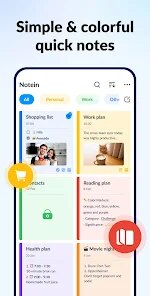
Finding a reliable note-taking app that syncs across devices without feeling bloated can be surprisingly difficult. Notepad, Notes, Easy Notebook, developed by Simple Design Ltd., is a lightweight option available on Google Play that focuses on the basics of text capture and organization. It is free to download and install, which makes it accessible, though it does include some advertisements and offers optional in-app purchases to remove them or unlock additional themes.
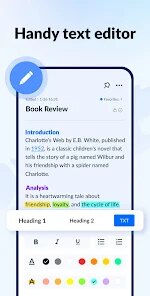
The app keeps its interface straightforward, presenting users with a simple list of notes upon opening. Creating a new entry is quick, and the editing screen provides just the essential tools for formatting text like bold, italics, and list creation. I found the process of jotting down quick ideas or reminders to be efficient, as there are no complex steps or menus to navigate. The app allows you to organize notes into folders or categories, which helps keep things tidy, and includes a search function that works reliably, even with a moderately sized collection of notes.
Compared to more comprehensive apps like Google Keep or Notion, this one feels intentionally minimal. Google Keep leans more into visual reminders and checklists with a card-like interface, while Notion offers a database-like structure for complex projects. This app, however, sits somewhere in between, offering more organizational features than a bare-bones text editor but without the steep learning curve of a full-fledged productivity suite. I personally prefer its clarity for simple, everyday use, though it certainly lacks the advanced collaboration features of its more prominent competitors.
Key Functional Highlights
- The search function within the app is notably responsive. I can type a few characters from a recipe or a meeting note, and results appear almost immediately, which saves considerable time when scrolling through dozens of entries. This is more reliable than the search in some similar lightweight apps.
- Organizing notes into folders is a practical feature that many basic note apps omit. I created separate folders for work ideas, personal lists, and travel plans, and the app maintains this structure cleanly without any visual clutter. The folder icons are simple but distinct enough to tell apart at a glance.
- The text editor covers essential formatting needs without overcomplicating things. I can add headers or bullet points easily, and the app does not insert unexpected styling or auto-corrections, which is a relief compared to some editors that try to be too smart. It feels like a digital version of a notepad, which is exactly its intention.
Advantages & Benefits
- It loads and runs smoothly even on older Android devices, making it a practical choice for users with less powerful hardware.
- The offline functionality is robust; I can access and edit all my notes without an internet connection, which is useful in areas with spotty coverage.
- Backup and restore options are built in, allowing me to move notes between devices or recover them after a factory reset without much hassle.
Areas for Improvement
- The free version displays ads that can occasionally be intrusive, especially when switching between notes, which interrupts the flow of work.
- Syncing across different devices is not as seamless as in cloud-first apps; it requires manual backup and transfer, which feels a bit outdated.
- The range of available themes and customization options is limited, so the app may feel visually plain to users who prefer a more personalized look.
Recommended Apps
![]()
ZEPETO: Avatar, Connect & Play
Naver Z Corporation4.3
![]()
Reverse Voice: Flip Singing
NindaFuit0![]()
AI Chat Ask Assistant - NowAI
Now Tech4.3![]()
Lie Detector Test: Prank App
DkTech inc.4.3![]()
Peachy - AI Face & Body Editor
InShot Video Editor4.8
![]()
AI Video Art Creator - Livensa
FERASET4.5![]()
Google Voice
Google LLC4.3![]()
Horoscopes & Tarot
Astrolis Horoscopes4.7![]()
eBay online shopping & selling
eBay Mobile4.6![]()
JPay
Jpay Mobile4.1![]()
Stranger Things 5 Challenges
MVH Entertainment Team5![]()
Chat Master: Prank Story
ABI Game Studio4.8![]()
Google Maps
Google LLC4.2![]()
AI Chat・Ask Chatbot Assistant
AI Chat Studio4.5![]()
Name Meanings with Impact
Alif Innovative Solution3.7















You May Like
-
![]()
True Tarot Card Reading
KaApps4.2 -
![]()
LinkedIn: Jobs & Business News
LinkedIn4.2 -
![]()
iControl: Easy Widgets Themes
Fancy keyboard for theme apps4.6 -
![]()
Duolingo: Language & Chess
Duolingo4.7 -
![]()
Flipped:Chat with AI Character
First Group pte ltd4.1 -
![]()
Hearing Age
Mobile Solutions Tech0 -
![]()
TikTok
TikTok Pte. Ltd.4.4 -
![]()
Pretty Makeup - Beauty Camera
Photo Editor Perfect Corp.4.4 -
![]()
PhotoRoom AI Photo Editor
PhotoRoom Background Editor App4.7 -
![]()
Lightleap by Lightricks
Lightricks Ltd.4.3 -
![]()
Name Meaning
Dexati4.1 -
![]()
Truth Social
T Media Tech LLC3.3 -
![]()
Ace Hardware
Ace Hardware Corporation4.7 -
![]()
Kpop Fans Demon Hunter Wallpap
JHNStudio4.3 -
![]()
Artplay - AI Photo & Video
Hideaway Technology Limited4.5











































