

Google Home
Google LLC
Installs
500,000,000+
Developer
Google LLC
-
Category
Lifestyle
-
Content Rating
Rated for 3+
Developer Email
Privacy Policy
https://policies.google.com/privacy
Screenshots
Expert Review
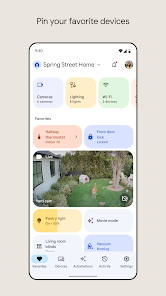
Google Home is Google's official app for setting up and controlling its ecosystem of smart devices, like Nest speakers, displays, and thermostats. You can download it for free from the Google Play Store or the Apple App Store, and it's installed on millions of devices. The app itself doesn't have ads, but it serves as the gateway to services you might subscribe to, like YouTube Music or Nest Aware.
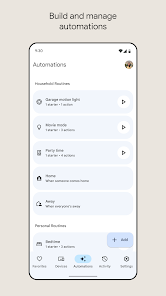
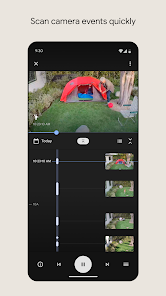
In practice, you use the app primarily for the initial setup of a new device—guiding you through connecting it to your Wi-Fi—and then as a central dashboard. From here, you can adjust speaker volumes, see camera feeds, or create routines that automate multiple actions. I've found it most useful for managing device groupings; setting up a speaker pair for stereo sound is straightforward, and creating a ‘Good Morning' routine that turns on lights and reads the news works reliably.
Compared to other smart home platforms, Google Home feels more integrated if you're already using Android or Google services. Amazon's Alexa app, for instance, can feel a bit more cluttered with shopping prompts, while Apple's Home app is cleaner but requires a more locked-in Apple hardware ecosystem. For someone with a mix of Google and third-party smart bulbs or plugs, Google Home strikes a good balance of compatibility and a clean interface.
Key Functional Highlights
- The device setup process is notably smooth. The app uses clear visual cues and audio prompts to guide you, which makes adding a new smart speaker or display feel almost foolproof. It's a noticeable improvement over some other apps where the Wi-Fi handoff can be finicky.
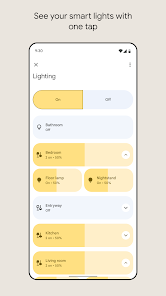
- Managing your home's layout within the app is a strong point. You can assign devices to specific rooms, which then allows for very natural voice commands like “Hey Google, turn off the bedroom lights.” From my experience, this room-based organization is more intuitive than a simple list of devices.
- The routines feature is powerful yet accessible. You can combine actions from different devices—like starting a playlist, adjusting the thermostat, and turning on a light—into a single command or schedule. While similar to Alexa's routines, I find Google's interface for building them is slightly more visual and easier to edit on the fly.
- Media control is seamless if you use supported services. Casting music or a video from your phone to a Nest speaker or display happens with a tap. The experience is tighter here than when trying to cast to a generic Bluetooth speaker from a music app.
Advantages & Benefits
- Voice match recognition works well for personalizing news or calendar summaries for different household members.
- The ‘Broadcast' function to send a voice message to all speakers in the house is surprisingly handy for quick announcements.
- Integrating with many popular smart home brands like Philips Hue or TP-Link Kasa means you're rarely locked out.
- The home view widget for Android provides a useful glance at your devices without opening the full app.
Areas for Improvement
- Some advanced settings for Nest devices, like detailed camera history, are buried in menus and can be hard to find.
- Performance can occasionally feel sluggish, especially when loading the live feed from multiple cameras at once.
- The app's design, while clean, updates frequently, which sometimes moves familiar controls to new places.
- Creating complex automations based on device states still isn't as flexible as what you might find in a dedicated platform like Home Assistant.
Recommended Apps
![]()
ZEPETO: Avatar, Connect & Play
Naver Z Corporation4.3
![]()
Reverse Voice: Flip Singing
NindaFuit0![]()
AI Chat Ask Assistant - NowAI
Now Tech4.3![]()
Lie Detector Test: Prank App
DkTech inc.4.3![]()
Peachy - AI Face & Body Editor
InShot Video Editor4.8
![]()
AI Video Art Creator - Livensa
FERASET4.5![]()
Google Voice
Google LLC4.3![]()
Horoscopes & Tarot
Astrolis Horoscopes4.7![]()
eBay online shopping & selling
eBay Mobile4.6![]()
JPay
Jpay Mobile4.1![]()
Stranger Things 5 Challenges
MVH Entertainment Team5![]()
Chat Master: Prank Story
ABI Game Studio4.8![]()
Google Maps
Google LLC4.2![]()
AI Chat・Ask Chatbot Assistant
AI Chat Studio4.5![]()
Name Meanings with Impact
Alif Innovative Solution3.7















You May Like
-
![]()
True Tarot Card Reading
KaApps4.2 -
![]()
LinkedIn: Jobs & Business News
LinkedIn4.2 -
![]()
iControl: Easy Widgets Themes
Fancy keyboard for theme apps4.6 -
![]()
Duolingo: Language & Chess
Duolingo4.7 -
![]()
Flipped:Chat with AI Character
First Group pte ltd4.1 -
![]()
Hearing Age
Mobile Solutions Tech0 -
![]()
TikTok
TikTok Pte. Ltd.4.4 -
![]()
Pretty Makeup - Beauty Camera
Photo Editor Perfect Corp.4.4 -
![]()
PhotoRoom AI Photo Editor
PhotoRoom Background Editor App4.7 -
![]()
Lightleap by Lightricks
Lightricks Ltd.4.3 -
![]()
Name Meaning
Dexati4.1 -
![]()
Truth Social
T Media Tech LLC3.3 -
![]()
Ace Hardware
Ace Hardware Corporation4.7 -
![]()
Kpop Fans Demon Hunter Wallpap
JHNStudio4.3 -
![]()
Artplay - AI Photo & Video
Hideaway Technology Limited4.5










































