

Life360: Live Location Sharing
Life360
Installs
100,000,000+
Developer
Life360
-
Category
Lifestyle
-
Content Rating
Rated for 3+
Developer Email
Privacy Policy
http://www.life360.com/mobile_privacy_policy
Screenshots
Expert Review
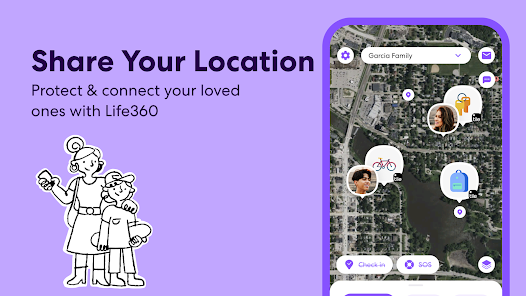
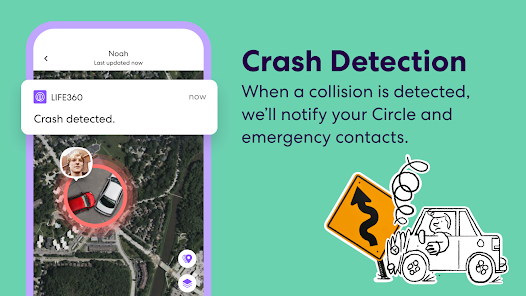
Life360: Live Location Sharing is an app centered on keeping family members or close groups connected through real-time GPS tracking. It is available for free download and install from Google Play, with optional subscription tiers that unlock additional features. The app relies on cellular or Wi-Fi data to let you see where other members of your designated "Circle" are on a map, along with their device's battery level. While the basic version is free, it includes ads, and the premium subscriptions remove those while adding extras like crash detection and roadside assistance.
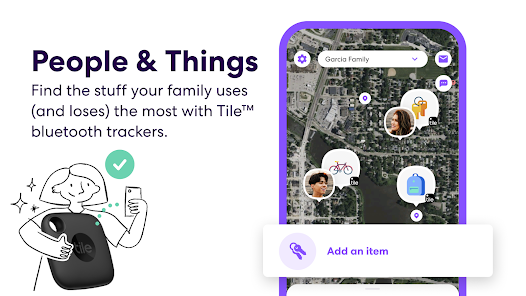
Getting started involves creating a Circle and sending an invitation to others—family members, friends, or anyone you wish to track—who must then create their own accounts and accept. Once they do, their location updates regularly on your map view, with each person shown by a colored dot that includes a small icon. Tapping any dot brings up their name, last check-in time, and options to message them or send an alert to the whole Circle. You can also set up place alerts, so you receive a notification when someone arrives at or leaves a frequently visited location, such as school or work. Using it daily, the map feels fairly accurate, but location data only updates when the person's phone has an active internet signal.
Compared to other location apps like Find My (Apple) or Google Maps' location sharing, Life360 provides a more structured social framework. While Find My is integrated neatly into Apple's ecosystem, Life360 feels more feature-rich for group management across both Android and iOS. Google Maps sharing is simpler and more casual, but Life360 packs dedicated safety features and driving reports, which gives it a stronger tilt towards parenting or coordinating travel. Having tested both, I find Life360 offers a balanced trade-off—deeper functionality without becoming too overwhelming for day-to-day use.
Key Functional Highlights
- The location accuracy, for the most part, is quite reliable, often pinpointing a family member's position within a few meters when they are outdoors. However, indoors or in areas with poor reception, the dot might drift a bit, showing a spot near your actual location rather than the exact room.
- Place alerts are one of the most useful features. Setting a custom radius for a location means you get a push notification when someone crosses the boundary. In practice, this removes the need to constantly open the app to check on arrivals, though false alerts can happen if the phone's location jumps briefly across that line.
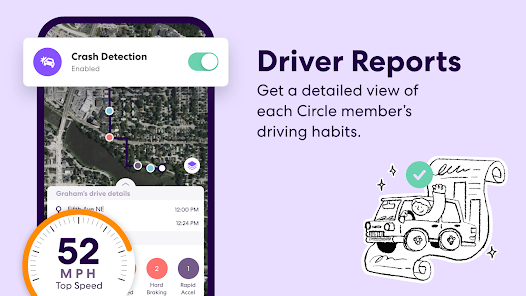
- Unlike basic location-sharing apps, Life360 includes a driving report that summarizes trip speed, hard braking, and phone usage while moving. It feels mostly informative rather than judgmental, but teens might dislike the level of detail it provides to the Circle admin.
Advantages & Benefits
- Helps reduce worry during long drives or travels by instantly showing a person's progress on the map. A quick glance can confirm they have started heading home or arrived safely.
- The in-app messaging and Panic Alert button create a simple way for group members to communicate during emergencies without switching to another app. Tapping the alert sends your location and message to everyone in the Circle, which can be quicker than calling each person individually.
- Event history logs location changes over time, which can be useful for tracking daily routines or verifying where someone has been—helpful for parents of younger children.
Areas for Improvement
- The free version includes ads that can be noticeable, sometimes appearing after you check a member's location, which feels a little distracting when you just want a quick update.
- Battery drain is slightly higher than expected because the app runs location services continuously in the background; turning on battery saving settings under family does help, but not completely eliminate the extra consumption.
- In higher-density environments like schools or crowded shopping centers, locations can lag by several seconds, causing the map to show a person near a store they left minutes ago—just enough to trigger a brief false alarm.
Recommended Apps
![]()
ZEPETO: Avatar, Connect & Play
Naver Z Corporation4.3
![]()
Reverse Voice: Flip Singing
NindaFuit0![]()
AI Chat Ask Assistant - NowAI
Now Tech4.3![]()
Lie Detector Test: Prank App
DkTech inc.4.3![]()
Peachy - AI Face & Body Editor
InShot Video Editor4.8
![]()
AI Video Art Creator - Livensa
FERASET4.5![]()
Google Voice
Google LLC4.3![]()
Horoscopes & Tarot
Astrolis Horoscopes4.7![]()
eBay online shopping & selling
eBay Mobile4.6![]()
JPay
Jpay Mobile4.1![]()
Stranger Things 5 Challenges
MVH Entertainment Team5![]()
Chat Master: Prank Story
ABI Game Studio4.8![]()
Google Maps
Google LLC4.2![]()
AI Chat・Ask Chatbot Assistant
AI Chat Studio4.5![]()
Name Meanings with Impact
Alif Innovative Solution3.7















You May Like
-
![]()
True Tarot Card Reading
KaApps4.2 -
![]()
LinkedIn: Jobs & Business News
LinkedIn4.2 -
![]()
iControl: Easy Widgets Themes
Fancy keyboard for theme apps4.6 -
![]()
Duolingo: Language & Chess
Duolingo4.7 -
![]()
Flipped:Chat with AI Character
First Group pte ltd4.1 -
![]()
Hearing Age
Mobile Solutions Tech0 -
![]()
TikTok
TikTok Pte. Ltd.4.4 -
![]()
Pretty Makeup - Beauty Camera
Photo Editor Perfect Corp.4.4 -
![]()
PhotoRoom AI Photo Editor
PhotoRoom Background Editor App4.7 -
![]()
Lightleap by Lightricks
Lightricks Ltd.4.3 -
![]()
Name Meaning
Dexati4.1 -
![]()
Truth Social
T Media Tech LLC3.3 -
![]()
Ace Hardware
Ace Hardware Corporation4.7 -
![]()
Kpop Fans Demon Hunter Wallpap
JHNStudio4.3 -
![]()
Artplay - AI Photo & Video
Hideaway Technology Limited4.5











































