

Moises: The Musician's AI App
Moises Systems
Installs
50M+
Developer
Moises Systems
-
Category
Entertainment
-
Content Rating
Everyone
Developer Email
Privacy Policy
https://app.moises.ai/privacy
Screenshots

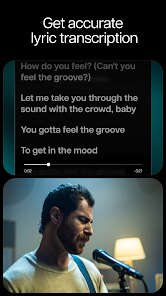
Expert Review
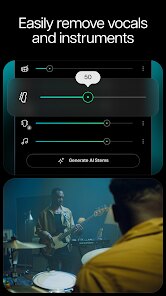
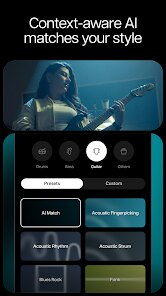
For musicians looking to separate instruments, adjust tempos, or practice with isolated tracks, Moises: The Musician's App has become a notable tool available on Google Play. Developed by Moises Systems, this application uses artificial intelligence to analyze uploaded audio files and split them into distinct stems — typically vocals, drums, bass, and other instruments. The app can be downloaded for free, with a subscription model unlocking additional features like higher audio quality, unlimited exports, and longer processing limits. Advertisements appear in the free version, but they don't interrupt the core workflow too often.
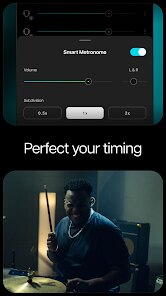
The process of working with tracks feels reasonably straightforward. You select a song from your device or paste a YouTube link, and within a minute or two, the AI delivers separated stems. You can then mute certain instruments or adjust their individual volume levels. The tempo-changing feature works smoothly, and the pitch shifting capability gives singers or instrumentalists flexibility without noticeable artifacts in most cases. As someone who's used various practice tools over the years, I found the interface clear enough, though a few button labels could be more intuitive. The app's design emphasizes quick access to core actions like looping a section or saving a mix.
Compared to other stem separation apps I've tried — such as Vocal Remover or various online services — Moises stands out for its speed and the quality of its output on simpler mixes. Dense tracks with many overlapping sounds can occasionally confuse the AI, leaving faint traces of unwanted instruments in certain stems. That said, the mobile interface feels more polished than many browser-based alternatives, and the ability to adjust timing without affecting pitch is a feature that competing apps often treat as a premium add-on rather than a standard tool. For musicians who already rely on digital tools for practice, this app offers a more unified experience than juggling separate audio editors.
Key Functional Highlights
- Stem separation accuracy is generally impressive with clean recordings, though complex arrangements sometimes leave residual sounds in unintended channels. The AI handles pop, rock, and electronic music better than dense orchestral or heavily layered tracks.
- Real-time tempo and pitch adjustment works without glitching, which is helpful when learning a piece at a slower speed or transposing it to a different key. This feature feels more responsive than similar options in general audio editing apps like Audacity's time-stretch function.
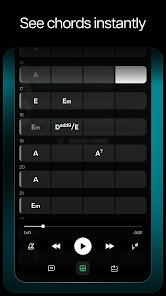
- The chord detection tool provides instant analysis of harmonic progressions, though it occasionally misidentifies complex jazz chords or fast passages. It's a solid reference point for quickly sketching out a song's structure, especially for beginners who aren't yet confident with ear training.
- Exporting mixes as stems or full tracks is straightforward, but the free version limits both the number of monthly exports and the maximum audio length, which can feel restrictive during extended practice sessions.
Advantages & Benefits
- Practicing with isolated vocals or instruments helps me focus on specific parts without background noise, which is especially useful when learning bass lines or intricate guitar riffs.
- Being able to slow down a track without altering pitch means I can gradually increase speed as muscle memory improves, a technique that works well for both instrumental and vocal practice.
- Creating a custom mix by muting certain instruments lets me produce a backing track for live performance or rehearsals, saving time compared to searching for karaoke versions online.
Areas for Improvement
- Processing time can be a bit slow with longer tracks, particularly when using the free tier, and uploading multiple songs in a row sometimes causes the app to hang briefly.
- The free version's 5-minute audio limit makes it impractical for longer songs or classical pieces, forcing me to trim files or upgrade before fully evaluating the tool.
- Occasional glitches in the chord detection feature produce incorrect results on minor seventh chords or rapid chord changes, requiring manual correction if the analysis is critical to your workflow.
Recommended Apps
![]()
ZEPETO: Avatar, Connect & Play
Naver Z Corporation4.3
![]()
Reverse Voice: Flip Singing
NindaFuit0![]()
AI Chat Ask Assistant - NowAI
Now Tech4.3![]()
Lie Detector Test: Prank App
DkTech inc.4.3![]()
Peachy - AI Face & Body Editor
InShot Video Editor4.8
![]()
AI Video Art Creator - Livensa
FERASET4.5![]()
Google Voice
Google LLC4.3![]()
Horoscopes & Tarot
Astrolis Horoscopes4.7![]()
eBay online shopping & selling
eBay Mobile4.6![]()
JPay
Jpay Mobile4.1![]()
Stranger Things 5 Challenges
MVH Entertainment Team5![]()
Chat Master: Prank Story
ABI Game Studio4.8![]()
Google Maps
Google LLC4.2![]()
AI Chat・Ask Chatbot Assistant
AI Chat Studio4.5![]()
Name Meanings with Impact
Alif Innovative Solution3.7















You May Like
-
![]()
True Tarot Card Reading
KaApps4.2 -
![]()
LinkedIn: Jobs & Business News
LinkedIn4.2 -
![]()
iControl: Easy Widgets Themes
Fancy keyboard for theme apps4.6 -
![]()
Duolingo: Language & Chess
Duolingo4.7 -
![]()
Flipped:Chat with AI Character
First Group pte ltd4.1 -
![]()
Hearing Age
Mobile Solutions Tech0 -
![]()
TikTok
TikTok Pte. Ltd.4.4 -
![]()
Pretty Makeup - Beauty Camera
Photo Editor Perfect Corp.4.4 -
![]()
PhotoRoom AI Photo Editor
PhotoRoom Background Editor App4.7 -
![]()
Lightleap by Lightricks
Lightricks Ltd.4.3 -
![]()
Name Meaning
Dexati4.1 -
![]()
Truth Social
T Media Tech LLC3.3 -
![]()
Ace Hardware
Ace Hardware Corporation4.7 -
![]()
Kpop Fans Demon Hunter Wallpap
JHNStudio4.3 -
![]()
Artplay - AI Photo & Video
Hideaway Technology Limited4.5










































