
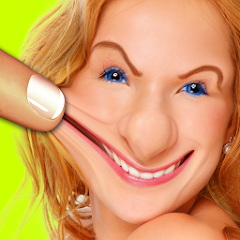
Warp My Face: Fun Photo Editor
Kaufcom Games Apps Widgets
Installs
5M+
Developer
Kaufcom Games Apps Widgets
-
Category
Video Players & Editors
-
Content Rating
Rated for 12+
Developer Email
Privacy Policy
http://www.kauf.com/cgi-bin/privacy_policy.pl
Screenshots
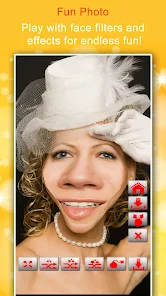
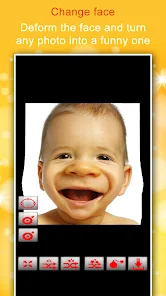
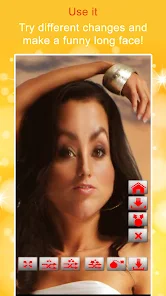
Expert Review
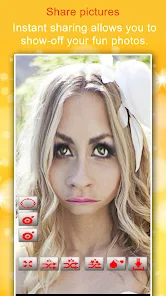
Warp My Face: Fun Photo Editor is exactly what its name suggests – a goofy, lighthearted app for twisting, stretching, and generally messing with photos of faces. It's a photo editing and entertainment app, perfect for creating hilarious pictures to share with friends. I first came across this app on the Google Play Store a few years back, and it's been a reliable source of laughs ever since. You can download it for free, and it doesn't require any registration to start warping faces right away. The app does show ads, which is pretty standard for a free download, and there are optional in-app purchases if you want to remove them or unlock some extra silly effects. It's got a solid number of installs, showing it's a popular choice for quick, fun photo edits.
Using the app is super straightforward. You just pick a photo from your gallery or take a new one, and then you use your finger to push, pull, and pinch different parts of the face. The nose, eyes, mouth – everything becomes putty in your hands. My tip is to start with a clear, well-lit photo for the best results; the warping effects work much better. You can also apply filters or add funny stickers after you're done distorting. I usually spend a few minutes creating a couple of ridiculous versions and then save them directly to my phone to send in messages or post on social media for a quick chuckle.
Compared to other similar apps in the photo fun genre, like FaceTune or even the distortion tools in Snapchat, Warp My Face is much more focused and simpler. It doesn't try to be a professional editor. Apps like FaceTune have some warping features, but they're buried among skin-smoothing and teeth-whitening tools. I chose Warp My Face because it's dedicated to pure, silly distortion. It loads fast, the controls are immediate, and there's no learning curve. For just creating a funny picture to make your friends laugh, it's quicker and more direct than opening a more complex app and hunting for the right tool.
Key Functional Highlights
- 🎭 Dedicated Face Warping: Unlike general photo editors, this app's entire purpose is to twist and morph facial features with intuitive touch controls. It's incredibly responsive and makes creating exaggerated, funny faces effortless.
- 🆓 Instant Free Fun: You can download and install the app without paying anything. There's no account needed, so you're warping photos within seconds of opening it for the first time, which is great for spontaneous fun.
- 😂 Focused on Humor: The effects and filters are all designed for comedy. From bulging eyes to stretched-out chins, every tool encourages you to make something intentionally ridiculous, setting it apart from beauty-focused apps.
- 📤 Quick Sharing: After editing, saving and sharing your creation is a one-tap process. The app integrates seamlessly with other platforms, making it easy to send your warped masterpiece directly to friends or post it online.
Advantages & Benefits
- 👍 Pure Simplicity: It does one thing (warp faces) and does it very well, without clutter. Compared to something like PicsArt, which has a million features, this app is refreshingly straightforward.
- 👍 No Learning Curve: The controls are so intuitive that anyone can use it immediately. Other apps, even fun ones like MSQRD (which is more for live masks), can sometimes be less direct.
- 👍 Lightweight & Fast: The app installs quickly and doesn't take up much space. It launches and processes edits faster than many bulkier photo editors on Google Play.
Areas for Improvement
- 👎 Ad-Supported Experience: The free version has frequent video and banner ads, which can interrupt the fun. To compare, some other free apps in this genre might have a less intrusive ad placement.
- 👎 Limited Beyond Faces: As the name says, it's for faces. If you try to warp other objects, the results are often weird and not in the fun way. An app like Photoshop Express offers more versatile distortion tools.
- 👎 Basic Feature Set: It's great for quick laughs but lacks depth. For example, you can't layer multiple effects with fine control like you can in more advanced editors, which might limit creative users.
Recommended Apps
![]()
ZEPETO: Avatar, Connect & Play
Naver Z Corporation4.3
![]()
Reverse Voice: Flip Singing
NindaFuit0![]()
AI Chat Ask Assistant - NowAI
Now Tech4.3![]()
Lie Detector Test: Prank App
DkTech inc.4.3![]()
Peachy - AI Face & Body Editor
InShot Video Editor4.8
![]()
AI Video Art Creator - Livensa
FERASET4.5![]()
Google Voice
Google LLC4.3![]()
Horoscopes & Tarot
Astrolis Horoscopes4.7![]()
eBay online shopping & selling
eBay Mobile4.6![]()
JPay
Jpay Mobile4.1![]()
Stranger Things 5 Challenges
MVH Entertainment Team5![]()
Chat Master: Prank Story
ABI Game Studio4.8![]()
Google Maps
Google LLC4.2![]()
AI Chat・Ask Chatbot Assistant
AI Chat Studio4.5![]()
Name Meanings with Impact
Alif Innovative Solution3.7















You May Like
-
![]()
True Tarot Card Reading
KaApps4.2 -
![]()
LinkedIn: Jobs & Business News
LinkedIn4.2 -
![]()
iControl: Easy Widgets Themes
Fancy keyboard for theme apps4.6 -
![]()
Duolingo: Language & Chess
Duolingo4.7 -
![]()
Flipped:Chat with AI Character
First Group pte ltd4.1 -
![]()
Hearing Age
Mobile Solutions Tech0 -
![]()
TikTok
TikTok Pte. Ltd.4.4 -
![]()
Pretty Makeup - Beauty Camera
Photo Editor Perfect Corp.4.4 -
![]()
PhotoRoom AI Photo Editor
PhotoRoom Background Editor App4.7 -
![]()
Lightleap by Lightricks
Lightricks Ltd.4.3 -
![]()
Name Meaning
Dexati4.1 -
![]()
Truth Social
T Media Tech LLC3.3 -
![]()
Ace Hardware
Ace Hardware Corporation4.7 -
![]()
Kpop Fans Demon Hunter Wallpap
JHNStudio4.3 -
![]()
Artplay - AI Photo & Video
Hideaway Technology Limited4.5











































