

AI Photo Editor, Collage-Fotor
AI Art Photo Editor | Everimaging Ltd.
Installs
10M+
Developer
AI Art Photo Editor | Everimaging Ltd.
-
Category
Video Players & Editors
-
Content Rating
Rated for 3+
Developer Email
Privacy Policy
http://www.fotor.com/privacy.html
Screenshots
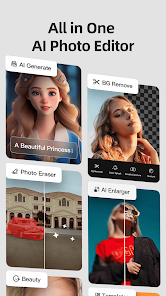
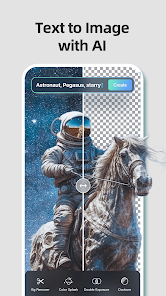
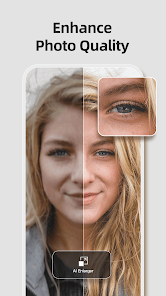
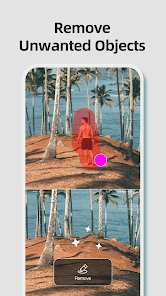
Expert Review
I've been using Fotor for a while now, and it's become my go-to app for quick photo edits and making collages. Basically, Fotor is an all-in-one photo editing and collage-making app. It launched way back in 2012, so it's been around for a good while. You can find it on both the Google Play Store and the App Store. It's super popular, with over 500 million downloads on Google Play alone. The app is free to download and install, which is great. You don't even need to create an account or register to start using most of its basic features right away. Of course, there are in-app purchases if you want to unlock the premium filters and tools, and you'll see some ads in the free version, but it's pretty manageable.
Using the app is straightforward. I usually open it, pick a photo from my gallery, and then just swipe through the different tabs. There's one for basic edits like cropping and adjusting brightness, another for fun filters and effects, and a dedicated section for creating collages with tons of layout templates. A good tip is to explore the 'Enhance' feature first—it often does a smart one-tap fix that makes photos look much better instantly. For collages, you can drag and drop your photos into the frames and then customize the borders and background color.
Compared to other apps in the same genre, like PicsArt or Canva, I keep coming back to Fotor. PicsArt feels a bit cluttered with social features I don't need, and Canva is more for design than pure photo editing. Fotor strikes a nice balance for me. It's focused on making your photos look good without being overly complicated. The collage maker is especially smooth and has more classic layouts I prefer. That's mainly why I chose this app over others; it just gets the job done quickly and well for everyday edits.
Key Functional Highlights
- 🖼️ All-in-One Editing Suite: Unlike some apps that specialize in just filters or just collages, Fotor packs everything into one place. After you install the app, you have access to basic touch-ups, advanced color curves, a huge library of filters, beauty tools for portraits, and a full-featured collage maker, all without jumping between different applications.
- 🤖 AI-Powered Enhancements: This is where Fotor really stands out. Its 'AI Enhance' feature analyzes your photo with one tap and automatically adjusts exposure, color, and sharpness. It often gives better results than me fiddling with sliders manually. Compared to similar apps, this AI touch feels more refined and consistently delivers a polished look.
- ✂️ Intuitive Collage Creator: The collage functionality is a core strength. It offers a massive grid of layout templates. You just pick one, add your photos, and the app smartly fits them in. You can then customize spacing, round corners, and change backgrounds effortlessly. It's much more streamlined than the collage module in some competing apps.
- 📁 Non-Destructive Editing: A feature I really appreciate is that your original photo is never altered. All edits are applied as layers, so you can go back and tweak or remove any effect at any time, even after saving. This gives a lot of freedom to experiment without worry.
Advantages & Benefits
- 👍 Streamlined Workflow: Compared to something like PicsArt, Fotor's interface is cleaner and less distracting. I can edit a photo and make a collage faster because the tools are logically organized and easy to find.
- 👍 Quality of One-Click Fixes: The 'Enhance' and 'AI Beauty' tools often produce better automatic results than the auto-fix features in other free editors like Photo Editor Pro, saving me a lot of time.
- 👍 Collage Layout Variety: It simply has a wider and more tasteful selection of grid and freestyle collage templates than many competitors, which often repeat the same basic layouts.
Areas for Improvement
- 👎 Ads in Free Version: The ad frequency can be intrusive, sometimes popping up between major actions. Apps like Snapseed are completely ad-free, which offers a smoother experience.
- 👎 Premium Paywall: Many of the best filters and advanced tools (like object removal) are locked behind a subscription. Other apps, such as Pixlr, offer a broader set of free features.
- 👎 Occasional Slowness: On older phones, the app can lag a bit, especially when applying complex AI effects or loading the full filter library. Lightweight apps like VSCO tend to run more smoothly on all devices.
Recommended Apps
![]()
ZEPETO: Avatar, Connect & Play
Naver Z Corporation4.3
![]()
Reverse Voice: Flip Singing
NindaFuit0![]()
AI Chat Ask Assistant - NowAI
Now Tech4.3![]()
Lie Detector Test: Prank App
DkTech inc.4.3![]()
Peachy - AI Face & Body Editor
InShot Video Editor4.8
![]()
AI Video Art Creator - Livensa
FERASET4.5![]()
Google Voice
Google LLC4.3![]()
Horoscopes & Tarot
Astrolis Horoscopes4.7![]()
eBay online shopping & selling
eBay Mobile4.6![]()
JPay
Jpay Mobile4.1![]()
Stranger Things 5 Challenges
MVH Entertainment Team5![]()
Chat Master: Prank Story
ABI Game Studio4.8![]()
Google Maps
Google LLC4.2![]()
AI Chat・Ask Chatbot Assistant
AI Chat Studio4.5![]()
Name Meanings with Impact
Alif Innovative Solution3.7















You May Like
-
![]()
True Tarot Card Reading
KaApps4.2 -
![]()
LinkedIn: Jobs & Business News
LinkedIn4.2 -
![]()
iControl: Easy Widgets Themes
Fancy keyboard for theme apps4.6 -
![]()
Duolingo: Language & Chess
Duolingo4.7 -
![]()
Flipped:Chat with AI Character
First Group pte ltd4.1 -
![]()
Hearing Age
Mobile Solutions Tech0 -
![]()
TikTok
TikTok Pte. Ltd.4.4 -
![]()
Pretty Makeup - Beauty Camera
Photo Editor Perfect Corp.4.4 -
![]()
PhotoRoom AI Photo Editor
PhotoRoom Background Editor App4.7 -
![]()
Lightleap by Lightricks
Lightricks Ltd.4.3 -
![]()
Name Meaning
Dexati4.1 -
![]()
Truth Social
T Media Tech LLC3.3 -
![]()
Ace Hardware
Ace Hardware Corporation4.7 -
![]()
Kpop Fans Demon Hunter Wallpap
JHNStudio4.3 -
![]()
Artplay - AI Photo & Video
Hideaway Technology Limited4.5









































