

Webex Meetings
Cisco Systems, Inc.
Installs
100,000,000+
Developer
Cisco Systems, Inc.
-
Category
Business
-
Content Rating
Rated for 3+
Developer Email
+18662293239
Privacy Policy
http://www.cisco.com/web/siteassets/legal/privacy.html
Screenshots


Expert Review
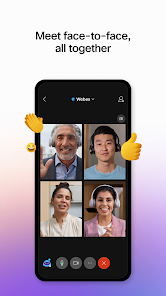
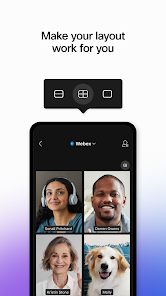
Webex Meetings is a video conferencing and online meeting app developed by Cisco. It's designed for hosting virtual meetings, webinars, and team collaborations. The app has been around for a long time, originally launching as a desktop platform, and its mobile version is widely available on both the Google Play Store and the Apple App Store. It has millions of downloads globally. You can download and install the app for free, and a basic account is also free to create, which is required to schedule or join meetings. While the core meeting features are accessible, there are premium plans for businesses that unlock more participants, longer meeting durations, and advanced admin controls. You might encounter some promotional messages for Cisco's other services, but in-meeting ads aren't really a thing, which keeps the experience professional.
Using the app is pretty straightforward. After you install it and sign in, you can either join a meeting instantly with a code or link, or schedule one for later. A handy tip is to set your audio and video preferences before joining to avoid fumbling when the meeting starts. For presenters, using the 'Share Content' feature to show your screen or a specific app works really well. I also recommend exploring the in-meeting chat and reaction emojis; they're great for interacting without interrupting the speaker.
Compared to other apps like Zoom or Microsoft Teams, I often find myself choosing Webex Meetings, especially for more formal or work-related calls. While Zoom is incredibly popular for its simplicity, Webex feels a bit more polished and secure for corporate environments. Google Meet is super easy if you're already in the Google ecosystem, but Webex offers more robust meeting controls and integration options out of the box. For me, the deciding factor was its reliability; the audio and video quality have been consistently solid, which isn't always the case with some other free apps. It strikes a good balance between being user-friendly and having the features you need for a serious meeting.
Key Functional Highlights
- 🔒 Enterprise-Grade Security: Right from the start, Webex is built with security in mind, offering end-to-end encryption for meetings. This is a core feature that sets it apart from many competitors and is a major reason businesses trust this app.
- 🔄 Seamless Device Switching: A standout feature is the ability to start a meeting on your phone and seamlessly transfer it to your laptop without dropping the call. This flexibility is something I use all the time and isn't as fluid in some other apps.
- 🎤 Advanced Audio Intelligence: The app includes features like noise removal and speech enhancement that automatically filter out background sounds. Compared to the basic audio in Google Meet, this makes a huge difference in noisy environments.
- 📁 Integrated File and Whiteboard Sharing: The sharing isn't just about your screen. You can directly pull files from cloud storage (like Box or Google Drive) into the meeting and collaborate on a digital whiteboard in real-time, which feels more integrated than the separate tools in Microsoft Teams.
Advantages & Benefits
- ✅ Rock-Solid Stability: The connection and audio/video quality are incredibly reliable. I've had fewer dropped calls or glitches compared to my experiences with the free version of Zoom.
- ✅ Superior Audio Clarity: The built-in audio processing (noise removal) is genuinely effective. In a side-by-side test with Google Meet, voices on Webex were consistently clearer when there was background noise.
- ✅ Professional Feature Set: It includes detailed host controls, waiting rooms, and meeting locks by default, which are sometimes behind paywalls in other apps. This makes it ready for professional use right after you install it.
Areas for Improvement
- ⚠️ Slightly Steeper Learning Curve: The interface, while powerful, isn't as instantly intuitive as Zoom's. New users might need a minute to find all the options, which can be a hurdle for quick, informal gatherings.
- ⚠️ Resource Usage on Mobile: The app can be a bit heavier on phone battery and data compared to lighter apps like Google Meet or WhatsApp calls, especially during long video meetings.
- ⚠️ Free Plan Limitations: While the free tier is generous, it has participant and time limits. For marathon brainstorming sessions, apps like Microsoft Teams (with its free plan) might offer longer uninterrupted meeting times.
Recommended Apps
![]()
ZEPETO: Avatar, Connect & Play
Naver Z Corporation4.3
![]()
Reverse Voice: Flip Singing
NindaFuit0![]()
AI Chat Ask Assistant - NowAI
Now Tech4.3![]()
Lie Detector Test: Prank App
DkTech inc.4.3![]()
Peachy - AI Face & Body Editor
InShot Video Editor4.8
![]()
AI Video Art Creator - Livensa
FERASET4.5![]()
Google Voice
Google LLC4.3![]()
Horoscopes & Tarot
Astrolis Horoscopes4.7![]()
eBay online shopping & selling
eBay Mobile4.6![]()
JPay
Jpay Mobile4.1![]()
Stranger Things 5 Challenges
MVH Entertainment Team5![]()
Chat Master: Prank Story
ABI Game Studio4.8![]()
Google Maps
Google LLC4.2![]()
AI Chat・Ask Chatbot Assistant
AI Chat Studio4.5![]()
Name Meanings with Impact
Alif Innovative Solution3.7















You May Like
-
![]()
True Tarot Card Reading
KaApps4.2 -
![]()
LinkedIn: Jobs & Business News
LinkedIn4.2 -
![]()
iControl: Easy Widgets Themes
Fancy keyboard for theme apps4.6 -
![]()
Duolingo: Language & Chess
Duolingo4.7 -
![]()
Flipped:Chat with AI Character
First Group pte ltd4.1 -
![]()
Hearing Age
Mobile Solutions Tech0 -
![]()
TikTok
TikTok Pte. Ltd.4.4 -
![]()
Pretty Makeup - Beauty Camera
Photo Editor Perfect Corp.4.4 -
![]()
PhotoRoom AI Photo Editor
PhotoRoom Background Editor App4.7 -
![]()
Lightleap by Lightricks
Lightricks Ltd.4.3 -
![]()
Name Meaning
Dexati4.1 -
![]()
Truth Social
T Media Tech LLC3.3 -
![]()
Ace Hardware
Ace Hardware Corporation4.7 -
![]()
Kpop Fans Demon Hunter Wallpap
JHNStudio4.3 -
![]()
Artplay - AI Photo & Video
Hideaway Technology Limited4.5










































