
Perfect Me -Face & Body Editor
ryzenrise
Installs
10M+
Developer
ryzenrise
-
Category
Video Players & Editors
-
Content Rating
Rated for 3+
Developer Email
Privacy Policy
https://www.wisharcbuilder.com/privacy_perfectme.html
Screenshots
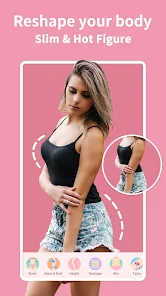
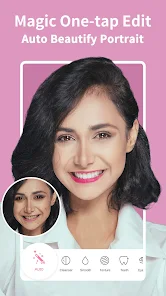
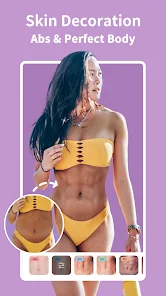
Expert Review
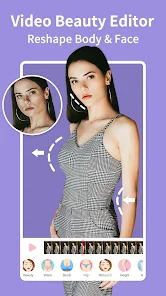
I've been using Perfect Me - Face & Body Editor for a few months now, and it's become my go-to photo editing app. This app is designed for quick and easy touch-ups, letting you adjust facial features, slim your body, and enhance your skin with just a few taps. It first launched a while back, and you can find it on the Google Play Store. It has millions of downloads, which shows how popular it is. The app itself is free to download and install, and you don't need to register an account to start using it right away. That's a big plus for me because I hate signing up for things. Of course, being a free app, it does have in-app ads and offers various premium filters and tools through in-app purchases if you want to unlock everything.
Using the app is super straightforward. I usually open a photo, and the app's AI suggests adjustments automatically, which is a great starting point. My tip is to use the sliders subtly; a little change goes a long way to looking natural. I often just smooth my skin a bit and adjust the lighting. The 'reshape' tool is powerful but easy to overdo, so I keep it around 10-15% max. You can also use it for full-body shots to tweak posture or proportions. It's all about enhancing, not completely changing how you look.
I've tried other similar apps like FaceTune or AirBrush, but I keep coming back to Perfect Me. Why? For one, it feels less complicated. Some of those other apps have so many options it gets overwhelming. Perfect Me gives me the core editing tools I actually use without the clutter. Also, for a free app, the results from Perfect Me are really impressive. The sliders are responsive, and the changes apply instantly without making the photo look obviously edited or plastic. It just gets the job done quickly, which is what I need when I'm posting on social media.
Key Functional Highlights
- 🎯 Smart Auto-Enhance: Unlike many editors that make you figure everything out, Perfect Me's one-tap 'Auto' feature analyzes your photo and applies balanced adjustments to skin, brightness, and contrast. It's a fantastic starting point that often gets you 80% of the way there without any manual work.
- 🎯 Precise Localized Editing: A standout feature for me is the ability to edit specific areas. You can brighten just your eyes, whiten teeth selectively, or smooth skin on one spot without affecting the whole face. This level of control rivals premium apps but is accessible here for free.
- 🎯 Natural-Body Reshaping Tools: Compared to other body editors that can distort backgrounds, Perfect Me's algorithms are smarter. The sliders for slimming or height adjustment work more intelligently, preserving the integrity of your surroundings for a more believable result.
- 🎯 Diverse & Trendy Filters: Beyond basic edits, the app offers a constantly updated library of filters and makeup looks. From natural 'no-makeup' glow to bold editorial styles, it keeps up with trends better than some static competitors.
Advantages & Benefits
- ✅ User-Friendly Interface: Compared to something like Photoshop Express or even Facetune, Perfect Me's layout is intuitive. Tools are logically grouped, and you're not buried in menus. It's perfect for quick edits.
- ✅ Great Free Tier: Apps like AirBrush lock essential tools behind a paywall quickly. With Perfect Me, the free version is genuinely usable for most basic edits, which is a huge strength.
- ✅ Fast Processing: The app works quickly even on older phones. I've used apps that lag with every slider move, but Perfect Me applies changes in real-time, making the editing process smooth.
Areas for Improvement
- ⚠️ Persistent Ads: The ad frequency in the free version can be intrusive, popping up between edits. Some competing apps offer a one-time payment to remove ads, which I'd prefer here.
- ⚠️ Premium Feature Paywall: The best filters and advanced tools (like background changes) require a subscription. While common, it feels a bit more aggressive here than in similar apps.
- ⚠️ Occasional Over-Smoothing: On automatic settings, the skin smoothing can sometimes look a bit too perfect and uniform, losing skin texture. Manual adjustment is needed to avoid this.
Recommended Apps
![]()
ZEPETO: Avatar, Connect & Play
Naver Z Corporation4.3
![]()
Reverse Voice: Flip Singing
NindaFuit0![]()
AI Chat Ask Assistant - NowAI
Now Tech4.3![]()
Lie Detector Test: Prank App
DkTech inc.4.3![]()
Peachy - AI Face & Body Editor
InShot Video Editor4.8
![]()
AI Video Art Creator - Livensa
FERASET4.5![]()
Google Voice
Google LLC4.3![]()
Horoscopes & Tarot
Astrolis Horoscopes4.7![]()
eBay online shopping & selling
eBay Mobile4.6![]()
JPay
Jpay Mobile4.1![]()
Stranger Things 5 Challenges
MVH Entertainment Team5![]()
Chat Master: Prank Story
ABI Game Studio4.8![]()
Google Maps
Google LLC4.2![]()
AI Chat・Ask Chatbot Assistant
AI Chat Studio4.5![]()
Name Meanings with Impact
Alif Innovative Solution3.7















You May Like
-
![]()
True Tarot Card Reading
KaApps4.2 -
![]()
LinkedIn: Jobs & Business News
LinkedIn4.2 -
![]()
iControl: Easy Widgets Themes
Fancy keyboard for theme apps4.6 -
![]()
Duolingo: Language & Chess
Duolingo4.7 -
![]()
Flipped:Chat with AI Character
First Group pte ltd4.1 -
![]()
Hearing Age
Mobile Solutions Tech0 -
![]()
TikTok
TikTok Pte. Ltd.4.4 -
![]()
Pretty Makeup - Beauty Camera
Photo Editor Perfect Corp.4.4 -
![]()
PhotoRoom AI Photo Editor
PhotoRoom Background Editor App4.7 -
![]()
Lightleap by Lightricks
Lightricks Ltd.4.3 -
![]()
Name Meaning
Dexati4.1 -
![]()
Truth Social
T Media Tech LLC3.3 -
![]()
Ace Hardware
Ace Hardware Corporation4.7 -
![]()
Kpop Fans Demon Hunter Wallpap
JHNStudio4.3 -
![]()
Artplay - AI Photo & Video
Hideaway Technology Limited4.5












































