
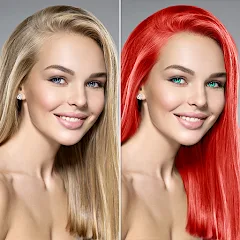
Change Hair And Eye Color
Csmartworld
Installs
10M+
Developer
Csmartworld
-
Category
Video Players & Editors
-
Content Rating
Rated for 3+
Developer Email
Privacy Policy
http://csmartworldprivacypolicy.blogspot.in/2017/03/privacy-policy-of-csmartworldterms-and.html
Screenshots
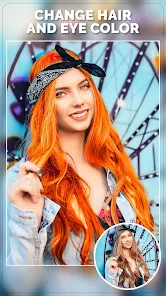
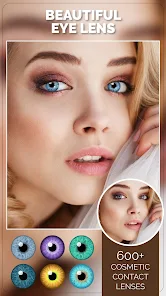
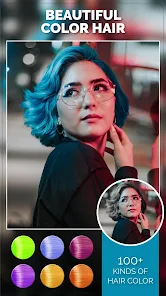
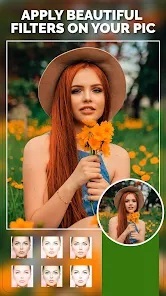
Expert Review
I've been using the Change Hair And Eye Color app for a while now, and it's exactly what it sounds like. It's a photo-editing app focused on letting you digitally try out different hair colors and eye colors on your photos. I first downloaded it from the Google Play store a couple of years ago. The app is free to install and has a pretty high download count, which gave me some confidence before I hit the install button. You don't need to register an account to start playing around with it, which is nice for quick edits. However, to unlock all the premium colors and tools, there is an in-app purchase. You'll also see some banner ads at the bottom, but they're not too intrusive during the editing process.
Using the app is straightforward. You just pick a photo from your gallery, and the app usually does a decent job of detecting your hair and eyes. For hair, you use a brush tool to paint over the areas you want to change. My tip is to zoom in and use a smaller brush for edges like around your face and ears to make the color look more natural. For eyes, you often just tap on the iris, and the app applies the color. It's fun for seeing what you'd look like with, say, blue hair or green eyes without any commitment.
There are other similar apps out there, like YouCam Makeup or FaceApp, which offer hair color changes as part of a bigger suite of beauty filters. I chose this specific app because it's dedicated to just hair and eyes. It feels less cluttered. While those other apps might have more advanced AI, this one is simpler and faster for the one thing I want to do. If all you care about is experimenting with hair and eye color quickly, this app from Csmartworld gets the job done without overcomplicating things.
Key Functional Highlights
- 🎨 Focused Editing Tools: Unlike broader beauty apps, this app's tools are specialized. The hair color brush and eye color picker are intuitive and designed specifically for these transformations, making the process quicker than hunting through menus in a more complex app.
- 📁 Instant Gallery Access: Right after you install the app, you can immediately access your phone's photo gallery. There's no forced tutorial or login wall, so you can jump straight into testing colors on your pictures.
- 🌈 Wide Color Palette for Free: Even without purchasing the premium pack, the app offers a solid range of natural and fun hair and eye colors to download and try. This lets you do a lot of experimentation before deciding if you need more options.
Advantages & Benefits
- 👍 Simplicity Over Bloat: Compared to something like FaceApp, which is packed with features, this app's strength is its single-purpose design. It launches fast and does the one thing it promises without distractions.
- 👍 Quality of Basic Edits: For a free app, the color overlay on hair can look surprisingly natural if you take your time with the brush. It often does a better job on hair than the more automated process in some similar apps.
- 👍 No Account Needed: You can download, install, and use the core features immediately without handing over an email. Many other apps in this genre now require sign-ups.
Areas for Improvement
- 👎 Ads and Upsells: The free version has banner ads and constant prompts to buy the premium pack. Apps like YouCam Makeup also have ads, but the prompts here can feel a bit more persistent during your editing session.
- 👎 AI Detection Can Be Spotty: The auto-detection for hair and eyes isn't always perfect, especially with complex hairstyles or low-light photos. You might spend more time manually correcting than with a more advanced app.
- 👎 Limited Sharing Options: Once you're done, the sharing options within the app are basic. Other social media-focused apps have more integrated sharing features to platforms like Instagram.
Recommended Apps
![]()
ZEPETO: Avatar, Connect & Play
Naver Z Corporation4.3
![]()
Reverse Voice: Flip Singing
NindaFuit0![]()
AI Chat Ask Assistant - NowAI
Now Tech4.3![]()
Lie Detector Test: Prank App
DkTech inc.4.3![]()
Peachy - AI Face & Body Editor
InShot Video Editor4.8
![]()
AI Video Art Creator - Livensa
FERASET4.5![]()
Google Voice
Google LLC4.3![]()
Horoscopes & Tarot
Astrolis Horoscopes4.7![]()
eBay online shopping & selling
eBay Mobile4.6![]()
JPay
Jpay Mobile4.1![]()
Stranger Things 5 Challenges
MVH Entertainment Team5![]()
Chat Master: Prank Story
ABI Game Studio4.8![]()
Google Maps
Google LLC4.2![]()
AI Chat・Ask Chatbot Assistant
AI Chat Studio4.5![]()
Name Meanings with Impact
Alif Innovative Solution3.7















You May Like
-
![]()
True Tarot Card Reading
KaApps4.2 -
![]()
LinkedIn: Jobs & Business News
LinkedIn4.2 -
![]()
iControl: Easy Widgets Themes
Fancy keyboard for theme apps4.6 -
![]()
Duolingo: Language & Chess
Duolingo4.7 -
![]()
Flipped:Chat with AI Character
First Group pte ltd4.1 -
![]()
Hearing Age
Mobile Solutions Tech0 -
![]()
TikTok
TikTok Pte. Ltd.4.4 -
![]()
Pretty Makeup - Beauty Camera
Photo Editor Perfect Corp.4.4 -
![]()
PhotoRoom AI Photo Editor
PhotoRoom Background Editor App4.7 -
![]()
Lightleap by Lightricks
Lightricks Ltd.4.3 -
![]()
Name Meaning
Dexati4.1 -
![]()
Truth Social
T Media Tech LLC3.3 -
![]()
Ace Hardware
Ace Hardware Corporation4.7 -
![]()
Kpop Fans Demon Hunter Wallpap
JHNStudio4.3 -
![]()
Artplay - AI Photo & Video
Hideaway Technology Limited4.5












































