

myChevrolet
General Motors (GM)
Installs
5M+
Developer
General Motors (GM)
-
Category
Lifestyle
-
Content Rating
Everyone
Developer Email
Privacy Policy
https://www.gm.com/privacy-statement?evar25=onstar_legal_privacy
Screenshots
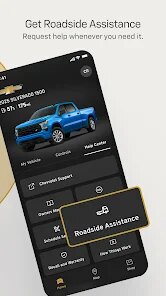
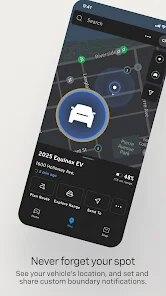
Expert Review
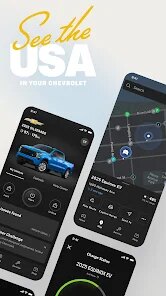
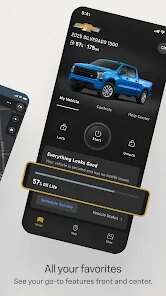
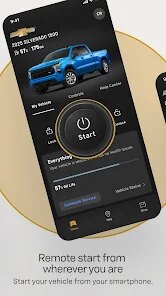
Available through Google Play, myChevrolet is the official companion app for Chevrolet vehicle owners, developed by General Motors. It serves as a centralized hub for managing various aspects of vehicle ownership, from remote start and lock/unlock functions to scheduling service appointments and viewing vehicle diagnostics. The app itself is free to download and install, though it naturally requires an active OnStar subscription for many of its more advanced connected features. While the download scale is significant, given Chevrolet's market presence, you will encounter some in-app prompts for services and plan upgrades, but the core functionality is not cluttered with excessive third-party advertising.
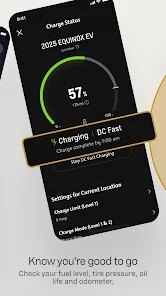
The main interface presents a clean dashboard upon launch, displaying essential information like fuel level, tire pressure, and oil life at a glance. Navigating to the remote functions is straightforward, with clearly labeled buttons for starting the engine or activating the horn and lights. I found the service appointment scheduler particularly intuitive; it pulls up nearby dealerships and available time slots without requiring a separate search. The app also logs trip data and driving efficiency metrics, which update reasonably quickly, though not in real-time. One minor frustration is that the app can take a few extra seconds to wake up and establish a connection with the vehicle, especially on a weak cellular network.
Compared to FordPass, which feels more aggressively marketed with its reward points and plan upgrade notices, myChevrolet presents a slightly more utilitarian approach. Both apps offer similar core functions like remote start and vehicle status, but the Chevrolet app places a heavier emphasis on detailed vehicle health data and diagnostic alerts. Where FordPass feels geared toward a younger, more connected lifestyle, myChevrolet seems designed for someone who wants straightforward vehicle management without many social or gamified elements. That said, the app's design language feels a bit dated compared to Tesla's minimalist and highly responsive interface, though that is an entirely different platform with a different ownership model.
Key Functional Highlights
- The remote start and climate control functions work reliably, allowing you to precondition the cabin from a distance. I have used this on hot days, and the car was noticeably cooler by the time I reached it, though the app's feedback on the actual interior temperature is not available.
- Vehicle health alerts are sent directly to your phone, such as low tire pressure or a check engine light notification. This proactive warning system saved me from driving on an under-inflated tire, providing a clear description of the issue rather than just a generic alert.
- Parked vehicle locator is a nice touch, marking your car's position on the map using GPS. It is especially handy in sprawling parking lots, but unlike Hyundai's Blue Link system, it does not offer a guided augmented reality view to find the car.
Advantages & Benefits
- Scheduling a service appointment through the app takes less than a minute, and you can select specific reasons for the visit, which helps the dealership prepare in advance.
- Viewing your vehicle's diagnostic data remotely gives you peace of mind before long trips, allowing you to catch potential problems without physically checking the car.
- The ability to remotely lock or unlock doors has been useful when I have forgotten whether I secured the car or needed to let someone grab something from it.
Areas for Improvement
- The app sometimes requires you to log in again after a few days of inactivity, which can be slightly inconvenient if you are just trying to quickly check your fuel level.
- Map and location loading within the app can be noticeably slow compared to standalone navigation apps, occasionally freezing or failing to load the correct address.
- Certain features, like remote start, do not work if your vehicle is parked in a location with poor cellular reception, which is understandable but still limiting in suburban garages.
Recommended Apps
![]()
ZEPETO: Avatar, Connect & Play
Naver Z Corporation4.3
![]()
Reverse Voice: Flip Singing
NindaFuit0![]()
AI Chat Ask Assistant - NowAI
Now Tech4.3![]()
Lie Detector Test: Prank App
DkTech inc.4.3![]()
Peachy - AI Face & Body Editor
InShot Video Editor4.8
![]()
AI Video Art Creator - Livensa
FERASET4.5![]()
Google Voice
Google LLC4.3![]()
Horoscopes & Tarot
Astrolis Horoscopes4.7![]()
eBay online shopping & selling
eBay Mobile4.6![]()
JPay
Jpay Mobile4.1![]()
Stranger Things 5 Challenges
MVH Entertainment Team5![]()
Chat Master: Prank Story
ABI Game Studio4.8![]()
Google Maps
Google LLC4.2![]()
AI Chat・Ask Chatbot Assistant
AI Chat Studio4.5![]()
Name Meanings with Impact
Alif Innovative Solution3.7















You May Like
-
![]()
True Tarot Card Reading
KaApps4.2 -
![]()
LinkedIn: Jobs & Business News
LinkedIn4.2 -
![]()
iControl: Easy Widgets Themes
Fancy keyboard for theme apps4.6 -
![]()
Duolingo: Language & Chess
Duolingo4.7 -
![]()
Flipped:Chat with AI Character
First Group pte ltd4.1 -
![]()
Hearing Age
Mobile Solutions Tech0 -
![]()
TikTok
TikTok Pte. Ltd.4.4 -
![]()
Pretty Makeup - Beauty Camera
Photo Editor Perfect Corp.4.4 -
![]()
PhotoRoom AI Photo Editor
PhotoRoom Background Editor App4.7 -
![]()
Lightleap by Lightricks
Lightricks Ltd.4.3 -
![]()
Name Meaning
Dexati4.1 -
![]()
Truth Social
T Media Tech LLC3.3 -
![]()
Ace Hardware
Ace Hardware Corporation4.7 -
![]()
Kpop Fans Demon Hunter Wallpap
JHNStudio4.3 -
![]()
Artplay - AI Photo & Video
Hideaway Technology Limited4.5










































