
Amazon Prime Video
Amazon Mobile LLC
Installs
500,000,000+
Developer
Amazon Mobile LLC
-
Category
Entertainment
-
Content Rating
Rated for 12+
Developer Email
Privacy Policy
http://www.amazon.com/gp/help/customer/display.html?nodeId=468496
Screenshots
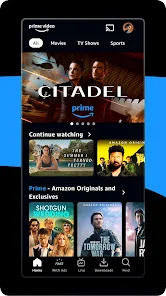

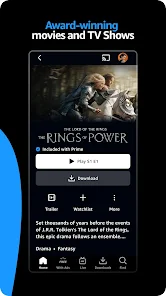
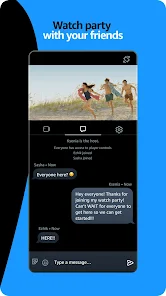
Expert Review
Amazon Prime Video is a streaming app that lets you watch movies, TV shows, and Amazon Originals. It's part of an Amazon Prime membership, but you can also get the app separately. The service launched back in 2006 as Amazon Unbox in the US, and the mobile app has been available for download on Google Play and the App Store for years. It has over 100 million installs on Google Play alone. You can download the app for free, but you need a subscription to watch most content. No separate registration is needed if you use your existing Amazon account. While the app itself is free to install, there are in-app purchases for renting or buying titles not included with Prime, and you might see some ads for Amazon's own shows before you start watching.
Using the app is pretty straightforward. I mainly watch on my tablet. You can browse by genre or use the search, and the 'Watch Next' row is helpful for continuing series. A good tip is to download shows for offline viewing before a trip – it's a lifesaver on flights without Wi-Fi. The X-Ray feature is cool too; just pause and it shows you actor names and song info. For families, setting up separate profiles keeps recommendations from getting mixed up.
Compared to other apps like Netflix or Hulu, I keep coming back to Prime Video for a couple of reasons. First, it's bundled with my Prime membership for shipping, so it feels like a bonus. The selection of older movies and niche genres is often better. While Netflix has more buzzworthy originals, Prime Video has gems like 'The Boys' and 'The Marvelous Mrs. Maisel'. The interface is less flashy than Disney+ but I find it easier to navigate. For the price, especially if you already have Prime, it's hard to beat the value you get from this app.
Key Functional Highlights
- 📦 Offline Downloads: Unlike some apps that restrict downloads, Prime Video lets you download a huge amount of content to watch later without any internet. This is perfect for commutes or travel.
- 🎭 X-Ray Feature: This is a standout. While watching, you can pause and instantly see the actors on screen, hear the soundtrack, or get trivia. Netflix has something similar but Prime's integration with IMDb feels more detailed.
- 🌐 Global Content & Channels: You can subscribe to other streaming channels like Paramount+ or STARZ right inside the app. Compared to Hulu's live TV bundle, this is a more à la carte way to manage all your subscriptions in one place.
- 👨👩👧👦 Profile & Parental Controls: Setting up individual profiles is easy, and the parental controls are robust. You can set PINs for mature content, which is more straightforward than the profile maturity settings on Disney+.
Advantages & Benefits
- 💰 Value with Prime: If you're already an Amazon Prime member for shipping, the video app is a massive free bonus. Compared to paying for Netflix or Disney+ separately, this bundled value is its biggest strength.
- 🎬 Deep Movie Library: It often has a better catalog of classic and indie films than Netflix, which focuses more on recent releases and originals.
- 📱 Stable Performance: The app rarely crashes or buffers compared to my experience with other apps like HBO Max, which can sometimes be buggy.
Areas for Improvement
- 🔍 Cluttered Interface: The home screen can feel messy with too many promotional rows. Apps like Apple TV+ have a much cleaner, more curated look.
- ⚠️ Inconsistent Content: Movies and shows frequently leave the service. Your watchlist might shrink overnight, which is less of an issue on Netflix with its more stable core library.
- 📺 Ad Interruptions: While not mid-show, you can't skip the previews for other Amazon Originals before your content starts. Pure, ad-free platforms like Disney+ don't have this.
Recommended Apps
![]()
ZEPETO: Avatar, Connect & Play
Naver Z Corporation4.3
![]()
Reverse Voice: Flip Singing
NindaFuit0![]()
AI Chat Ask Assistant - NowAI
Now Tech4.3![]()
Lie Detector Test: Prank App
DkTech inc.4.3![]()
Peachy - AI Face & Body Editor
InShot Video Editor4.8
![]()
AI Video Art Creator - Livensa
FERASET4.5![]()
Google Voice
Google LLC4.3![]()
Horoscopes & Tarot
Astrolis Horoscopes4.7![]()
eBay online shopping & selling
eBay Mobile4.6![]()
JPay
Jpay Mobile4.1![]()
Stranger Things 5 Challenges
MVH Entertainment Team5![]()
Chat Master: Prank Story
ABI Game Studio4.8![]()
Google Maps
Google LLC4.2![]()
AI Chat・Ask Chatbot Assistant
AI Chat Studio4.5![]()
Name Meanings with Impact
Alif Innovative Solution3.7















You May Like
-
![]()
True Tarot Card Reading
KaApps4.2 -
![]()
LinkedIn: Jobs & Business News
LinkedIn4.2 -
![]()
iControl: Easy Widgets Themes
Fancy keyboard for theme apps4.6 -
![]()
Duolingo: Language & Chess
Duolingo4.7 -
![]()
Flipped:Chat with AI Character
First Group pte ltd4.1 -
![]()
Hearing Age
Mobile Solutions Tech0 -
![]()
TikTok
TikTok Pte. Ltd.4.4 -
![]()
Pretty Makeup - Beauty Camera
Photo Editor Perfect Corp.4.4 -
![]()
PhotoRoom AI Photo Editor
PhotoRoom Background Editor App4.7 -
![]()
Lightleap by Lightricks
Lightricks Ltd.4.3 -
![]()
Name Meaning
Dexati4.1 -
![]()
Truth Social
T Media Tech LLC3.3 -
![]()
Ace Hardware
Ace Hardware Corporation4.7 -
![]()
Kpop Fans Demon Hunter Wallpap
JHNStudio4.3 -
![]()
Artplay - AI Photo & Video
Hideaway Technology Limited4.5












































