

Walgreens
Walgreen Co.
Installs
10,000,000+
Developer
Walgreen Co.
-
Category
Health & Fitness
-
Content Rating
Rated for 3+
Developer Email
Privacy Policy
http://www.walgreens.com/topic/help/generalhelp/privacyandsecurity.jsp
Screenshots
Expert Review
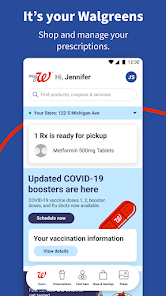
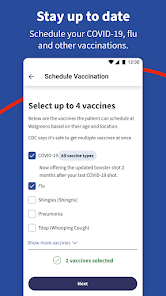
I've been using the Walgreens app for years now to manage my prescriptions and shop for everyday essentials. It's basically the digital version of the physical store, letting you handle everything from refilling medications to browsing weekly deals right from your phone. The app first launched a good while back, and you can easily download it for free from the Google Play Store or the Apple App Store. It has millions of installs, which isn't surprising given how many people rely on Walgreens. You don't need to pay to install it, but you do need to create an account to get the full experience, like accessing your prescription history. While the core app is free, there are optional in-app purchases, like buying photo prints or gifts, and you will occasionally see ads or promotions for their own products and services.
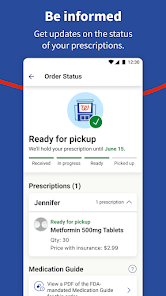
Using the app is pretty straightforward. I mainly use it for prescription refills – you just scan the barcode on your bottle, and it's done. A great tip is to set up notifications for when your refills are ready; it saves a trip to the store if there's a delay. I also use the app to clip digital coupons before I shop. You have to add them to your balance in the app, and then they apply automatically at the register when you pay with your linked account. It's much easier than cutting out paper coupons.
Compared to other pharmacy apps like CVS or Rite Aid, I stick with Walgreens because it feels more integrated with my local store's inventory. The 'Refill by Scan' feature is a huge time-saver that some others don't have, or it's not as smooth. While the CVS app might have similar features, I find the Walgreens app layout cleaner for quickly checking prescription status. For someone who just needs a reliable way to manage meds and grab some toothpaste on sale, this app gets the job done without much fuss.
Key Functional Highlights
- 📱 Refill by Scan: This is the killer feature for me. Instead of typing in long prescription numbers, you just point your camera at the barcode on your old bottle. The Walgreens app reads it and queues up the refill in seconds. It's way faster than the manual entry required in some competing apps.
- 🛒 Integrated Shopping & Deals: The app seamlessly blends pharmacy needs with general shopping. I can refill a prescription, browse the weekly ad, clip digital coupons directly to my account, and even get my photo prints—all in one place. Other apps often separate these functions into different sections.
- 📍 Real-Time Store Details: It shows precise info for my chosen Walgreens location, like pharmacy hours, wait times for prescription pickup, and whether an item is in stock at that specific store. This level of local integration is more accurate than what I've seen in some broader retail apps.
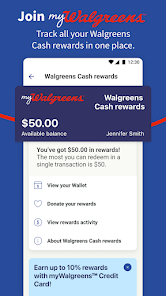
- 💳 Streamlined Pickup & Payment: With Walgreens Balance Rewards linked, I can pay for everything (scripts and shopping) right in the app and just show a barcode for contactless pickup. It turns a multi-step checkout process into a single scan, which is more cohesive than systems that handle pharmacy and front-store purchases separately.
Advantages & Benefits
- ✅ Refill Process: The barcode scan refill is unmatched for convenience compared to manual entry on apps like the CVS app.
- ✅ Coupon Integration: Digital coupons auto-apply at checkout when your account is linked, which is smoother than some systems that require a separate barcode.
- ✅ All-in-One Hub: It reliably combines pharmacy, shopping, and photo services in a single, familiar app, reducing the need for multiple store-specific apps.
Areas for Improvement
- ❌ Promotional Push: The app can feel cluttered with ads and promotions for Walgreens brands, more so than a minimalist app like the Target app.
- ❌ Account Dependency: You need a full account for almost everything, even basic tasks like viewing the weekly ad, which isn't always required elsewhere.
- ❌ Occasional Bugs: Like many big retail apps, it sometimes has glitches, like clipped coupons not appearing or pickup notifications being delayed.
Recommended Apps
![]()
ZEPETO: Avatar, Connect & Play
Naver Z Corporation4.3
![]()
Reverse Voice: Flip Singing
NindaFuit0![]()
AI Chat Ask Assistant - NowAI
Now Tech4.3![]()
Lie Detector Test: Prank App
DkTech inc.4.3![]()
Peachy - AI Face & Body Editor
InShot Video Editor4.8
![]()
AI Video Art Creator - Livensa
FERASET4.5![]()
Google Voice
Google LLC4.3![]()
Horoscopes & Tarot
Astrolis Horoscopes4.7![]()
eBay online shopping & selling
eBay Mobile4.6![]()
JPay
Jpay Mobile4.1![]()
Stranger Things 5 Challenges
MVH Entertainment Team5![]()
Chat Master: Prank Story
ABI Game Studio4.8![]()
Google Maps
Google LLC4.2![]()
AI Chat・Ask Chatbot Assistant
AI Chat Studio4.5![]()
Name Meanings with Impact
Alif Innovative Solution3.7















You May Like
-
![]()
True Tarot Card Reading
KaApps4.2 -
![]()
LinkedIn: Jobs & Business News
LinkedIn4.2 -
![]()
iControl: Easy Widgets Themes
Fancy keyboard for theme apps4.6 -
![]()
Duolingo: Language & Chess
Duolingo4.7 -
![]()
Flipped:Chat with AI Character
First Group pte ltd4.1 -
![]()
Hearing Age
Mobile Solutions Tech0 -
![]()
TikTok
TikTok Pte. Ltd.4.4 -
![]()
Pretty Makeup - Beauty Camera
Photo Editor Perfect Corp.4.4 -
![]()
PhotoRoom AI Photo Editor
PhotoRoom Background Editor App4.7 -
![]()
Lightleap by Lightricks
Lightricks Ltd.4.3 -
![]()
Name Meaning
Dexati4.1 -
![]()
Truth Social
T Media Tech LLC3.3 -
![]()
Ace Hardware
Ace Hardware Corporation4.7 -
![]()
Kpop Fans Demon Hunter Wallpap
JHNStudio4.3 -
![]()
Artplay - AI Photo & Video
Hideaway Technology Limited4.5












































