

Medic Scanner - skin analyze
Investment Analytics
Installs
100K+
Developer
Investment Analytics
-
Category
Health & Fitness
-
Content Rating
Everyone
Developer Email
Privacy Policy
https://medicscanner.com/en/polityka-prywatnosci
Screenshots

Expert Review
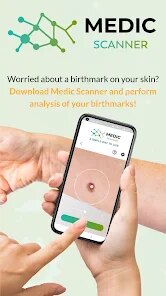
Medical scanning applications have carved out a notable niche in the health tech space, and this one focuses specifically on dermatological analysis. Available for download on Google Play, the app promises to assess skin conditions using the phone's camera. The install base remains modest compared to mainstream health apps, which suggests it's still building its user community. It operates on a freemium model, offering basic scans at no cost while reserving advanced reports for a subscription. Users do encounter occasional advertisements within the free tier, though they are not overly intrusive.
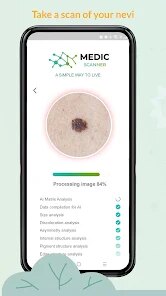
The core interaction revolves around capturing an image of a skin irregularity and running it through the detection algorithms. I tried it on a minor spot I had been casually monitoring, and the process felt straightforward enough. The app asks you to position the camera carefully and maintain steady lighting, which makes sense given how much visual data influences the analysis. It then cross-references the image against its internal database, delivering a preliminary assessment within seconds. I found the response time reasonable, though the accuracy of the result left me slightly cautious rather than fully reassured.
Among the many skin analysis tools on the market, this one distinguishes itself by emphasizing mobile accessibility rather than deep clinical rigor. Competitors like SkinVision lean heavier into medical validation and professional network integration, while this app prioritizes simplicity and speed. It lacks the polished interface of some rivals, but it also steers clear of overwhelming users with jargon or excessive data fields. That trade-off works nicely for someone who wants quick impressions rather than exhaustive diagnostic detail.
Key Functional Highlights
- The camera calibration process stands out as particularly helpful. Before any analysis, the app guides you through lighting adjustments and focus optimization. I appreciated this step because it reduced the likelihood of inaccurate scans due to poor image quality. In contrast, some competing apps skip this guidance entirely and produce less reliable images.
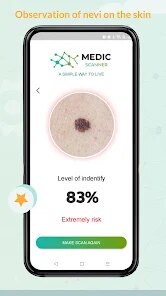
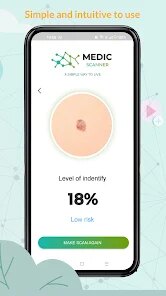
- Scan results are presented with a color-coded risk indicator rather than just raw text. Green, yellow, and red categories make the output intuitive at a glance. This visual approach helps users quickly grasp the severity without needing medical training.
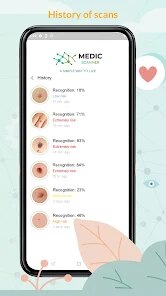
- History tracking allows you to compare scans over time. You can photograph the same spot after intervals and see how the risk level changes. This feature proved useful when monitoring a mole I was concerned about, as it gave me a clearer picture of whether it was actually changing or just appearing different.
- One element that surprised me was the lack of a comprehensive FAQ section inside the app. Similar applications often embed explanatory content about skin conditions, whereas this one leaves users to interpret findings on their own.
Advantages & Benefits
- It provides a useful starting point for deciding whether a skin mark warrants professional attention. Rather than ignoring something or panicking, I got a reasoned suggestion to either monitor or consult a doctor.
- The scanning process is quick enough for regular use. Taking a photo and getting feedback takes maybe two minutes, which makes it easy to incorporate into a routine check.
- It reduces anxiety around uncertain skin changes by giving you data rather than just guesswork. For me, that alone justified the download.
Areas for Improvement
- Results lack the depth and validation of a clinical examination. I would never rely solely on this app for medical decisions.
- Free tier limitations are noticeable. After a handful of scans, the app prompts you to subscribe for more detailed breakdowns.
- The interface occasionally feels cluttered, with too many menu options competing for attention. Navigating settings took longer than I expected.
Recommended Apps
![]()
ZEPETO: Avatar, Connect & Play
Naver Z Corporation4.3
![]()
Reverse Voice: Flip Singing
NindaFuit0![]()
AI Chat Ask Assistant - NowAI
Now Tech4.3![]()
Lie Detector Test: Prank App
DkTech inc.4.3![]()
Peachy - AI Face & Body Editor
InShot Video Editor4.8
![]()
AI Video Art Creator - Livensa
FERASET4.5![]()
Google Voice
Google LLC4.3![]()
Horoscopes & Tarot
Astrolis Horoscopes4.7![]()
eBay online shopping & selling
eBay Mobile4.6![]()
JPay
Jpay Mobile4.1![]()
Stranger Things 5 Challenges
MVH Entertainment Team5![]()
Chat Master: Prank Story
ABI Game Studio4.8![]()
Google Maps
Google LLC4.2![]()
AI Chat・Ask Chatbot Assistant
AI Chat Studio4.5![]()
Name Meanings with Impact
Alif Innovative Solution3.7















You May Like
-
![]()
True Tarot Card Reading
KaApps4.2 -
![]()
LinkedIn: Jobs & Business News
LinkedIn4.2 -
![]()
iControl: Easy Widgets Themes
Fancy keyboard for theme apps4.6 -
![]()
Duolingo: Language & Chess
Duolingo4.7 -
![]()
Flipped:Chat with AI Character
First Group pte ltd4.1 -
![]()
Hearing Age
Mobile Solutions Tech0 -
![]()
TikTok
TikTok Pte. Ltd.4.4 -
![]()
Pretty Makeup - Beauty Camera
Photo Editor Perfect Corp.4.4 -
![]()
PhotoRoom AI Photo Editor
PhotoRoom Background Editor App4.7 -
![]()
Lightleap by Lightricks
Lightricks Ltd.4.3 -
![]()
Name Meaning
Dexati4.1 -
![]()
Truth Social
T Media Tech LLC3.3 -
![]()
Ace Hardware
Ace Hardware Corporation4.7 -
![]()
Kpop Fans Demon Hunter Wallpap
JHNStudio4.3 -
![]()
Artplay - AI Photo & Video
Hideaway Technology Limited4.5











































