
Mirror Plus: Mirror with Light
Digitalchemy, LLC
Installs
10M+
Developer
Digitalchemy, LLC
-
Category
Video Players & Editors
-
Content Rating
Rated for 3+
Developer Email
Privacy Policy
https://www.digitalchemy.us/mirror/privacy-policy
Screenshots
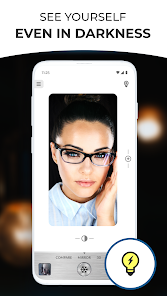
Expert Review
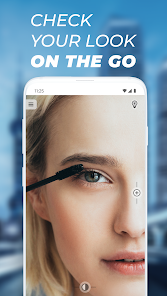
I've been using Mirror Plus: Mirror with Light for a few months now, and it's become a real staple on my phone. As the name suggests, it's a mirror app with a built-in adjustable light source. It first launched a while back, and you can easily find and download it from the Google Play store. It's completely free to install, which is a great starting point. You don't need to register or sign up for anything to use its core features, which I really appreciate. The app does show some banner ads, but they're not too intrusive, and there are optional in-app purchases if you want to remove them or access some extra lighting effects.
Using the app is straightforward. After you install it, you just open it and your phone's front camera turns into a high-quality mirror. The real game-changer is the light ring you can activate around the screen. It's perfect for those moments when you need a bit more light for detail work, like plucking eyebrows or applying makeup in a dimly lit room. A good tip is to play with the color temperature settings—you can switch from a cool white to a warm yellow light, which is much kinder for checking your makeup in different lighting conditions, like office fluorescents versus evening restaurant lights.
I've tried a few other mirror apps from the Google Play store, like 'Simple Mirror' or some of the more beauty-focused ones. A lot of them are either too basic or overloaded with filters and beauty modes that distort your face. I chose Mirror Plus because it strikes the perfect balance. It feels like a genuine, functional tool rather than a gimmick. The light feature is its standout, and it's implemented so well that it makes other similar apps feel incomplete. For a quick, reliable mirror with a genuinely useful light, this app is my go-to.
Key Functional Highlights
- ✨ Adjustable Ring Light: This is the core feature that sets it apart. Unlike basic mirror apps, Mirror Plus lets you turn on a virtual ring light around the mirror. You can adjust its brightness and, crucially, its color temperature from cool to warm white. This is invaluable for getting your makeup or skincare right under any lighting condition.
- ✨ High-Quality, Real-Time Mirror: The app uses your front camera to provide a clear, real-time reflection with minimal lag. It feels much more like looking into an actual mirror compared to some other apps that have a slight delay or lower resolution.
- ✨ Simple, Ad-Free Core (Optional): While the free version has ads, a one-time in-app purchase removes them permanently. This is a straightforward model I prefer over apps that lock essential features behind subscriptions. After the purchase, you get a clean, distraction-free mirror tool.
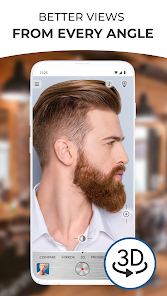
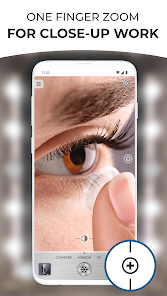
- ✨ Useful Extras Without Clutter: Beyond the mirror and light, it includes handy extras like a magnifier mode and a side-by-side comparison view, but these are tucked away neatly. They don't clutter the main, simple interface, which keeps the app focused on its primary job.
Advantages & Benefits
- ✅ Superior Lighting Control: Compared to apps like 'Simple Mirror', the adjustable ring light in Mirror Plus is in a league of its own. It's a practical feature that actually solves a common problem (bad lighting) rather than just being a visual effect.
- ✅ Focus on Function Over Filters: Many apps in this genre, such as 'Beauty Mirror', are packed with skin-smoothing filters. Mirror Plus avoids this, offering a true-to-life reflection which is more honest and useful for tasks like shaving or applying acne treatment.
- ✅ One-Time Purchase Model: Unlike some utility apps that have moved to subscriptions, you can pay once to remove ads in Mirror Plus. This feels fairer for a simple tool and is a strength over similar apps with recurring fees.
Areas for Improvement
- ⚠️ Basic Ad-Supported Version: The free version does display banner ads. While not overly aggressive, they are present. Some competing apps, like the very basic 'Mirror', offer a completely ad-free experience without any purchase, though they lack features.
- ⚠️ Device-Dependent Performance: The mirror's quality and frame rate depend heavily on your phone's front camera. On older devices, the performance might not be as smooth as on newer models, which is a limitation compared to a pure static mirror app.
- ⚠️ Limited 'Wow' Factor: If you're looking for fun AR filters or beauty simulations, this isn't that app. Its strength is utility, but this can be a weakness for users who want entertainment from a mirror app, something apps like 'YouCam Makeup' provide.
Recommended Apps
![]()
ZEPETO: Avatar, Connect & Play
Naver Z Corporation4.3
![]()
Reverse Voice: Flip Singing
NindaFuit0![]()
AI Chat Ask Assistant - NowAI
Now Tech4.3![]()
Lie Detector Test: Prank App
DkTech inc.4.3![]()
Peachy - AI Face & Body Editor
InShot Video Editor4.8
![]()
AI Video Art Creator - Livensa
FERASET4.5![]()
Google Voice
Google LLC4.3![]()
Horoscopes & Tarot
Astrolis Horoscopes4.7![]()
eBay online shopping & selling
eBay Mobile4.6![]()
JPay
Jpay Mobile4.1![]()
Stranger Things 5 Challenges
MVH Entertainment Team5![]()
Chat Master: Prank Story
ABI Game Studio4.8![]()
Google Maps
Google LLC4.2![]()
AI Chat・Ask Chatbot Assistant
AI Chat Studio4.5![]()
Name Meanings with Impact
Alif Innovative Solution3.7















You May Like
-
![]()
True Tarot Card Reading
KaApps4.2 -
![]()
LinkedIn: Jobs & Business News
LinkedIn4.2 -
![]()
iControl: Easy Widgets Themes
Fancy keyboard for theme apps4.6 -
![]()
Duolingo: Language & Chess
Duolingo4.7 -
![]()
Flipped:Chat with AI Character
First Group pte ltd4.1 -
![]()
Hearing Age
Mobile Solutions Tech0 -
![]()
TikTok
TikTok Pte. Ltd.4.4 -
![]()
Pretty Makeup - Beauty Camera
Photo Editor Perfect Corp.4.4 -
![]()
PhotoRoom AI Photo Editor
PhotoRoom Background Editor App4.7 -
![]()
Lightleap by Lightricks
Lightricks Ltd.4.3 -
![]()
Name Meaning
Dexati4.1 -
![]()
Truth Social
T Media Tech LLC3.3 -
![]()
Ace Hardware
Ace Hardware Corporation4.7 -
![]()
Kpop Fans Demon Hunter Wallpap
JHNStudio4.3 -
![]()
Artplay - AI Photo & Video
Hideaway Technology Limited4.5











































