

Easy Clean Pro
Limtech Developers
Installs
5M+
Developer
Limtech Developers
-
Category
Productivity
-
Content Rating
Everyone
Developer Email
Privacy Policy
https://sites.google.com/view/ecpprivacy
Screenshots
Expert Review
Easy Clean Pro is a phone cleanup and optimization tool from Limtech Developers, available on Google Play as a free download. The install base sits in the millions, which is typical for utility apps in this category. There are no in-app purchases to worry about, though ads do appear between actions, and a subscription option removes them if they start to bother you.
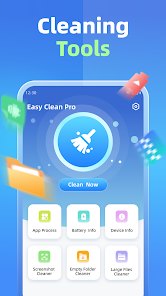
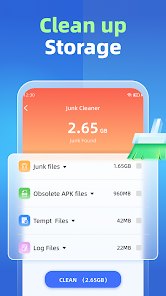
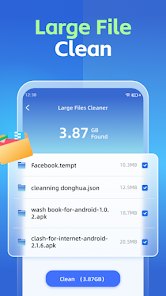
Once installed, the app scans your device for junk files, residual data, and unused cache, then presents the results as a list you can review before deleting anything. Nothing is removed automatically unless you enable that behavior. I tried it on an older handset that had been slowing down, and the first scan surfaced roughly 2 GB of clutter, mostly thumbnails and leftover files from apps I had uninstalled months earlier. The interface uses large circular buttons and a progress ring, so the whole process feels closer to a game than a system tool. A one-tap boost sits on the home screen for quick memory clearing, and the battery section shows which background processes are draining power.
Plenty of cleaner apps exist, and most of them push you toward a paid tier almost immediately. What stands out here is how restrained the design feels by comparison. Files by Google takes a more minimal, storage-focused approach, while Clean Master-style apps tend to pile on notifications and extra modules. Easy Clean Pro sits somewhere in the middle, leaning toward simplicity. Ads are present, but they rarely interrupt a scan. That said, the scanning engine is not especially deep; it catches the obvious junk but misses some app-specific caches that more thorough tools find.
Key Functional Highlights
- Junk scanning runs quickly and groups results by category, so you can clear cache without touching photos or documents. Reviewing before deleting takes only a few seconds.
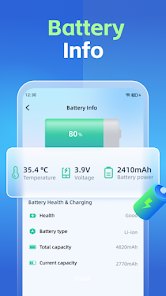
- The battery monitor lists background processes with their consumption levels, which proved more useful than expected on a phone with several always-on apps. Comparable tools often bury this information in submenus.
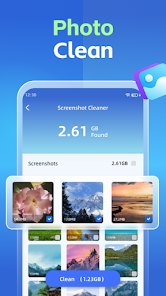
- Duplicate photo detection works reasonably well, though it relies on file names and sizes rather than visual comparison, so near-identical shots sometimes slip through.
- The one-tap boost frees memory in under a second on most devices. It feels responsive, although the effect fades as background apps restart.
Advantages & Benefits
- Clearing cache regularly kept my older phone from stuttering during everyday tasks.
- The battery overview made it easy to spot which apps were quietly draining power in the background.
- No payment is required to use the core features, which matters for a utility app you might open only occasionally.
- Uninstalling leftover files recovered a meaningful amount of storage without any risk to personal data.
Areas for Improvement
- Ads appear between actions and can interrupt the flow, especially during repeated scans.
- Some app-specific caches are missed, so the cleanup is not as thorough as manual clearing.
- The duplicate finder occasionally flags similar photos as copies when they are not.
- Advanced options like auto-clean sit behind the ad-free subscription, which feels slightly restrictive.
Recommended Apps
![]()
ZEPETO: Avatar, Connect & Play
Naver Z Corporation4.3
![]()
Reverse Voice: Flip Singing
NindaFuit0![]()
AI Chat Ask Assistant - NowAI
Now Tech4.3![]()
Lie Detector Test: Prank App
DkTech inc.4.3![]()
Peachy - AI Face & Body Editor
InShot Video Editor4.8
![]()
AI Video Art Creator - Livensa
FERASET4.5![]()
Google Voice
Google LLC4.3![]()
Horoscopes & Tarot
Astrolis Horoscopes4.7![]()
eBay online shopping & selling
eBay Mobile4.6![]()
JPay
Jpay Mobile4.1![]()
Stranger Things 5 Challenges
MVH Entertainment Team5![]()
Chat Master: Prank Story
ABI Game Studio4.8![]()
Google Maps
Google LLC4.2![]()
AI Chat・Ask Chatbot Assistant
AI Chat Studio4.5![]()
Name Meanings with Impact
Alif Innovative Solution3.7















You May Like
-
![]()
True Tarot Card Reading
KaApps4.2 -
![]()
LinkedIn: Jobs & Business News
LinkedIn4.2 -
![]()
iControl: Easy Widgets Themes
Fancy keyboard for theme apps4.6 -
![]()
Duolingo: Language & Chess
Duolingo4.7 -
![]()
Flipped:Chat with AI Character
First Group pte ltd4.1 -
![]()
Hearing Age
Mobile Solutions Tech0 -
![]()
TikTok
TikTok Pte. Ltd.4.4 -
![]()
Pretty Makeup - Beauty Camera
Photo Editor Perfect Corp.4.4 -
![]()
PhotoRoom AI Photo Editor
PhotoRoom Background Editor App4.7 -
![]()
Lightleap by Lightricks
Lightricks Ltd.4.3 -
![]()
Name Meaning
Dexati4.1 -
![]()
Truth Social
T Media Tech LLC3.3 -
![]()
Ace Hardware
Ace Hardware Corporation4.7 -
![]()
Kpop Fans Demon Hunter Wallpap
JHNStudio4.3 -
![]()
Artplay - AI Photo & Video
Hideaway Technology Limited4.5












































