

Food Allergy Scanner - Bokha
Alexandre Grisey
Installs
10K+
Developer
Alexandre Grisey
-
Category
Food & Drink
-
Content Rating
Everyone
Developer Email
Privacy Policy
https://alex0x47.github.io/bokha/privacy/
Screenshots


Expert Review
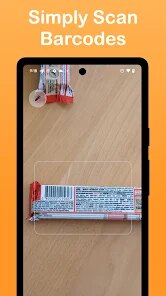
For anyone dealing with food allergies or dietary restrictions, the Food Allergy Scanner - Bokha app on Google Play offers a practical way to check packaged foods. It uses the phone's camera or manual barcode entry to scan product labels, then cross-references the ingredient list against common allergens. The download is free to install, though it does include ads and offers optional in-app purchases to remove them. Since nutrition information varies by country, the app's database relies on user contributions and publicly available data, which means coverage can differ depending on where you live.
Using the app mostly feels straightforward. After a quick install, you can either scan a barcode or take a photo of the ingredient list. The app highlights any allergens it detects, like milk, nuts, or gluten, and also displays a safety score. What I found helpful is that it doesn't just flag risks; it also explains why a particular ingredient might be problematic. That said, the scanning speed depends on lighting and the clarity of the label. When the barcode isn't recognized, you can manually search for the product, though the database isn't always complete for smaller or local brands.
Next to similar tools like Figtat or Yuka, Bokha feels more straightforward in design but slightly narrower in scope. Where Yuka focuses on overall nutritional quality and Figtat relies heavily on community feedback, Bokha puts allergy detection front and center. The interface is clean and loads quickly even on older devices, which I appreciated during rushed grocery trips. One difference I noticed is that Bokha handles additive detection less thoroughly than Yuka, so it's better suited for people whose main concern is allergen avoidance rather than general food quality.
Key Functional Highlights
- Barcode scanning works reliably under good lighting and instantly pulls up results, though dimmer store environments sometimes require two or three attempts. In contrast, Figtat has a faster camera response but shows less detail about each allergen.
- The app clearly tags each detected allergen with a brief explanation of why it's included. This makes it easier to understand processed ingredients that might contain hidden milk or soy derivatives, rather than just seeing a red warning.
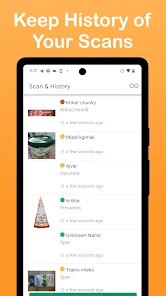
- Manual ingredient entry is available but feels a bit clunky since you have to type full product names. It would be more helpful to allow partial name searches or recent scan history to speed things up.
- Safety scores are color-coded, which helps at a glance, but the rating system sometimes flags items that are actually fine based on local formulations.
Advantages & Benefits
- You get immediate peace of mind during shopping since the app checks ingredients faster than reading labels manually.
- It's helpful when trying unfamiliar brands, especially those with long ingredient lists or regional names that are hard to interpret.
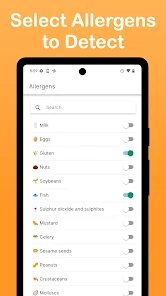
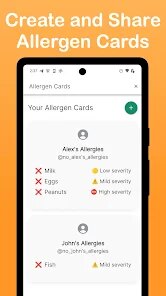
- For families with multiple allergy concerns, the app allows customizing which allergens to track, so you don't have to recheck the same products.
Areas for Improvement
- The free version shows ads between scans, which can interrupt the flow when you're checking several items quickly.
- Database coverage for European or Asian products is less complete than for North American items, so results vary depending on location.
- Occasional false positives happen when a product has similar packaging to an allergenic version but actually uses different ingredients.
Recommended Apps
![]()
ZEPETO: Avatar, Connect & Play
Naver Z Corporation4.3
![]()
Reverse Voice: Flip Singing
NindaFuit0![]()
AI Chat Ask Assistant - NowAI
Now Tech4.3![]()
Lie Detector Test: Prank App
DkTech inc.4.3![]()
Peachy - AI Face & Body Editor
InShot Video Editor4.8
![]()
AI Video Art Creator - Livensa
FERASET4.5![]()
Google Voice
Google LLC4.3![]()
Horoscopes & Tarot
Astrolis Horoscopes4.7![]()
eBay online shopping & selling
eBay Mobile4.6![]()
JPay
Jpay Mobile4.1![]()
Stranger Things 5 Challenges
MVH Entertainment Team5![]()
Chat Master: Prank Story
ABI Game Studio4.8![]()
Google Maps
Google LLC4.2![]()
AI Chat・Ask Chatbot Assistant
AI Chat Studio4.5![]()
Name Meanings with Impact
Alif Innovative Solution3.7















You May Like
-
![]()
True Tarot Card Reading
KaApps4.2 -
![]()
LinkedIn: Jobs & Business News
LinkedIn4.2 -
![]()
iControl: Easy Widgets Themes
Fancy keyboard for theme apps4.6 -
![]()
Duolingo: Language & Chess
Duolingo4.7 -
![]()
Flipped:Chat with AI Character
First Group pte ltd4.1 -
![]()
Hearing Age
Mobile Solutions Tech0 -
![]()
TikTok
TikTok Pte. Ltd.4.4 -
![]()
Pretty Makeup - Beauty Camera
Photo Editor Perfect Corp.4.4 -
![]()
PhotoRoom AI Photo Editor
PhotoRoom Background Editor App4.7 -
![]()
Lightleap by Lightricks
Lightricks Ltd.4.3 -
![]()
Name Meaning
Dexati4.1 -
![]()
Truth Social
T Media Tech LLC3.3 -
![]()
Ace Hardware
Ace Hardware Corporation4.7 -
![]()
Kpop Fans Demon Hunter Wallpap
JHNStudio4.3 -
![]()
Artplay - AI Photo & Video
Hideaway Technology Limited4.5










































