
Blood Pressure Log
Sharon Evans
Installs
1M+
Developer
Sharon Evans
-
Category
Health & Fitness
-
Content Rating
Everyone
Developer Email
Privacy Policy
https://www.sharon-apps.com/privacy_policy.html
Screenshots
Expert Review
Blood Pressure Log is a health-tracking utility designed for people who need to monitor their blood pressure readings regularly. The app focuses on simplicity and allows users to record systolic and diastolic values, pulse rate, and add optional notes for each entry. It is available for free on Google Play, and while it does contain ads, they are not overly intrusive. There is also an option to remove ads through an in-app purchase, which is a reasonable trade-off given the app's core functionality is fully accessible without paying.
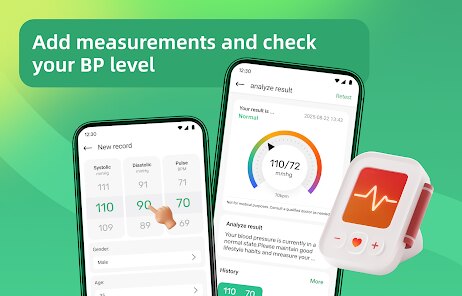
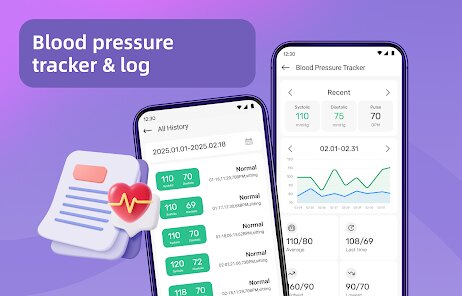
Getting started with Blood Pressure Log is straightforward. After you download and install it from Google Play, the main screen presents a clean interface centered around adding a new reading. Tapping the plus button opens a form where you input your numbers, select a date and time, and optionally tag the reading with context like medication or exercise. The app then automatically organizes these entries into a chronological list, making it easy to scroll through past data. I found the color-coded indicators helpful, as they quickly show whether a reading falls into normal, elevated, or high ranges without needing to interpret the numbers myself.
Compared to other blood pressure apps like SmartBP or BP Journal, this one feels noticeably more minimal. SmartBP offers extensive charts and export options, while Blood Pressure Log keeps the experience closer to a straightforward diary. Some users might find this lack of advanced analytics limiting, but I personally appreciated not being overwhelmed by data. The trade-off is clear: you get a faster, less cluttered experience here, but you sacrifice the deeper trend analysis that competing apps often provide.
Key Functional Highlights
- One of the more useful features is the ability to add notes alongside each reading. This lets me record what I was doing before measuring, like after a walk or right after waking up, which gives more context when reviewing trends later. It is a small addition but makes the data more meaningful over time.
- Color coding of readings works well as a quick visual reference. Unlike other apps that require you to interpret a chart, this approach lets me see at a glance if any recent entries seem concerning. The system uses standard medical ranges, so it feels reliable rather than arbitrary.
- Export options are limited compared to apps like Health Monitor, but the app does allow you to share data as a CSV file. This is enough for basic record-keeping or sharing with a doctor, though I wish the export included more formatting choices. Still, for casual users, it meets the essential need without extra complexity.
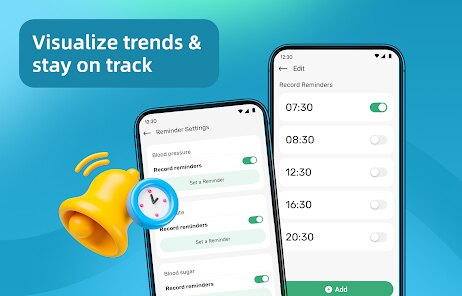
- The reminder system is simple but effective. You can set specific times for daily alerts, and the app will nudge you to take a measurement. I found this helpful for building consistency, though the notification sound is not customizable without adjusting system settings.
Advantages & Benefits
- Tracking readings over weeks gave me a clearer picture of how my habits affect my blood pressure, which made discussions with my doctor more productive.
- The app does not require an internet connection for core functions, so I can log entries anywhere without worrying about mobile data or Wi-Fi.
- Since the interface is uncluttered, even family members who are not tech-savvy have been able to use it without help, which made shared monitoring easier.
Areas for Improvement
- The ad placement can occasionally be a bit distracting, appearing between the list and the input button right when I am trying to review recent entries.
- There is no option to edit a past entry after saving, so if I mistype a number, I have to delete and re-enter it, which is mildly inconvenient.
- The app lacks any graphical trends or charts, which means spotting gradual changes requires manually scanning through the log rather than relying on a visual overview.
Recommended Apps
![]()
ZEPETO: Avatar, Connect & Play
Naver Z Corporation4.3
![]()
Reverse Voice: Flip Singing
NindaFuit0![]()
AI Chat Ask Assistant - NowAI
Now Tech4.3![]()
Lie Detector Test: Prank App
DkTech inc.4.3![]()
Peachy - AI Face & Body Editor
InShot Video Editor4.8
![]()
AI Video Art Creator - Livensa
FERASET4.5![]()
Google Voice
Google LLC4.3![]()
Horoscopes & Tarot
Astrolis Horoscopes4.7![]()
eBay online shopping & selling
eBay Mobile4.6![]()
JPay
Jpay Mobile4.1![]()
Stranger Things 5 Challenges
MVH Entertainment Team5![]()
Chat Master: Prank Story
ABI Game Studio4.8![]()
Google Maps
Google LLC4.2![]()
AI Chat・Ask Chatbot Assistant
AI Chat Studio4.5![]()
Name Meanings with Impact
Alif Innovative Solution3.7















You May Like
-
![]()
True Tarot Card Reading
KaApps4.2 -
![]()
LinkedIn: Jobs & Business News
LinkedIn4.2 -
![]()
iControl: Easy Widgets Themes
Fancy keyboard for theme apps4.6 -
![]()
Duolingo: Language & Chess
Duolingo4.7 -
![]()
Flipped:Chat with AI Character
First Group pte ltd4.1 -
![]()
Hearing Age
Mobile Solutions Tech0 -
![]()
TikTok
TikTok Pte. Ltd.4.4 -
![]()
Pretty Makeup - Beauty Camera
Photo Editor Perfect Corp.4.4 -
![]()
PhotoRoom AI Photo Editor
PhotoRoom Background Editor App4.7 -
![]()
Lightleap by Lightricks
Lightricks Ltd.4.3 -
![]()
Name Meaning
Dexati4.1 -
![]()
Truth Social
T Media Tech LLC3.3 -
![]()
Ace Hardware
Ace Hardware Corporation4.7 -
![]()
Kpop Fans Demon Hunter Wallpap
JHNStudio4.3 -
![]()
Artplay - AI Photo & Video
Hideaway Technology Limited4.5










































