

AndrOpen Office
Akikazu Yoshikawa
Installs
5M+
Developer
Akikazu Yoshikawa
-
Category
Productivity
-
Content Rating
Everyone
Developer Email
Privacy Policy
https://www.andropenoffice.com/privacy-policy
Screenshots
Expert Review
AndrOpen Office brings a full office suite to Android devices, offering document, spreadsheet, and presentation editing capabilities similar to desktop alternatives. Available for free download on Google Play, this open-source application has been installed over a million times and provides a comprehensive toolset without requiring a subscription. The app does contain ads and offers optional in-app purchases, though the core functionality remains accessible without spending anything, making it a practical option for users who need occasional editing on the go.
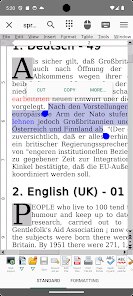
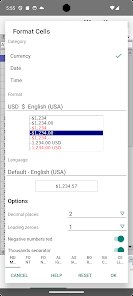
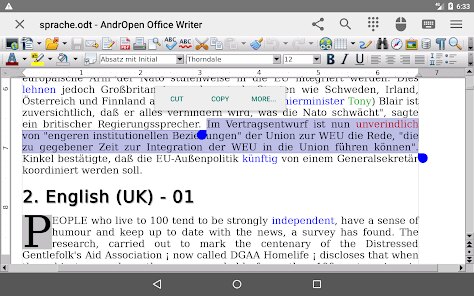
Setting up AndrOpen Office is straightforward after downloading from Google Play, but the interface presents a learning curve. The app provides a file manager that organizes documents stored locally on the device, and users can open various formats including DOCX, ODT, XLSX, and PPT files. Working with the word processor feels familiar to those who have used desktop versions of OpenOffice, with toolbars arranged along the top and formatting options accessible through nested menus. However, the touch interface can feel cramped on smaller screens, and some gestures don't respond as smoothly as one might expect from a modern mobile app.
When compared with mainstream mobile office apps like Google Docs or Microsoft Office, AndrOpen Office offers more control over formatting and supports a wider range of file types. But that added capability comes at a cost: the design feels dated and less polished than competitors. The layout reminds me of older desktop software ported directly to mobile without much adaptation, which affects usability. While other apps emphasize collaboration and cloud storage integration, this one focuses purely on local file editing, which may appeal to users who prefer keeping documents on their device without syncing everything online.
Key Functional Highlights
- The format compatibility is impressive. Files created in older versions of Microsoft Office open correctly, preserving layout and fonts that newer apps sometimes mess up. This makes it useful for viewing archive documents or working with files from less common software.
- Battery and memory usage stays reasonable even when handling larger documents. Unlike some suite apps that slow down noticeably, AndrOpen Office manages to keep the phone responsive during editing sessions, which matters when working with multi-page spreadsheets or long text files.
- One area where it actually outperforms Google Docs is offline functionality. Since everything saves locally, there's no syncing delay or error messages about lost connections. The entire suite works completely without internet access once installed.
- However, the user interface lacks the polish seen in WPS Office or Microsoft's mobile version. Menus feel cluttered with options that duplicate desktop layouts, making simple tasks like inserting images or adjusting margins require several taps rather than the streamlined approach competitors offer.
Advantages & Benefits
- Having a full office suite on my phone saved me during a trip when I needed to adjust a contract before signing. The app opened the file correctly and let me make edits without rushing to find a computer.
- Since it saves documents locally, I don't worry about privacy or accidental cloud sharing. Files stay on my device unless I choose to move them elsewhere.
- No subscription fees or trial periods means I can install it on any Android device without checking whether I have an active account or enough storage for cached sync files.
Areas for Improvement
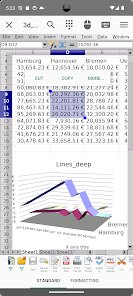
- Touch response in the spreadsheet component feels sluggish when scrolling through large sheets, sometimes registering taps half a second late which disrupts the workflow during data entry.
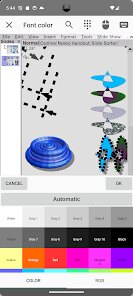
- Formatting options are extensive but presented in a confusing way. Finding specific tools like text wrap or cell merging takes longer than it should because of the poorly organized menu hierarchy.
- The app doesn't integrate with cloud storage services directly. Moving files between AndrOpen and Google Drive or Dropbox requires manual downloading and uploading, which becomes tedious for regular users.
Recommended Apps
![]()
ZEPETO: Avatar, Connect & Play
Naver Z Corporation4.3
![]()
Reverse Voice: Flip Singing
NindaFuit0![]()
AI Chat Ask Assistant - NowAI
Now Tech4.3![]()
Lie Detector Test: Prank App
DkTech inc.4.3![]()
Peachy - AI Face & Body Editor
InShot Video Editor4.8
![]()
AI Video Art Creator - Livensa
FERASET4.5![]()
Google Voice
Google LLC4.3![]()
Horoscopes & Tarot
Astrolis Horoscopes4.7![]()
eBay online shopping & selling
eBay Mobile4.6![]()
JPay
Jpay Mobile4.1![]()
Stranger Things 5 Challenges
MVH Entertainment Team5![]()
Chat Master: Prank Story
ABI Game Studio4.8![]()
Google Maps
Google LLC4.2![]()
AI Chat・Ask Chatbot Assistant
AI Chat Studio4.5![]()
Name Meanings with Impact
Alif Innovative Solution3.7















You May Like
-
![]()
True Tarot Card Reading
KaApps4.2 -
![]()
LinkedIn: Jobs & Business News
LinkedIn4.2 -
![]()
iControl: Easy Widgets Themes
Fancy keyboard for theme apps4.6 -
![]()
Duolingo: Language & Chess
Duolingo4.7 -
![]()
Flipped:Chat with AI Character
First Group pte ltd4.1 -
![]()
Hearing Age
Mobile Solutions Tech0 -
![]()
TikTok
TikTok Pte. Ltd.4.4 -
![]()
Pretty Makeup - Beauty Camera
Photo Editor Perfect Corp.4.4 -
![]()
PhotoRoom AI Photo Editor
PhotoRoom Background Editor App4.7 -
![]()
Lightleap by Lightricks
Lightricks Ltd.4.3 -
![]()
Name Meaning
Dexati4.1 -
![]()
Truth Social
T Media Tech LLC3.3 -
![]()
Ace Hardware
Ace Hardware Corporation4.7 -
![]()
Kpop Fans Demon Hunter Wallpap
JHNStudio4.3 -
![]()
Artplay - AI Photo & Video
Hideaway Technology Limited4.5











































