

Pollo AI: AI Video Generator
COCOSOFT TECHNOLOGY PTE. LTD.
Installs
1M+
Developer
COCOSOFT TECHNOLOGY PTE. LTD.
-
Category
Entertainment
-
Content Rating
Everyone
Developer Email
Privacy Policy
https://pollo.ai/privacy-policy
Screenshots




Expert Review
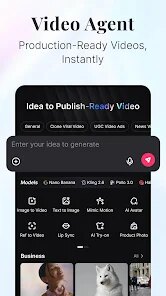
There's a growing selection of AI-powered tools available for video creation on Google Play, and Pollo AI: AI Video Generator is one that has been steadily gaining attention. Developed by COCOSOFT TECHNOLOGY PTE. LTD., this app focuses on turning text prompts or images into short video clips using artificial intelligence. The download number is still modest, which suggests it hasn't gone fully mainstream yet, though its rating indicates reasonably positive reception. It's free to install, but like many apps in this space, it includes ads and offers in-app purchases for additional features or generation credits.
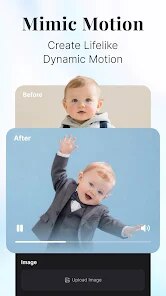
Getting started with the app is fairly straightforward. After installing it, users are greeted with a clean interface that presents several modes for generating video. You can type in a description, and after a brief processing period, the app produces a clip that attempts to match the content and style of your prompt. I found that shorter, more concrete prompts yielded better results; abstract or complicated requests sometimes produced confusing outputs. The app also supports image-to-video, which means you can upload a photo and have it animated, and there's a text-to-video mode as well. The rendering times vary depending on length and complexity, but for a 5-second clip it usually took under a minute on a decent device.
Compared to other video generators on the market, Pollo AI feels more accessible to casual users. Apps like Runway or Pika Labs offer more advanced controls but come with a steeper learning curve, while Pollo keeps its options limited and easy to navigate. That simplicity is both its strength and its limitation. It doesn't offer fine-grained control over camera movements or scene composition, which might frustrate users looking for precision. On the flip side, if you just need quick visual content without wrestling with complicated settings, this app handles the basics well enough.
Key Functional Highlights
- One notable feature is the real-time preview, which lets you see a rough version of your video before the full render completes. This saves time, though the preview resolution is noticeably lower, making it hard to judge details.
- Style presets are another highlight, covering options like anime, cinematic, and 3D rendering. In practice, the anime style works best, while the cinematic one sometimes adds unwanted grain or odd lighting effects that look artificial.
- Compared to something like CapCut's AI features, Pollo gives more creative freedom with prompts, but it lacks the same level of refinement. Where CapCut polishes results heavily, Pollo sometimes leaves rough edges in character movements.
- Batch generation is available for paid users, allowing multiple clips to be created from a single prompt. The quality between batches can vary noticeably, which makes it less reliable for consistent output across a series.
Advantages & Benefits
- Saves time when you need quick visual content for social media or presentations, especially if you lack video editing skills.
- No need to learn complex editing software; the text-to-video approach feels intuitive and requires minimal effort.
- Handy for brainstorming ideas visually; I've used it to quickly prototype concepts before committing to more detailed production work.
- Works offline for basic generations, which is convenient if you're on a commute or in an area with patchy internet connectivity.
Areas for Improvement
- Free tier credits run out fast after just a handful of generations, pushing users toward paid plans sooner than expected.
- Ads appear after each video generation, disrupting the flow and making longer sessions feel clunky.
- Output quality is inconsistent; some clips look polished while others show obvious artifacts or jittery motion that kills the illusion.
- Limited control over specific elements like lighting direction or character positioning, which restricts creative direction for more demanding projects.
Recommended Apps
![]()
ZEPETO: Avatar, Connect & Play
Naver Z Corporation4.3
![]()
Reverse Voice: Flip Singing
NindaFuit0![]()
AI Chat Ask Assistant - NowAI
Now Tech4.3![]()
Lie Detector Test: Prank App
DkTech inc.4.3![]()
Peachy - AI Face & Body Editor
InShot Video Editor4.8
![]()
AI Video Art Creator - Livensa
FERASET4.5![]()
Google Voice
Google LLC4.3![]()
Horoscopes & Tarot
Astrolis Horoscopes4.7![]()
eBay online shopping & selling
eBay Mobile4.6![]()
JPay
Jpay Mobile4.1![]()
Stranger Things 5 Challenges
MVH Entertainment Team5![]()
Chat Master: Prank Story
ABI Game Studio4.8![]()
Google Maps
Google LLC4.2![]()
AI Chat・Ask Chatbot Assistant
AI Chat Studio4.5![]()
Name Meanings with Impact
Alif Innovative Solution3.7















You May Like
-
![]()
True Tarot Card Reading
KaApps4.2 -
![]()
LinkedIn: Jobs & Business News
LinkedIn4.2 -
![]()
iControl: Easy Widgets Themes
Fancy keyboard for theme apps4.6 -
![]()
Duolingo: Language & Chess
Duolingo4.7 -
![]()
Flipped:Chat with AI Character
First Group pte ltd4.1 -
![]()
Hearing Age
Mobile Solutions Tech0 -
![]()
TikTok
TikTok Pte. Ltd.4.4 -
![]()
Pretty Makeup - Beauty Camera
Photo Editor Perfect Corp.4.4 -
![]()
PhotoRoom AI Photo Editor
PhotoRoom Background Editor App4.7 -
![]()
Lightleap by Lightricks
Lightricks Ltd.4.3 -
![]()
Name Meaning
Dexati4.1 -
![]()
Truth Social
T Media Tech LLC3.3 -
![]()
Ace Hardware
Ace Hardware Corporation4.7 -
![]()
Kpop Fans Demon Hunter Wallpap
JHNStudio4.3 -
![]()
Artplay - AI Photo & Video
Hideaway Technology Limited4.5












































