

Emoji Battery Widget
MIA Studio Inc
Installs
5M+
Developer
MIA Studio Inc
-
Category
Productivity
-
Content Rating
Everyone
Developer Email
Privacy Policy
https://sites.google.com/view/miastudiopolicy
Screenshots

Expert Review
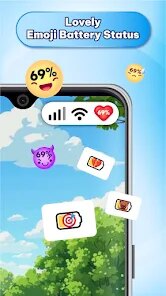
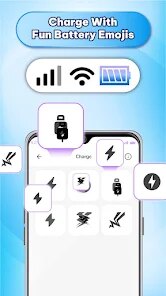
I've been using the Emoji Battery Widget app on my phone for a few months now, and it's become one of my favorite little customizations. This app, as the name suggests, lets you replace your phone's standard battery icon with a fun, animated emoji that changes expression based on your battery level. It's a simple but super effective way to add some personality to your home screen. The app first launched a while back, and you can easily download it for free from the Google Play Store. It has a solid number of installs, which shows it's pretty popular. You don't need to register an account to use it, which is a big plus for privacy. After you install the app, it walks you through setting up the widget. There are no disruptive in-app ads that pop up while you're using your phone, though there might be a small banner somewhere in the app's settings menu. There are some optional in-app purchases if you want to unlock extra emoji packs or special themes, but the free version has plenty of great options.
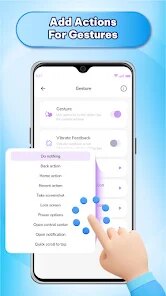
Using the app is straightforward. Once it's installed, you long-press on your home screen, add a widget, and choose the Emoji Battery Widget from the list. You can then pick your favorite emoji style and resize the widget. A handy tip is to try different emoji packs; some show more dramatic changes from 100% to 1%, which is really fun to watch throughout the day. You can also have multiple widgets with different emojis if you want. The app runs quietly in the background, and the widget updates automatically, so you don't have to do anything after the initial setup.
I've tried a couple of other battery widget apps from the Google Play Store, like 'Battery Widget Reborn' or simple percentage ones. While those are more technical and data-focused, I chose the Emoji Battery Widget app because it's just more enjoyable. It serves the same core purpose—showing my battery level—but does it in a way that makes me smile. Other apps in this genre might give you more detailed stats or graphs, but for a quick, at-a-glance check that doesn't look boring, this app is my go-to. It turns a mundane piece of information into something playful.
Key Functional Highlights
- 🎯 Animated Emoji Reactions: The core feature is brilliant. The chosen emoji doesn't just sit there; it animates and changes its expression as your battery drains. A happy, full-faced emoji at 100% slowly becomes tired and then panicked as you reach 10%. It's much more intuitive and engaging than just watching numbers drop.
- 🛠️ Easy Home Screen Integration: Setting up the widget is a standard Android process, but the app makes it painless. After you install it, a simple guide helps you place the widget. You can have multiple widgets of different sizes and styles on one screen, which is great for customization compared to more rigid single-widget apps.
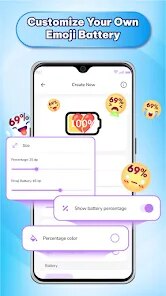
- 🎨 Wide Variety of Styles: Beyond the default pack, the app offers various themed emoji packs (some free, some paid). You can have cute animals, classic smileys, or even pixel-art characters as your battery indicator. This variety sets it apart from similar apps that might only offer one or two static icon sets.
- 📊 Essential Info at a Glance: While it's fun, it doesn't sacrifice function. Tapping the widget usually opens a detailed battery usage page, and many widget styles cleverly integrate the exact battery percentage into the emoji's design, giving you both the fun visual cue and the precise number.
Advantages & Benefits
- 😊 Pure Fun Factor: Its biggest strength is turning a utility into a delight. Unlike a purely functional app like 'AccuBattery', this one adds personality to your phone every time you glance at it.
- 🎭 Unique Visual Language: It communicates battery status through emotion and animation, which is faster to process than reading a small percentage. This is a clear win over standard text-based widgets.
- 🔧 Lightweight and Stable: Once set up, it's incredibly low-maintenance and doesn't drain the battery it's monitoring, which isn't always true for other widget-heavy apps in the genre.
- 🆓 Great Free Tier: You can get a fully functional, ad-light experience without paying, which is better than some similar apps that lock basic features behind a paywall immediately after install.
Areas for Improvement
- 📱 Android-Only: A clear weakness is that it's only available on the Google Play Store. iPhone users can't download this app, missing out on this fun customization.
- ⚙️ Limited Advanced Data: If you're a power user who wants detailed battery health stats or per-app usage, you'll need a separate app. It's not trying to compete with diagnostic tools like 'GSam Battery Monitor'.
- 🎨 Some Best Packs are Paid: While the free version is good, the most unique and creative emoji packs require an in-app purchase. Other free widget apps might offer more complete free icon sets.
- 🔄 Occasional Update Lag: Very rarely, after a major Android OS update, the widget might need a restart to refresh properly. It's a minor hiccup compared to rock-solid system widgets, but worth noting.
Recommended Apps
![]()
ZEPETO: Avatar, Connect & Play
Naver Z Corporation4.3
![]()
Reverse Voice: Flip Singing
NindaFuit0![]()
AI Chat Ask Assistant - NowAI
Now Tech4.3![]()
Lie Detector Test: Prank App
DkTech inc.4.3![]()
Peachy - AI Face & Body Editor
InShot Video Editor4.8
![]()
AI Video Art Creator - Livensa
FERASET4.5![]()
Google Voice
Google LLC4.3![]()
Horoscopes & Tarot
Astrolis Horoscopes4.7![]()
eBay online shopping & selling
eBay Mobile4.6![]()
JPay
Jpay Mobile4.1![]()
Stranger Things 5 Challenges
MVH Entertainment Team5![]()
Chat Master: Prank Story
ABI Game Studio4.8![]()
Google Maps
Google LLC4.2![]()
AI Chat・Ask Chatbot Assistant
AI Chat Studio4.5![]()
Name Meanings with Impact
Alif Innovative Solution3.7















You May Like
-
![]()
True Tarot Card Reading
KaApps4.2 -
![]()
LinkedIn: Jobs & Business News
LinkedIn4.2 -
![]()
iControl: Easy Widgets Themes
Fancy keyboard for theme apps4.6 -
![]()
Duolingo: Language & Chess
Duolingo4.7 -
![]()
Flipped:Chat with AI Character
First Group pte ltd4.1 -
![]()
Hearing Age
Mobile Solutions Tech0 -
![]()
TikTok
TikTok Pte. Ltd.4.4 -
![]()
Pretty Makeup - Beauty Camera
Photo Editor Perfect Corp.4.4 -
![]()
PhotoRoom AI Photo Editor
PhotoRoom Background Editor App4.7 -
![]()
Lightleap by Lightricks
Lightricks Ltd.4.3 -
![]()
Name Meaning
Dexati4.1 -
![]()
Truth Social
T Media Tech LLC3.3 -
![]()
Ace Hardware
Ace Hardware Corporation4.7 -
![]()
Kpop Fans Demon Hunter Wallpap
JHNStudio4.3 -
![]()
Artplay - AI Photo & Video
Hideaway Technology Limited4.5












































