

PawAI: AI Cartoon Pet Filter
Now Tech
Installs
1M+
Developer
Now Tech
-
Category
Generative AI
-
Content Rating
Rated for 3+
Developer Email
Privacy Policy
https://nowtechpro.github.io/Privacy/Privacy.html
Screenshots
Expert Review
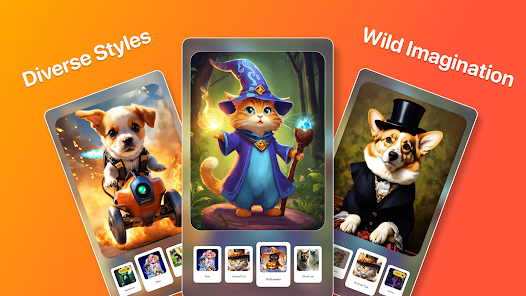
I've been using PawAI: AI Cartoon Pet Filter for a few months now, and it's become my go-to app for turning photos of my pets into adorable cartoon characters. This app, which falls into the photo editing and entertainment genre, uses artificial intelligence to transform your pet's picture into various artistic styles. It first launched on the Google Play Store and is also available on the App Store. I downloaded it for free, and it has a pretty high number of installs, which gave me confidence it was popular. You don't need to register to start using the basic features, which is great for quick access. While the core download and install process is simple, the app does include in-app purchases to unlock more filter styles and remove ads. There are some banner ads in the free version, but they're not too intrusive.
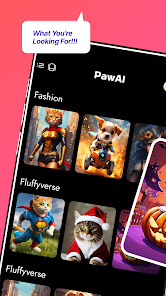
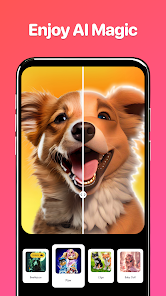
Using the app is straightforward. You just open it, grant camera or gallery access, and pick a photo of your dog, cat, or any other pet. The AI does its magic in seconds, offering you several cartoon versions. My tip is to use a clear, well-lit photo for the best results; pictures with good contrast make the cartoon conversion much sharper. I love experimenting with the different art styles, from a classic comic book look to a more watercolor-inspired filter. It's a fun way to create unique profile pictures or share something cute with friends.
I've tried a few similar apps like 'ToonMe' or general AI photo editors, but I keep coming back to PawAI. The main reason is its specialization. While other apps might do people or generic objects, PawAI is built specifically for pets. The AI seems better trained to recognize animal features like fur texture, snouts, and ears, so the final cartoon doesn't look weird or distorted. For someone who mostly wants to cartoonify their furry friends, this dedicated app just delivers more consistent and charming results than the more general alternatives.
Key Functional Highlights
- 🎨 Pet-Specific AI Training: Unlike broader cartoon apps, PawAI's filters are fine-tuned for animals. It handles fur, whiskers, and pet expressions remarkably well, avoiding the uncanny results I sometimes got with other apps when trying to process my cat.
- ⚡ One-Tap Transformation: The process is incredibly fast. After you install the app and select a photo, the AI generates multiple cartoon versions in just a couple of seconds, making it perfect for quick, fun edits.
- 📂 Style Variety & Unlocks: The app offers a solid range of artistic styles right after download. While more are behind purchases, the free options include a nice mix, from pop art to sketch styles, giving plenty to play with initially.
- 🔍 Simple, Intuitive Interface: Compared to a feature-packed editor like PicsArt, PawAI keeps it simple. The interface is clean and focused solely on the cartoon filter task, so there's no learning curve or clutter.
Advantages & Benefits
- 👍 Superior Pet Detection: It simply works better for animals than apps like 'ToonMe'. The cartoons look more like my actual pet, preserving their unique personality.
- 👍 Lightweight and Fast: The app downloads quickly from Google Play and doesn't hog storage or battery, unlike some bulkier photo suites.
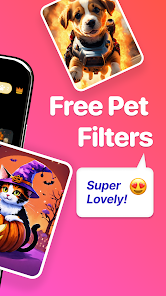
- 👍 Great Free Tier: You can have a lot of fun without paying, which isn't always the case with similar niche filter apps.
Areas for Improvement
- 👎 Limited Free Filters: After the initial download, you might want more styles quickly, as the free selection can feel limited compared to apps with larger free libraries.
- 👎 Ad Interruptions: The presence of ads, even if not excessive, can be a minor annoyance, a trade-off for the free install that some competitors avoid with different models.
- 👎 Niche Use Case: If you want to cartoonify people or landscapes too, you'll need another app. It's strictly for pets, unlike more versatile options.
Recommended Apps
![]()
ZEPETO: Avatar, Connect & Play
Naver Z Corporation4.3
![]()
Reverse Voice: Flip Singing
NindaFuit0![]()
AI Chat Ask Assistant - NowAI
Now Tech4.3![]()
Lie Detector Test: Prank App
DkTech inc.4.3![]()
Peachy - AI Face & Body Editor
InShot Video Editor4.8
![]()
AI Video Art Creator - Livensa
FERASET4.5![]()
Google Voice
Google LLC4.3![]()
Horoscopes & Tarot
Astrolis Horoscopes4.7![]()
eBay online shopping & selling
eBay Mobile4.6![]()
JPay
Jpay Mobile4.1![]()
Stranger Things 5 Challenges
MVH Entertainment Team5![]()
Chat Master: Prank Story
ABI Game Studio4.8![]()
Google Maps
Google LLC4.2![]()
AI Chat・Ask Chatbot Assistant
AI Chat Studio4.5![]()
Name Meanings with Impact
Alif Innovative Solution3.7















You May Like
-
![]()
True Tarot Card Reading
KaApps4.2 -
![]()
LinkedIn: Jobs & Business News
LinkedIn4.2 -
![]()
iControl: Easy Widgets Themes
Fancy keyboard for theme apps4.6 -
![]()
Duolingo: Language & Chess
Duolingo4.7 -
![]()
Flipped:Chat with AI Character
First Group pte ltd4.1 -
![]()
Hearing Age
Mobile Solutions Tech0 -
![]()
TikTok
TikTok Pte. Ltd.4.4 -
![]()
Pretty Makeup - Beauty Camera
Photo Editor Perfect Corp.4.4 -
![]()
PhotoRoom AI Photo Editor
PhotoRoom Background Editor App4.7 -
![]()
Lightleap by Lightricks
Lightricks Ltd.4.3 -
![]()
Name Meaning
Dexati4.1 -
![]()
Truth Social
T Media Tech LLC3.3 -
![]()
Ace Hardware
Ace Hardware Corporation4.7 -
![]()
Kpop Fans Demon Hunter Wallpap
JHNStudio4.3 -
![]()
Artplay - AI Photo & Video
Hideaway Technology Limited4.5










































