
DIY Emoji - Sticker Maker
Braly JSC
Installs
1M+
Developer
Braly JSC
-
Category
Productivity
-
Content Rating
Rated for 3+
Developer Email
Privacy Policy
https://bralyvn.com/privacy-policy.php
Screenshots
Expert Review
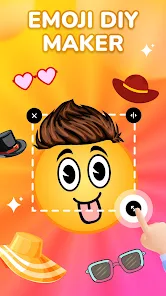
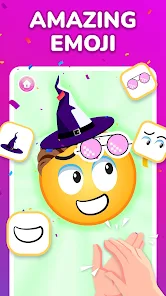
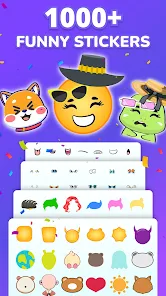
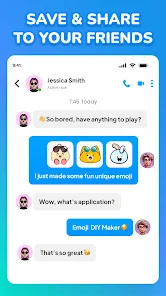
DIY Emoji - Sticker Maker is a creative app that lets you design your own custom emojis and stickers. It's perfect for personalizing your chats on messaging platforms like WhatsApp, Telegram, or Instagram. The app falls into the photo editing and personalization genre. It first launched a few years back and is available for download on the Google Play Store. I've seen it has millions of installs, which shows how popular it is. You can get the app for free, and you don't even need to register an account to start using it right away. That's super convenient. While the core app is free, there are some in-app purchases for extra sticker packs or advanced editing tools. You might also encounter some ads, but they're usually not too intrusive.
Using the app is pretty straightforward. You start by choosing a base image, either from your gallery or by taking a new photo. Then, you get to add all sorts of fun elements like text, doodles, and effects to turn it into a unique sticker. A good tip is to use a clear picture with a simple background; it makes cutting out the sticker shape much easier. Once you're happy with your creation, you can save it directly to your phone's sticker library for your favorite messaging app. I find myself making stickers of my pets or inside jokes with friends all the time.
Compared to other sticker maker apps out there, like 'Sticker Maker' or 'Personal Stickers for WhatsApp', I keep coming back to DIY Emoji. The interface just feels more intuitive to me. Some similar apps have cluttered menus or too many complicated features. With this one, the tools are right there when you need them, and the whole process from idea to finished sticker is quick. It might not have every single fancy filter under the sun, but for making fun, personal stickers fast, it's my go-to choice on Google Play.
Key Functional Highlights
- 🎨 Effortless Customization: The app provides a simple yet powerful set of tools. You can easily cut out images, add text with various fonts, and draw freehand. It's more focused on core sticker creation than some bloated photo editors, making the process quick and enjoyable.
- 📤 Direct Integration: Once your sticker is done, exporting is a breeze. The app guides you on how to add your new sticker pack directly to WhatsApp, Telegram, or other apps. This seamless step is often more streamlined than in other generic 'Sticker Maker' apps.
- 🆓 Truly Free to Start: You can download, install, and create a whole pack of stickers without spending a dime or even making an account. While other apps might gate basic features behind a paywall, this one lets you dive right into the creative fun.
- 📁 Organized Library: All your created stickers are kept neatly within the app, making it easy to find, edit, or re-export old designs. This built-in management is a handy feature that some similar utilities lack.
Advantages & Benefits
- ✅ User-Friendly Design: The interface is clean and much easier to navigate than competitors like 'Sticker Studio'. Tools are logically placed, so you're not lost hunting for the crop or text button.
- ✅ Speed and Simplicity: For making a sticker from a photo in under a minute, this app beats more complex editors. It does one job and does it well, without unnecessary extras that slow you down.
- ✅ Wide Compatibility: The stickers you create work perfectly across major platforms (WhatsApp, Telegram, etc.), which isn't always a given with every sticker maker app on Google Play.
Areas for Improvement
- ❌ Ad Interruptions: The free version shows ads, which can pop up and interrupt your workflow. Some similar apps offer a one-time purchase to remove them, which I'd prefer here.
- ❌ Limited Advanced Editing: If you want pro-level features like layer editing or advanced filters, apps like 'Sticker Maker' might offer more. This app keeps it simple, which can sometimes feel limiting.
- ❌ Occasional Bugs: I've had the app crash once or twice when saving a complex sticker. It's not frequent, but it's something I haven't experienced as much with other, more established apps in the genre.
Recommended Apps
![]()
ZEPETO: Avatar, Connect & Play
Naver Z Corporation4.3
![]()
Reverse Voice: Flip Singing
NindaFuit0![]()
AI Chat Ask Assistant - NowAI
Now Tech4.3![]()
Lie Detector Test: Prank App
DkTech inc.4.3![]()
Peachy - AI Face & Body Editor
InShot Video Editor4.8
![]()
AI Video Art Creator - Livensa
FERASET4.5![]()
Google Voice
Google LLC4.3![]()
Horoscopes & Tarot
Astrolis Horoscopes4.7![]()
eBay online shopping & selling
eBay Mobile4.6![]()
JPay
Jpay Mobile4.1![]()
Stranger Things 5 Challenges
MVH Entertainment Team5![]()
Chat Master: Prank Story
ABI Game Studio4.8![]()
Google Maps
Google LLC4.2![]()
AI Chat・Ask Chatbot Assistant
AI Chat Studio4.5![]()
Name Meanings with Impact
Alif Innovative Solution3.7















You May Like
-
![]()
True Tarot Card Reading
KaApps4.2 -
![]()
LinkedIn: Jobs & Business News
LinkedIn4.2 -
![]()
iControl: Easy Widgets Themes
Fancy keyboard for theme apps4.6 -
![]()
Duolingo: Language & Chess
Duolingo4.7 -
![]()
Flipped:Chat with AI Character
First Group pte ltd4.1 -
![]()
Hearing Age
Mobile Solutions Tech0 -
![]()
TikTok
TikTok Pte. Ltd.4.4 -
![]()
Pretty Makeup - Beauty Camera
Photo Editor Perfect Corp.4.4 -
![]()
PhotoRoom AI Photo Editor
PhotoRoom Background Editor App4.7 -
![]()
Lightleap by Lightricks
Lightricks Ltd.4.3 -
![]()
Name Meaning
Dexati4.1 -
![]()
Truth Social
T Media Tech LLC3.3 -
![]()
Ace Hardware
Ace Hardware Corporation4.7 -
![]()
Kpop Fans Demon Hunter Wallpap
JHNStudio4.3 -
![]()
Artplay - AI Photo & Video
Hideaway Technology Limited4.5









































