

Gallery - photo gallery, album
4th floor apps
Installs
10M+
Developer
4th floor apps
-
Category
Video Players & Editors
-
Content Rating
Rated for 3+
Developer Email
Privacy Policy
https://4thfloorapps.com/gallery-privacy-policy.html
Screenshots
Expert Review
Gallery is a photo gallery and album management app developed by 4th Floor Apps. It's my go-to app for organizing, viewing, and managing all the photos and videos on my Android phone. The app launched a while back and has become a popular choice in the 'Tools' genre on the Google Play Store. You can easily download it for free, and it doesn't require any registration to start using, which is super convenient. I've seen it has millions of installs, which shows how many people trust it. The app itself is free, and while there are some optional in-app purchases, the core features work perfectly without them. I do notice occasional ads, but they're not too intrusive and are a fair trade for a free, powerful tool.
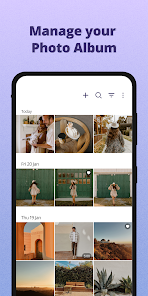
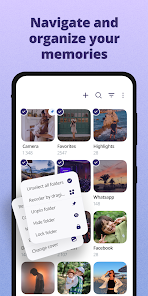
Using the app is pretty straightforward. After you install it, it automatically scans your device for images and videos, sorting them into a clean timeline. I like to use the album feature to create custom folders for trips or specific events. A handy tip is to use the 'Hide' album for photos you don't want showing up in the main gallery but don't want to delete either. The search function is also surprisingly good at finding pictures based on places or things in the photo.
I've tried a few other gallery apps from the Play Store, but I keep coming back to this one. Compared to something like Google Photos, which is more cloud-focused, this Gallery app is fantastic for pure, local device management. It's much faster at browsing photos stored directly on my phone. Some other similar apps feel cluttered with features I don't need. This app from 4th Floor Apps strikes the right balance—it's simple, does exactly what I want for organizing my local library, and doesn't try to force me into a cloud ecosystem. That's the main reason I chose it over the alternatives.
Key Functional Highlights
- 📁 Smart Local Organization: Unlike cloud-based apps, this Gallery app excels at managing the photos physically on your device. It creates albums based on folders and offers tools to move, copy, and rename files directly, giving you full control without an internet connection.
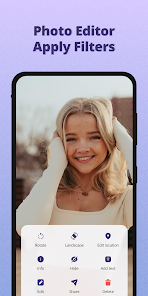
- 🎨 Built-in Basic Editor: Right after you install the app, you get access to a decent set of editing tools. You can crop, rotate, adjust lighting, and apply filters without needing to download a separate photo editing app, which is really convenient for quick fixes.
- 🔒 Privacy Features: The app includes a useful 'Hide' album function and a recycle bin. This is a standout feature compared to many basic gallery viewers, offering a simple layer of privacy and protection against accidental deletion.
- ⚡ Lightning-Fast Browsing: The app is optimized for speed. Scrolling through thousands of high-resolution photos is smooth, which isn't always the case with other gallery apps that can lag or stutter during heavy use.
Advantages & Benefits
- 👍 No Account Needed: You can download and use it immediately without signing up, unlike Google Photos which requires a Google account. It's all about your local device.
- 👍 Clean, Ad-Smart Interface: Compared to ad-heavy apps like 'Simple Gallery', the ad placement here is less disruptive, keeping the focus on your photos.
- 👍 Reliable Local Focus: For users who prefer not to use the cloud, this app is a stronger, more dedicated local manager than the default gallery apps on many phones.
Areas for Improvement
- 👎 Limited Cloud Integration: If you use Google Photos or Dropbox heavily, this app's cloud sync features aren't as seamless or automated as those dedicated services.
- 👎 Basic Sharing Options: Sharing photos directly from the app can be less streamlined compared to the deeply integrated sharing in Samsung Gallery or Google Photos.
- 👎 Occasional Ads: While not overwhelming, the presence of ads might be a downside for users who prefer a completely ad-free experience, which some competitors offer via a one-time purchase.
Recommended Apps
![]()
ZEPETO: Avatar, Connect & Play
Naver Z Corporation4.3
![]()
Reverse Voice: Flip Singing
NindaFuit0![]()
AI Chat Ask Assistant - NowAI
Now Tech4.3![]()
Lie Detector Test: Prank App
DkTech inc.4.3![]()
Peachy - AI Face & Body Editor
InShot Video Editor4.8
![]()
AI Video Art Creator - Livensa
FERASET4.5![]()
Google Voice
Google LLC4.3![]()
Horoscopes & Tarot
Astrolis Horoscopes4.7![]()
eBay online shopping & selling
eBay Mobile4.6![]()
JPay
Jpay Mobile4.1![]()
Stranger Things 5 Challenges
MVH Entertainment Team5![]()
Chat Master: Prank Story
ABI Game Studio4.8![]()
Google Maps
Google LLC4.2![]()
AI Chat・Ask Chatbot Assistant
AI Chat Studio4.5![]()
Name Meanings with Impact
Alif Innovative Solution3.7















You May Like
-
![]()
True Tarot Card Reading
KaApps4.2 -
![]()
LinkedIn: Jobs & Business News
LinkedIn4.2 -
![]()
iControl: Easy Widgets Themes
Fancy keyboard for theme apps4.6 -
![]()
Duolingo: Language & Chess
Duolingo4.7 -
![]()
Flipped:Chat with AI Character
First Group pte ltd4.1 -
![]()
Hearing Age
Mobile Solutions Tech0 -
![]()
TikTok
TikTok Pte. Ltd.4.4 -
![]()
Pretty Makeup - Beauty Camera
Photo Editor Perfect Corp.4.4 -
![]()
PhotoRoom AI Photo Editor
PhotoRoom Background Editor App4.7 -
![]()
Lightleap by Lightricks
Lightricks Ltd.4.3 -
![]()
Name Meaning
Dexati4.1 -
![]()
Truth Social
T Media Tech LLC3.3 -
![]()
Ace Hardware
Ace Hardware Corporation4.7 -
![]()
Kpop Fans Demon Hunter Wallpap
JHNStudio4.3 -
![]()
Artplay - AI Photo & Video
Hideaway Technology Limited4.5










































